
Turn on suggestions
Auto-suggest helps you quickly narrow down your search results by suggesting possible matches as you type.
Showing results for
EN
Turn on suggestions
Auto-suggest helps you quickly narrow down your search results by suggesting possible matches as you type.
Showing results for
Options
- Subscribe to RSS Feed
- Mark Topic as New
- Mark Topic as Read
- Pin this post for me
- Bookmark
- Subscribe to Topic
- Mute
- Printer Friendly Page

sma4bim
Contributor
Options
- Mark as New
- Bookmark
- Subscribe
- Mute
- Subscribe to RSS Feed
- Permalink
- Report Inappropriate Content
2022-06-26
11:43 PM
- last edited on
2025-01-30
04:25 PM
by
 Molinda Prey
Top link - home story - column favorite setting
2022-06-26
11:43 PM
Hello everbody ,
i am a revit pro, switching to Archicad ...
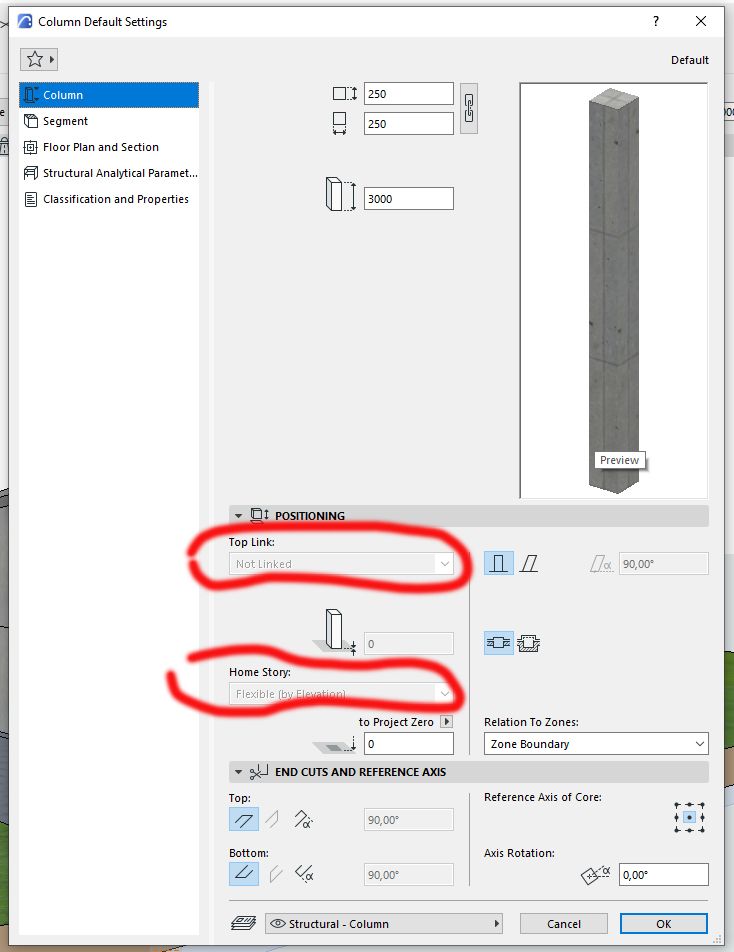
i have a little problem setting a column as favorite , the problem is : i need to link it by top link. but it is impossible to do it .
someone can help , have a solution this problem please.
Solved! Go to Solution.
1 Solution
Accepted Solutions

hevi
Ace
Options
- Mark as New
- Bookmark
- Subscribe
- Mute
- Subscribe to RSS Feed
- Permalink
- Report Inappropriate Content
2022-06-27 12:43 AM - edited 2022-06-27 12:46 AM
2022-06-27
12:43 AM
6 Replies 6

DGSketcher
Legend
Options
- Mark as New
- Bookmark
- Subscribe
- Mute
- Subscribe to RSS Feed
- Permalink
- Report Inappropriate Content
2022-06-26 11:55 PM
2022-06-26
11:55 PM
@sma4bim You cannot link to a top story if the current story is already the top story.
Apple iMac Intel i9 / macOS Sonoma / AC27UKI (most recent builds.. if they work)
sma4bim
Contributor
Options
- Mark as New
- Bookmark
- Subscribe
- Mute
- Subscribe to RSS Feed
- Permalink
- Report Inappropriate Content
2022-06-27 12:03 AM
2022-06-27
12:03 AM
Of course,
But in my case i am setting a column as a favorite, i didn't place the column yet.
I just double click the column tool to set.
I don't know why I have the problem, the file is downloaded from Graphisoft site (tutorial).
When I open a new file , the problem doesn't t exist.
So I guess it is a parameter somewhere to fix.
DGSketcher
Legend
Options
- Mark as New
- Bookmark
- Subscribe
- Mute
- Subscribe to RSS Feed
- Permalink
- Report Inappropriate Content
2022-06-27 12:08 AM
2022-06-27
12:08 AM
@sma4bim Try moving to the ground floor plan and then changing the linked story values.
Apple iMac Intel i9 / macOS Sonoma / AC27UKI (most recent builds.. if they work)
sma4bim
Contributor
Options
- Mark as New
- Bookmark
- Subscribe
- Mute
- Subscribe to RSS Feed
- Permalink
- Report Inappropriate Content
2022-06-27 12:12 AM
2022-06-27
12:12 AM
Same problem,
I can't set the linked storey (top and home)
hevi
Ace
Options
- Mark as New
- Bookmark
- Subscribe
- Mute
- Subscribe to RSS Feed
- Permalink
- Report Inappropriate Content
2022-06-27 12:43 AM - edited 2022-06-27 12:46 AM
2022-06-27
12:43 AM
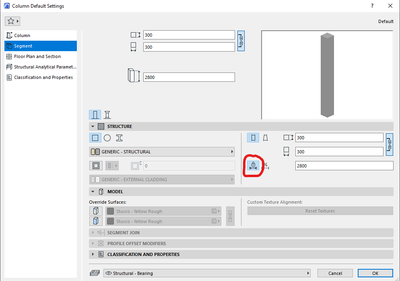
Is height set to fixed or flexible under Segment>Structure? You can't link if fixed.
sma4bim
Contributor
Options
- Mark as New
- Bookmark
- Subscribe
- Mute
- Subscribe to RSS Feed
- Permalink
- Report Inappropriate Content
2022-06-27 09:23 AM
2022-06-27
09:23 AM
Thank you ,
Indeed that resolve the problem.

Still looking?

Suggested topics
- Detailing | Better methods of 2d drafting, creation of Blocks , Detail Elements , 2d Objects in Documentation
- Archicad Project Compare & Project Migration in General discussions
- Interior Elevations Wish: place on Active Story in Documentation
- ArchiRADAR Responsive Facade Library with Grasshopper connection in General discussions
- Favorites Home Story in Project data & BIM
