
Turn on suggestions
Auto-suggest helps you quickly narrow down your search results by suggesting possible matches as you type.
Showing results for
EN
Turn on suggestions
Auto-suggest helps you quickly narrow down your search results by suggesting possible matches as you type.
Showing results for
Options
- Subscribe to RSS Feed
- Mark Topic as New
- Mark Topic as Read
- Pin this post for me
- Bookmark
- Subscribe to Topic
- Mute
- Printer Friendly Page

VasVac
Contributor
Options
- Mark as New
- Bookmark
- Subscribe
- Mute
- Subscribe to RSS Feed
- Permalink
- Report Inappropriate Content
2021-11-16 09:35 PM
Tube command doesnt work
2021-11-16
09:35 PM
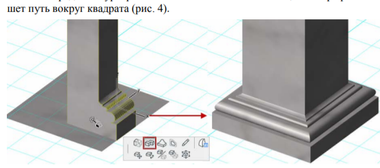
I need to make a square column. I must use tube command but it just do nothing.
Solved! Go to Solution.
Solved
Read-Only
20 Replies 20

Barry Kelly
Moderator
Options
- Mark as New
- Bookmark
- Subscribe
- Mute
- Subscribe to RSS Feed
- Permalink
- Report Inappropriate Content
2021-11-18 07:09 AM
2021-11-18
07:09 AM
I just tried and the depth has no effect.
It will just create a hole where it overlaps.
I had no trouble tubing around the base in either direction.
Just make sure the pint you use to activate the tube command is the point you want to stretch around.
This is not using the magic wand.
Select morph plane, click front corner and activate tube command from pet palette.
Stretch around base and back to where you started from.

Barry.
One of the forum moderators.
Versions 6.5 to 27
i7-10700 @ 2.9Ghz, 32GB ram, GeForce RTX 2060 (6GB), Windows 10
Lenovo Thinkpad - i7-1270P 2.20 GHz, 32GB RAM, Nvidia T550, Windows 11
Versions 6.5 to 27
i7-10700 @ 2.9Ghz, 32GB ram, GeForce RTX 2060 (6GB), Windows 10
Lenovo Thinkpad - i7-1270P 2.20 GHz, 32GB RAM, Nvidia T550, Windows 11
VasVac
Contributor
Options
- Mark as New
- Bookmark
- Subscribe
- Mute
- Subscribe to RSS Feed
- Permalink
- Report Inappropriate Content
2021-11-18 07:25 AM
2021-11-18
07:25 AM
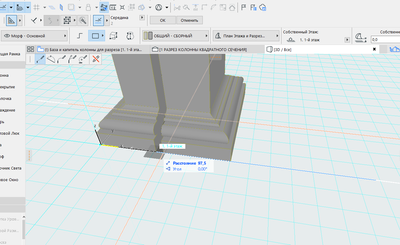
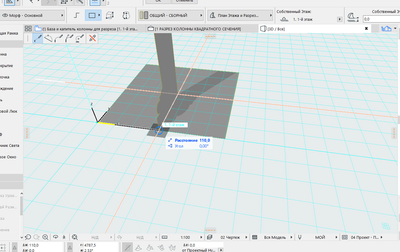
I tried. Is there any parameters that can hide the result of tubing?
Barry Kelly
Moderator
Options
- Mark as New
- Bookmark
- Subscribe
- Mute
- Subscribe to RSS Feed
- Permalink
- Report Inappropriate Content
2021-11-18 07:46 AM
2021-11-18
07:46 AM
Not that I can think of.
As soon as you click back on the starting point, the morph should complete.
What happens if you do not click back on the starting point.
Just click twice to form a short gap.
Does the morph appear then?
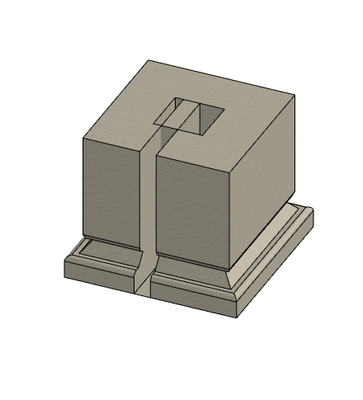
Or does that disappear too?
Barry.
One of the forum moderators.
Versions 6.5 to 27
i7-10700 @ 2.9Ghz, 32GB ram, GeForce RTX 2060 (6GB), Windows 10
Lenovo Thinkpad - i7-1270P 2.20 GHz, 32GB RAM, Nvidia T550, Windows 11
Versions 6.5 to 27
i7-10700 @ 2.9Ghz, 32GB ram, GeForce RTX 2060 (6GB), Windows 10
Lenovo Thinkpad - i7-1270P 2.20 GHz, 32GB RAM, Nvidia T550, Windows 11
VasVac
Contributor
Options
- Mark as New
- Bookmark
- Subscribe
- Mute
- Subscribe to RSS Feed
- Permalink
- Report Inappropriate Content
2021-11-18 07:57 AM
2021-11-18
07:57 AM
After double click it dissapears and beging new tubing lap
Barry Kelly
Moderator
Options
- Mark as New
- Bookmark
- Subscribe
- Mute
- Subscribe to RSS Feed
- Permalink
- Report Inappropriate Content
2021-11-18 08:27 AM
2021-11-18
08:27 AM
I have not seen this before.
What version of Archicad and what build number is it?
Barry.
One of the forum moderators.
Versions 6.5 to 27
i7-10700 @ 2.9Ghz, 32GB ram, GeForce RTX 2060 (6GB), Windows 10
Lenovo Thinkpad - i7-1270P 2.20 GHz, 32GB RAM, Nvidia T550, Windows 11
Versions 6.5 to 27
i7-10700 @ 2.9Ghz, 32GB ram, GeForce RTX 2060 (6GB), Windows 10
Lenovo Thinkpad - i7-1270P 2.20 GHz, 32GB RAM, Nvidia T550, Windows 11
VasVac
Contributor
Options
- Mark as New
- Bookmark
- Subscribe
- Mute
- Subscribe to RSS Feed
- Permalink
- Report Inappropriate Content
2021-11-18 09:08 AM
2021-11-18
09:08 AM
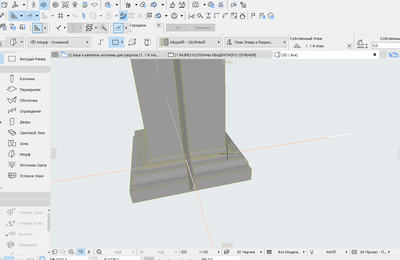
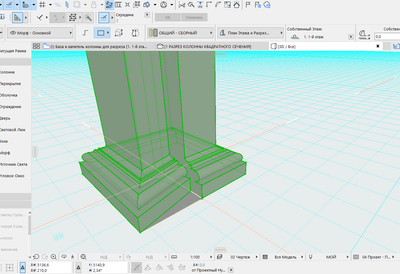
It just cant be completed in starting point.
VasVac
Contributor
Options
- Mark as New
- Bookmark
- Subscribe
- Mute
- Subscribe to RSS Feed
- Permalink
- Report Inappropriate Content
2021-11-18 09:10 AM
2021-11-18
09:10 AM
i have a student license.

Barry Kelly
Moderator
Options
- Mark as New
- Bookmark
- Subscribe
- Mute
- Subscribe to RSS Feed
- Permalink
- Report Inappropriate Content
2021-11-18 09:24 AM
2021-11-18
09:24 AM
OK.
Make sure your Archicad version is up to date.
Check for updates in the HELP menu.
Barry.
One of the forum moderators.
Versions 6.5 to 27
i7-10700 @ 2.9Ghz, 32GB ram, GeForce RTX 2060 (6GB), Windows 10
Lenovo Thinkpad - i7-1270P 2.20 GHz, 32GB RAM, Nvidia T550, Windows 11
Versions 6.5 to 27
i7-10700 @ 2.9Ghz, 32GB ram, GeForce RTX 2060 (6GB), Windows 10
Lenovo Thinkpad - i7-1270P 2.20 GHz, 32GB RAM, Nvidia T550, Windows 11
Barry Kelly
Moderator
Options
- Mark as New
- Bookmark
- Subscribe
- Mute
- Subscribe to RSS Feed
- Permalink
- Report Inappropriate Content
2021-11-18 09:31 AM
2021-11-18
09:31 AM
OK, so you can have a morph if there is a gap - so no problem seeing a morph.
Go to the selection tool and make sure the 'quick select' magnet is active.
Also choose the 'select sub-elements' option.
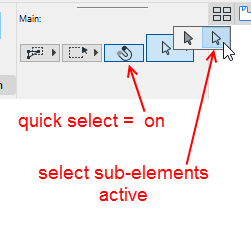
Now click on the side surface to select it.
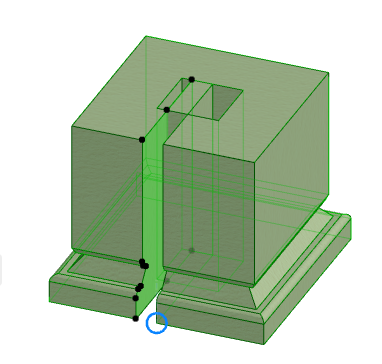
Now drag from the bottom node and choose the tube command again.
Drag to close the morph (click twice on that close point).
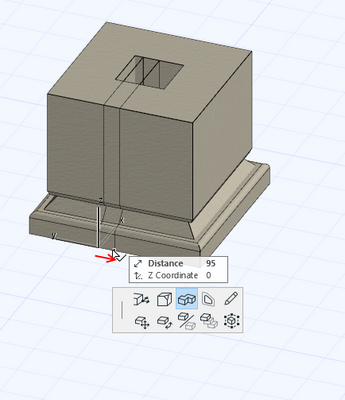
Does the morph stay or disappear?
If it disappears, I have no idea why.
If it stays, I have no idea why this is any different to you tubing all the way around in the first place.
But at least you have your morph.
Don't forget to set your selection arrow back to normal (not sub-elements) or you will have trouble selecting things.
Barry.
One of the forum moderators.
Versions 6.5 to 27
i7-10700 @ 2.9Ghz, 32GB ram, GeForce RTX 2060 (6GB), Windows 10
Lenovo Thinkpad - i7-1270P 2.20 GHz, 32GB RAM, Nvidia T550, Windows 11
Versions 6.5 to 27
i7-10700 @ 2.9Ghz, 32GB ram, GeForce RTX 2060 (6GB), Windows 10
Lenovo Thinkpad - i7-1270P 2.20 GHz, 32GB RAM, Nvidia T550, Windows 11
VasVac
Contributor
Options
- Mark as New
- Bookmark
- Subscribe
- Mute
- Subscribe to RSS Feed
- Permalink
- Report Inappropriate Content
2021-11-18 09:43 AM
2021-11-18
09:43 AM
It worked! Doing it in two steps feels clumsy BUT PROBLEM SOLVED
Thanks Berry

Still looking?

