
Turn on suggestions
Auto-suggest helps you quickly narrow down your search results by suggesting possible matches as you type.
Showing results for
EN
Turn on suggestions
Auto-suggest helps you quickly narrow down your search results by suggesting possible matches as you type.
Showing results for
Options
- Subscribe to RSS Feed
- Mark Topic as New
- Mark Topic as Read
- Pin this post for me
- Bookmark
- Subscribe to Topic
- Mute
- Printer Friendly Page

clauds1223
Enthusiast
Options
- Mark as New
- Bookmark
- Subscribe
- Mute
- Subscribe to RSS Feed
- Permalink
- Report Inappropriate Content
2026-06-30 04:15 AM
Wall junctions
2026-06-30
04:15 AM
Hi there,
I just have a question regarding the wall junctions in archicad. So I'm trying to connect these two walls (they have the same wall makeup etc) and all the layers of the walls before the cladding are joining, as soon as I extend the wall all the way to the end, it just create a gap like this (refer to image 2).
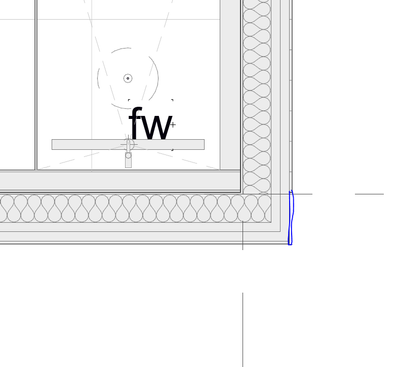
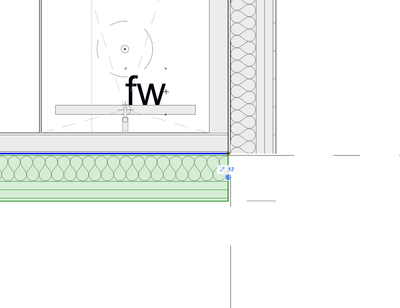
Image 2.
Operating system used: Windows 11
5 Replies 5

CosminF
Advisor
Options
- Mark as New
- Bookmark
- Subscribe
- Mute
- Subscribe to RSS Feed
- Permalink
- Report Inappropriate Content
2026-06-30
08:53 AM
- last edited on
2026-06-30
04:17 PM
by
 Laszlo Nagy
2026-06-30
08:53 AM
Hi,
You can check if the layer on which the walls are placed has intersections disabled (0 value):

More info on that: https://help.graphisoft.com/AC/22/INT/_AC22_Help/020_Configuration/020_Configuration-36.htm
Cosmin Furdui - architect @ Wincon
AC 27, running on Windows 11 Intel(R) Core(TM) i7-14700K CPU64, 3.40GHz, 32GB RAM, Nvidia GeForce RTX5060 32GB
AC 27, running on Windows 11 Intel(R) Core(TM) i7-14700K CPU64, 3.40GHz, 32GB RAM, Nvidia GeForce RTX5060 32GB

Barry Kelly
Moderator
Options
- Mark as New
- Bookmark
- Subscribe
- Mute
- Subscribe to RSS Feed
- Permalink
- Report Inappropriate Content
2026-06-30 11:27 AM
2026-06-30
11:27 AM
If the wall reference lines touch, the walls will trim automatically as in your first image.
Make sure the end lines and correct skin type (core, finish) is set in the composite settings.

This image is from 25, but should be similar in newer versions.
Also watch your building material strengths, a stronger material will stop a weaker one.
Barry.
One of the forum moderators.
Versions 6.5 to 27
i7-10700 @ 2.9Ghz, 32GB ram, GeForce RTX 2060 (6GB), Windows 10
Lenovo Thinkpad - i7-1270P 2.20 GHz, 32GB RAM, Nvidia T550, Windows 11
Versions 6.5 to 27
i7-10700 @ 2.9Ghz, 32GB ram, GeForce RTX 2060 (6GB), Windows 10
Lenovo Thinkpad - i7-1270P 2.20 GHz, 32GB RAM, Nvidia T550, Windows 11

Patrick M
Virtuoso
Options
- Mark as New
- Bookmark
- Subscribe
- Mute
- Subscribe to RSS Feed
- Permalink
- Report Inappropriate Content
2026-06-30 08:13 PM
2026-06-30
08:13 PM
It looks like you have 4 walls all sharing the reference line intersection. could be a matter of adjusting the outside walls to a higher junction order than the interior furr walls; but ideally, teh reference line for the exterior walls should be at the exterior face of structure. the reference line of the interior should be at the inside.
...
alternatively, you could have the furr walls on a separate layer. put the exterior wall layer on layer group 1, and the interior furr walls on layer group 2.
BIM solutions and trouble shooting (self proclaimed) expert. Using Archicad Version (all of them), on Mac OS (whatever is 1 version older than current)

Charlie64
Booster
Options
- Mark as New
- Bookmark
- Subscribe
- Mute
- Subscribe to RSS Feed
- Permalink
- Report Inappropriate Content
2026-07-20 01:33 PM
2026-07-20
01:33 PM
There also is a possibility that you have something already there in a hidden layer. Happened to me as I could connect walls because there was a slab in the way.

Lingwisyer
Guru
Options
- Mark as New
- Bookmark
- Subscribe
- Mute
- Subscribe to RSS Feed
- Permalink
- Report Inappropriate Content
2026-07-21 03:25 AM
2026-07-21
03:25 AM
Odd, a slab should have no affect on the walls in plan...
| AC22-29 AUS 3200 | Help Those Help You - Add a Signature |
| Self-taught, bend it till it breaks | Creating a Thread |
| Win11 | i9 10850K | 64GB | RX6600 | Win11 | 7800X3D | 32GB | RTX5070TI |

Still looking?

Suggested topics
- Archicad 30 Light mode: where did the contrast go? in General discussions
- Archicad 30 MCP is useless in AI solutions
- After 3 years with Archicad, I'm honestly disappointed in General discussions
- Missing Walls in projects migrated to Archicad 30 in Installation & update
- if else if in expressions in Project data & BIM
