
Turn on suggestions
Auto-suggest helps you quickly narrow down your search results by suggesting possible matches as you type.
Showing results for
EN
Turn on suggestions
Auto-suggest helps you quickly narrow down your search results by suggesting possible matches as you type.
Showing results for
Options
- Subscribe to RSS Feed
- Mark Topic as New
- Mark Topic as Read
- Pin this post for me
- Bookmark
- Subscribe to Topic
- Mute
- Printer Friendly Page

Geof Gainer
Enthusiast
Options
- Mark as New
- Bookmark
- Subscribe
- Mute
- Subscribe to RSS Feed
- Permalink
- Report Inappropriate Content
2009-01-15 06:30 AM
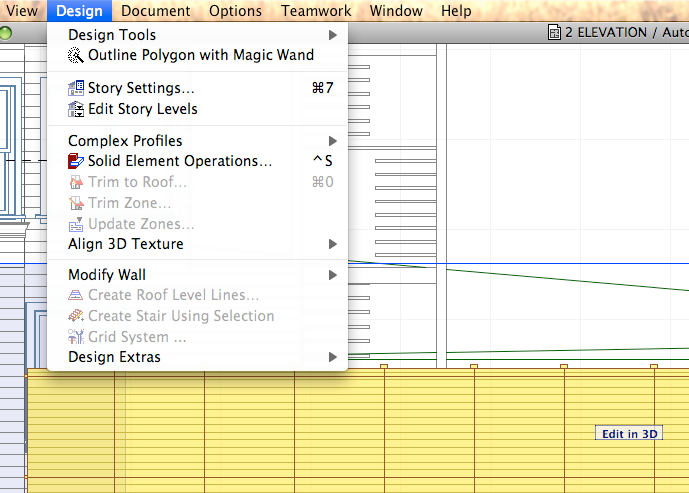
Where's curtain wall in menu?
2009-01-15
06:30 AM
How do I get there?
AC fan since v 7. Currently on AC 28.1.1 (4100) USA FULL, Apple Silicon,. 2022 Mac Studio, 32G ram. MacOS Sequoia 15.5
7 Replies 7

Erika Epstein
Enthusiast
Options
- Mark as New
- Bookmark
- Subscribe
- Mute
- Subscribe to RSS Feed
- Permalink
- Report Inappropriate Content
2009-01-15 07:35 AM
2009-01-15
07:35 AM
Click on the EDIT IN 3D in the lower right hand corner. That kind of edit is done in that window.
Erika
Architect, Consultant
MacBook Pro Retina, 15-inch Yosemite 2.8 GHz Intel Core i7 16 GB 1600 MHz DDR3
Mac OSX 10.11.1
AC5-18
Onuma System
"Implementing Successful Building Information Modeling"
Architect, Consultant
MacBook Pro Retina, 15-inch Yosemite 2.8 GHz Intel Core i7 16 GB 1600 MHz DDR3
Mac OSX 10.11.1
AC5-18
Onuma System
"Implementing Successful Building Information Modeling"

Barry Kelly
Moderator
Options
- Mark as New
- Bookmark
- Subscribe
- Mute
- Subscribe to RSS Feed
- Permalink
- Report Inappropriate Content
2009-01-15 08:09 AM
2009-01-15
08:09 AM
Geof wrote:You will need to add it to your Work Environment in the Menus section.
I've got a curtain wall selected in section, and try to go to Design>Curtain Wall>Boundary Editing in Section, but have no such menu items.
How do I get there?
Or use one of the default Archicad Work Environments.
Barry.
One of the forum moderators.
Versions 6.5 to 27
i7-10700 @ 2.9Ghz, 32GB ram, GeForce RTX 2060 (6GB), Windows 10
Lenovo Thinkpad - i7-1270P 2.20 GHz, 32GB RAM, Nvidia T550, Windows 11
Versions 6.5 to 27
i7-10700 @ 2.9Ghz, 32GB ram, GeForce RTX 2060 (6GB), Windows 10
Lenovo Thinkpad - i7-1270P 2.20 GHz, 32GB RAM, Nvidia T550, Windows 11
Geof Gainer
Enthusiast
Options
- Mark as New
- Bookmark
- Subscribe
- Mute
- Subscribe to RSS Feed
- Permalink
- Report Inappropriate Content
2009-01-15 06:53 PM
2009-01-15
06:53 PM
Erika wrote:Yes; I found this seems to work only if the curtain wall was created using the Boundary geometry method though. No biggie to re-do.
Click on the EDIT IN 3D in the lower right hand corner. That kind of edit is done in that window.
AC fan since v 7. Currently on AC 28.1.1 (4100) USA FULL, Apple Silicon,. 2022 Mac Studio, 32G ram. MacOS Sequoia 15.5
Geof Gainer
Enthusiast
Options
- Mark as New
- Bookmark
- Subscribe
- Mute
- Subscribe to RSS Feed
- Permalink
- Report Inappropriate Content
2009-01-15 06:57 PM
2009-01-15
06:57 PM
Barry wrote:Tried that, but couldn't find anything more than the Curtain Wall tool itself, plus rotate and label commands.
You will need to add it to your Work Environment in the Menus section.
Or use one of the default Archicad Work Environments.
AC fan since v 7. Currently on AC 28.1.1 (4100) USA FULL, Apple Silicon,. 2022 Mac Studio, 32G ram. MacOS Sequoia 15.5

Barry Kelly
Moderator
Options
- Mark as New
- Bookmark
- Subscribe
- Mute
- Subscribe to RSS Feed
- Permalink
- Report Inappropriate Content
2009-01-16 05:52 AM
2009-01-16
05:52 AM
Geof wrote:Try listing "All Commands By Theme".Barry wrote:Tried that, but couldn't find anything more than the Curtain Wall tool itself, plus rotate and label commands.
You will need to add it to your Work Environment in the Menus section.
Or use one of the default Archicad Work Environments.
You want number "19 Curtain Wall".
Barry.
One of the forum moderators.
Versions 6.5 to 27
i7-10700 @ 2.9Ghz, 32GB ram, GeForce RTX 2060 (6GB), Windows 10
Lenovo Thinkpad - i7-1270P 2.20 GHz, 32GB RAM, Nvidia T550, Windows 11
Versions 6.5 to 27
i7-10700 @ 2.9Ghz, 32GB ram, GeForce RTX 2060 (6GB), Windows 10
Lenovo Thinkpad - i7-1270P 2.20 GHz, 32GB RAM, Nvidia T550, Windows 11
Geof Gainer
Enthusiast
Options
- Mark as New
- Bookmark
- Subscribe
- Mute
- Subscribe to RSS Feed
- Permalink
- Report Inappropriate Content
2009-01-16 06:32 AM
2009-01-16
06:32 AM
Barry wrote:Thanks, Barry. It wouldn't let me move the whole folder, but I just applied the Standard Commands scheme and it shows up fine.
Try listing "All Commands By Theme".
You want number "19 Curtain Wall".
AC fan since v 7. Currently on AC 28.1.1 (4100) USA FULL, Apple Silicon,. 2022 Mac Studio, 32G ram. MacOS Sequoia 15.5

 Laszlo Nagy
Community Admin
Options
- Mark as New
- Bookmark
- Subscribe
- Mute
- Subscribe to RSS Feed
- Permalink
- Report Inappropriate Content
2009-01-16 03:20 PM
2009-01-16
03:20 PM
Geof wrote:Create a "Curtain Wall" group on the right and then you can select all Curtain Wall commands on the left and move them into that folder (Add selected button) in one step.Barry wrote:Thanks, Barry. It wouldn't let me move the whole folder, but I just applied the Standard Commands scheme and it shows up fine.
Try listing "All Commands By Theme".
You want number "19 Curtain Wall".
Loving Archicad since 1995 - Find Archicad Tips at x.com/laszlonagy
AMD Ryzen9 5900X CPU, 64 GB RAM 3600 MHz, Nvidia GTX 1060 6GB, 500 GB NVMe SSD
2x28" (2560x1440), Windows 10 PRO ENG, Ac20-Ac29
AMD Ryzen9 5900X CPU, 64 GB RAM 3600 MHz, Nvidia GTX 1060 6GB, 500 GB NVMe SSD
2x28" (2560x1440), Windows 10 PRO ENG, Ac20-Ac29

Still looking?
Suggested topics
- Curtain Wall custom panel transfer settings. in Modeling
- "X" at file opening menu...why does Archicad not remember where my files are located? in General discussions
- Curtain Wall Overall Shape and Adjustment of Individual Members in Modeling
- Unable to save a custom curtain wall panel in Modeling
- Curtain Wall with Custom Door Panel - Handles Not Showing in Modeling
