
Turn on suggestions
Auto-suggest helps you quickly narrow down your search results by suggesting possible matches as you type.
Showing results for
EN
Turn on suggestions
Auto-suggest helps you quickly narrow down your search results by suggesting possible matches as you type.
Showing results for
Options
- Subscribe to RSS Feed
- Mark Topic as New
- Mark Topic as Read
- Pin this post for me
- Bookmark
- Subscribe to Topic
- Mute
- Printer Friendly Page

LeeJaeYoung
Virtuoso
Options
- Mark as New
- Bookmark
- Subscribe
- Mute
- Subscribe to RSS Feed
- Permalink
- Report Inappropriate Content
2022-10-18 01:48 PM
Why aren't my palettes vertical?
2022-10-18
01:48 PM
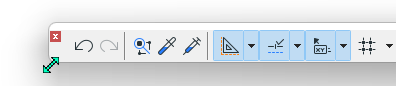
Why aren't my palettes vertical?

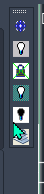
I would like to place it like this
AC27 on window 11
Solved! Go to Solution.
3 Solutions
Accepted Solutions

 Gordana Radonic
Community Manager
Options
- Mark as New
- Bookmark
- Subscribe
- Mute
- Subscribe to RSS Feed
- Permalink
- Report Inappropriate Content
2022-10-18 02:35 PM - edited 2022-10-18 02:35 PM
2022-10-18
02:35 PM
Hi @LeeJaeYoung,
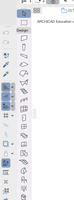
Drag palettes till the left or right vertical edge (next to Toolbox or Navigator) and they will snap vertically:
Hope it helps.
Gordana Radonić
Community Manager

Karl Ottenstein
Moderator Emeritus
Options
- Mark as New
- Bookmark
- Subscribe
- Mute
- Subscribe to RSS Feed
- Permalink
- Report Inappropriate Content
2022-10-18 08:43 PM - edited 2022-10-18 08:43 PM
2022-10-18
08:43 PM
Your second screenshot - of the QuickLayers Palette - is an exception to the rule given by Gordana's solution. As it is created by an add-on, it cannot be re-shaped. But (nearly) everything else can be horizontal or vertical - Info Box, Tool Box, various palettes (onscreen display, 3d navigation, etc )
Vote for Wish: Copy/Paste in 3D
AC 29 USA and earlier • hardware key • macOS Tahoe 26.7 MacBook Pro M2 Max 12CPU/30GPU cores, 32GB
AC 29 USA and earlier • hardware key • macOS Tahoe 26.7 MacBook Pro M2 Max 12CPU/30GPU cores, 32GB

Miha_M
Advisor
Options
- Mark as New
- Bookmark
- Subscribe
- Mute
- Subscribe to RSS Feed
- Permalink
- Report Inappropriate Content
2022-10-19 10:49 AM - edited 2022-10-19 10:51 AM
2022-10-19
10:49 AM
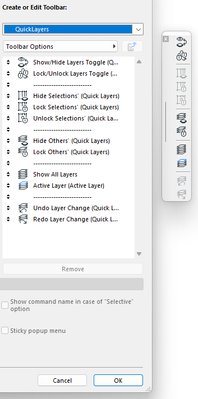
@Karl Ottenstein. Correct, the QuickLayers Palette is locked and can't be reshaped. But
you can create a custom Quicklayers Toolbar, which can be reshaped (and docked in a vertical position):
| Archicad 4.5 - 29
| HP Z840 | 2× E5-2643 v4 | 64 GB RAM | Quadro M5000 | Windows 10 Pro x64
| HP Z4 G4 | W-2245 | 64 GB RAM | RTX A4000 | Windows 11
9 Replies 9
Gordana Radonic
Community Manager
Options
- Mark as New
- Bookmark
- Subscribe
- Mute
- Subscribe to RSS Feed
- Permalink
- Report Inappropriate Content
2022-10-18 02:35 PM - edited 2022-10-18 02:35 PM
2022-10-18
02:35 PM
Hi @LeeJaeYoung,
Drag palettes till the left or right vertical edge (next to Toolbox or Navigator) and they will snap vertically:
Hope it helps.
Gordana Radonić
Community Manager
Karl Ottenstein
Moderator Emeritus
Options
- Mark as New
- Bookmark
- Subscribe
- Mute
- Subscribe to RSS Feed
- Permalink
- Report Inappropriate Content
2022-10-18 08:43 PM - edited 2022-10-18 08:43 PM
2022-10-18
08:43 PM
Your second screenshot - of the QuickLayers Palette - is an exception to the rule given by Gordana's solution. As it is created by an add-on, it cannot be re-shaped. But (nearly) everything else can be horizontal or vertical - Info Box, Tool Box, various palettes (onscreen display, 3d navigation, etc )
Vote for Wish: Copy/Paste in 3D
AC 29 USA and earlier • hardware key • macOS Tahoe 26.7 MacBook Pro M2 Max 12CPU/30GPU cores, 32GB
AC 29 USA and earlier • hardware key • macOS Tahoe 26.7 MacBook Pro M2 Max 12CPU/30GPU cores, 32GB
LeeJaeYoung
Virtuoso
Options
- Mark as New
- Bookmark
- Subscribe
- Mute
- Subscribe to RSS Feed
- Permalink
- Report Inappropriate Content
2022-10-19 02:25 AM
2022-10-19
02:25 AM
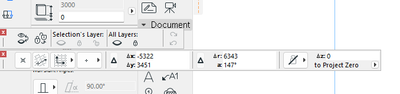
Doesn't it become my palette?
I become toobars.
AC27 on window 11
LeeJaeYoung
Virtuoso
Options
- Mark as New
- Bookmark
- Subscribe
- Mute
- Subscribe to RSS Feed
- Permalink
- Report Inappropriate Content
2022-10-19 02:30 AM
2022-10-19
02:30 AM
thank you so much
AC27 on window 11

Barry Kelly
Moderator
Options
- Mark as New
- Bookmark
- Subscribe
- Mute
- Subscribe to RSS Feed
- Permalink
- Report Inappropriate Content
2022-10-19 03:13 AM
2022-10-19
03:13 AM
If you drag a palette or toolbar to the top, bottom or sides of your screen it will dock if it can.
Some don't dock at all and some only dock to the sides.
Usually with a free standing toolbar or palette, you can resize them by dragging the edges or corners of the box.
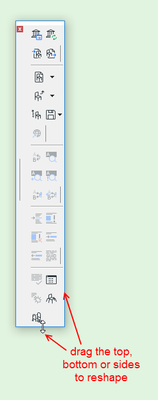
Some can be dragged outside of the main Archicad window onto a second screen.
Barry.
One of the forum moderators.
Versions 6.5 to 27
i7-10700 @ 2.9Ghz, 32GB ram, GeForce RTX 2060 (6GB), Windows 10
Lenovo Thinkpad - i7-1270P 2.20 GHz, 32GB RAM, Nvidia T550, Windows 11
Versions 6.5 to 27
i7-10700 @ 2.9Ghz, 32GB ram, GeForce RTX 2060 (6GB), Windows 10
Lenovo Thinkpad - i7-1270P 2.20 GHz, 32GB RAM, Nvidia T550, Windows 11
LeeJaeYoung
Virtuoso
Options
- Mark as New
- Bookmark
- Subscribe
- Mute
- Subscribe to RSS Feed
- Permalink
- Report Inappropriate Content
2022-10-19 03:17 AM
2022-10-19
03:17 AM
The two I want are not... ^^
AC27 on window 11
Barry Kelly
Moderator
Options
- Mark as New
- Bookmark
- Subscribe
- Mute
- Subscribe to RSS Feed
- Permalink
- Report Inappropriate Content
2022-10-19 04:03 AM
2022-10-19
04:03 AM
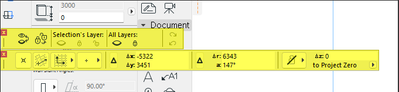
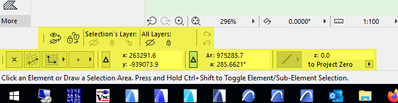
Correct.
Neither of the 2 you show can be locked vertically to the sides.
They also can not be re-shaped when they are free floating.
They can only be snapped into the top or bottom toolbars.
Barry.
One of the forum moderators.
Versions 6.5 to 27
i7-10700 @ 2.9Ghz, 32GB ram, GeForce RTX 2060 (6GB), Windows 10
Lenovo Thinkpad - i7-1270P 2.20 GHz, 32GB RAM, Nvidia T550, Windows 11
Versions 6.5 to 27
i7-10700 @ 2.9Ghz, 32GB ram, GeForce RTX 2060 (6GB), Windows 10
Lenovo Thinkpad - i7-1270P 2.20 GHz, 32GB RAM, Nvidia T550, Windows 11
LeeJaeYoung
Virtuoso
Options
- Mark as New
- Bookmark
- Subscribe
- Mute
- Subscribe to RSS Feed
- Permalink
- Report Inappropriate Content
2022-10-19 05:57 AM
2022-10-19
05:57 AM
thank you so much
AC27 on window 11
Miha_M
Advisor
Options
- Mark as New
- Bookmark
- Subscribe
- Mute
- Subscribe to RSS Feed
- Permalink
- Report Inappropriate Content
2022-10-19 10:49 AM - edited 2022-10-19 10:51 AM
2022-10-19
10:49 AM
@Karl Ottenstein. Correct, the QuickLayers Palette is locked and can't be reshaped. But
you can create a custom Quicklayers Toolbar, which can be reshaped (and docked in a vertical position):
| Archicad 4.5 - 29
| HP Z840 | 2× E5-2643 v4 | 64 GB RAM | Quadro M5000 | Windows 10 Pro x64
| HP Z4 G4 | W-2245 | 64 GB RAM | RTX A4000 | Windows 11

Still looking?

