
Turn on suggestions
Auto-suggest helps you quickly narrow down your search results by suggesting possible matches as you type.
Showing results for
EN
Turn on suggestions
Auto-suggest helps you quickly narrow down your search results by suggesting possible matches as you type.
Showing results for
Options
- Subscribe to RSS Feed
- Mark Topic as New
- Mark Topic as Read
- Pin this post for me
- Bookmark
- Subscribe to Topic
- Mute
- Printer Friendly Page

Johann_P
Advocate
Options
- Mark as New
- Bookmark
- Subscribe
- Mute
- Subscribe to RSS Feed
- Permalink
- Report Inappropriate Content
2021-05-21 02:17 PM
Zone area text
2021-05-21
02:17 PM
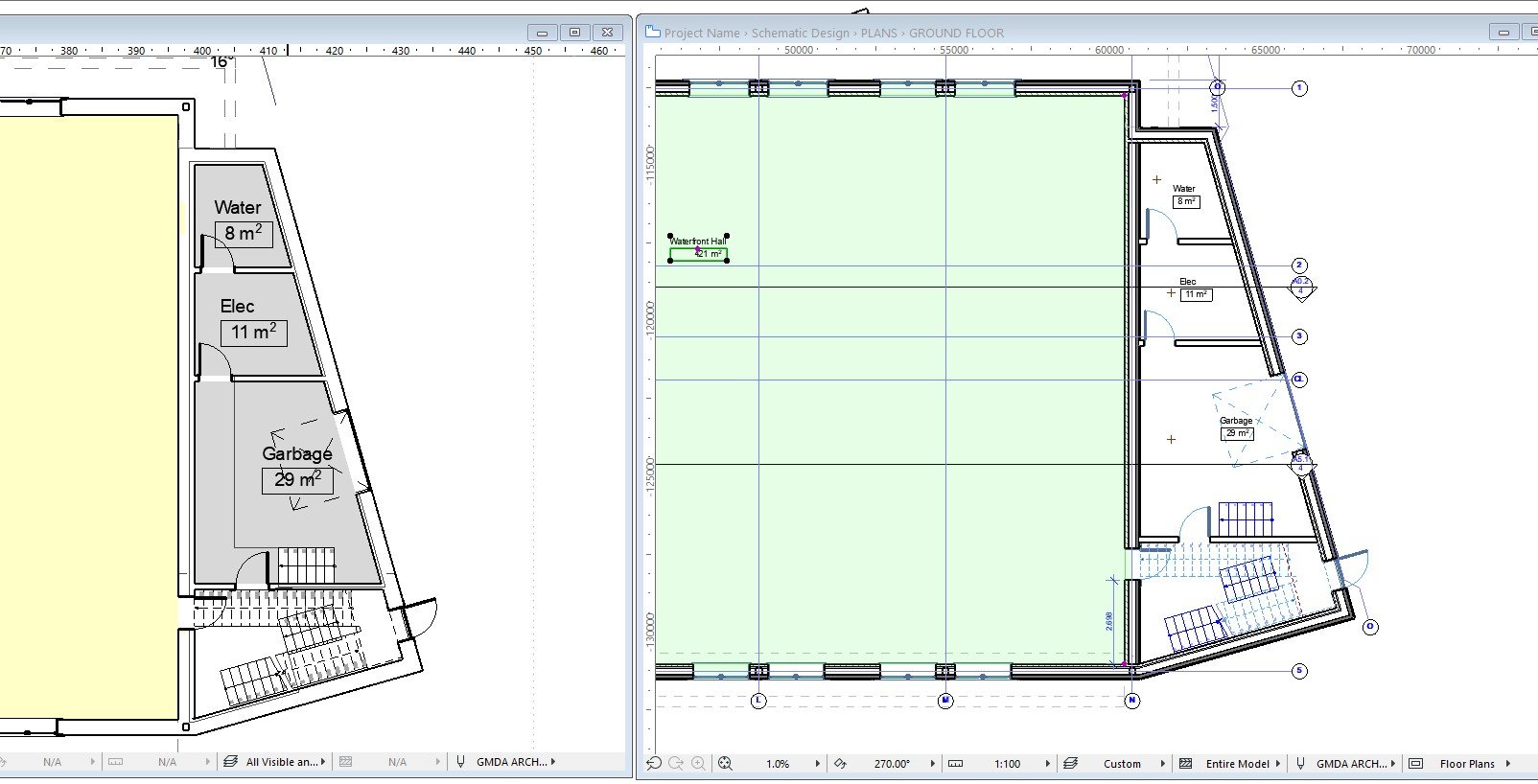
If I change the settings of the zone it changes in all views.
How can I apply different settings to different views for the zone stamps?
ArchiCAD24 - since Nov 2020
Revit - 2005 to 2020
Windows 10 Pro
2 screens: nvidia quadro RTX 4000
Revit - 2005 to 2020
Windows 10 Pro
2 screens: nvidia quadro RTX 4000
Solved! Go to Solution.
1 Solution
Accepted Solutions
Johann_P
Advocate
Options
- Mark as New
- Bookmark
- Subscribe
- Mute
- Subscribe to RSS Feed
- Permalink
- Report Inappropriate Content
2021-05-27 04:51 PM
2021-05-27
04:51 PM
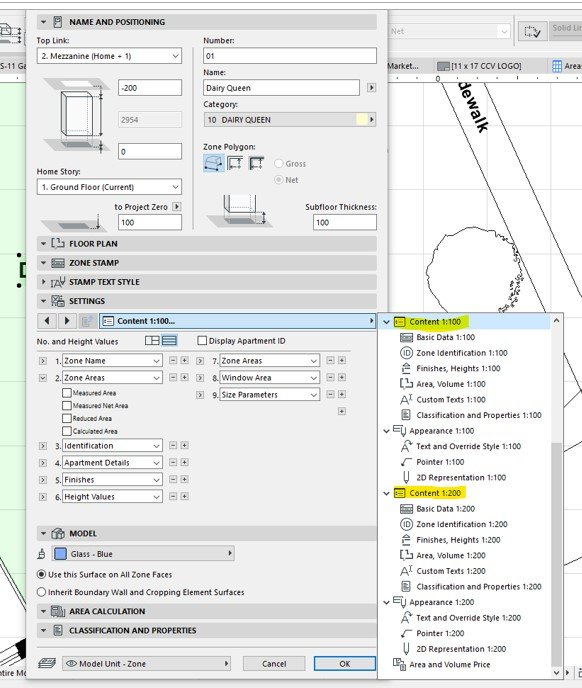
It seems the information displayed can be controlled to a certain extent.
The "area" can be displayed or not displayed in different scale settings.
But seems that, as per Podolsky's post, not in drawings of the same scale.
The "area" can be displayed or not displayed in different scale settings.
But seems that, as per Podolsky's post, not in drawings of the same scale.
ArchiCAD24 - since Nov 2020
Revit - 2005 to 2020
Windows 10 Pro
2 screens: nvidia quadro RTX 4000
Revit - 2005 to 2020
Windows 10 Pro
2 screens: nvidia quadro RTX 4000
Solution
3 Replies 3
Podolsky
Ace
Options
- Mark as New
- Bookmark
- Subscribe
- Mute
- Subscribe to RSS Feed
- Permalink
- Report Inappropriate Content
2021-05-21 04:25 PM
2021-05-21
04:25 PM
To solve that I programmed my own zone with MVO control. Standard ArchiCAD zone does not have such a possibility, I'm afraid.
Johann_P
Advocate
Options
- Mark as New
- Bookmark
- Subscribe
- Mute
- Subscribe to RSS Feed
- Permalink
- Report Inappropriate Content
2021-05-27 04:51 PM
2021-05-27
04:51 PM
It seems the information displayed can be controlled to a certain extent.
The "area" can be displayed or not displayed in different scale settings.
But seems that, as per Podolsky's post, not in drawings of the same scale.
The "area" can be displayed or not displayed in different scale settings.
But seems that, as per Podolsky's post, not in drawings of the same scale.
ArchiCAD24 - since Nov 2020
Revit - 2005 to 2020
Windows 10 Pro
2 screens: nvidia quadro RTX 4000
Revit - 2005 to 2020
Windows 10 Pro
2 screens: nvidia quadro RTX 4000
Solution

vdentello
Advocate
Options
- Mark as New
- Bookmark
- Subscribe
- Mute
- Subscribe to RSS Feed
- Permalink
- Report Inappropriate Content
2021-05-28 03:07 PM
2021-05-28
03:07 PM
Johann.P wrote:I coded up this guy, so you are able to to set it accordingly to each view through Model View Options.
It seems the information displayed can be controlled to a certain extent.
The "area" can be displayed or not displayed in different scale settings.
But seems that, as per Podolsky's post, not in drawings of the same scale.
Archi59.jpg
It's in portuguese, but, it could be translated.
Archicad User Since 2013
GDL Developer
Experimenting with API
from Brazil
GDL Developer
Experimenting with API
from Brazil

Still looking?

Suggested topics
- How can I combine model data and schedule totals into one building data summary table? in Project data & BIM
- Trying to calculate ACTUAL Wall Areas in Project data & BIM
- Text/Autotext Label -Can not edit Text Content from the tool's settings dialogue in Documentation
- Zone boundary excludes curtainwall footprint area. in Project data & BIM
- Tying a zone area to slabs archicad in Modeling
