
Turn on suggestions
Auto-suggest helps you quickly narrow down your search results by suggesting possible matches as you type.
Showing results for
EN
Turn on suggestions
Auto-suggest helps you quickly narrow down your search results by suggesting possible matches as you type.
Showing results for
Options
- Subscribe to RSS Feed
- Mark Topic as New
- Mark Topic as Read
- Pin this post for me
- Bookmark
- Subscribe to Topic
- Mute
- Printer Friendly Page

sooksealand
Contributor
Options
- Mark as New
- Bookmark
- Subscribe
- Mute
- Subscribe to RSS Feed
- Permalink
- Report Inappropriate Content
2022-05-10 08:17 AM
beam tool option icons are greyed out except single beam.
2022-05-10
08:17 AM
Hi
I'm working in Archicad 25.
I'd like to use curved beam tool.
It has only option of single geometry method.
Chain, rectangular, circular... all greyed out.
Also single geometry won't show any options to make curve either.
I'm not sure if I have some work setting wrong or anything. Please help.
Solved! Go to Solution.
1 Solution
Accepted Solutions

Barry Kelly
Moderator
Options
- Mark as New
- Bookmark
- Subscribe
- Mute
- Subscribe to RSS Feed
- Permalink
- Report Inappropriate Content
2022-05-10 08:56 AM - edited 2022-05-10 08:57 AM
2022-05-10
08:56 AM
@sooksealand wrote:
Thanks for the reply. No I'm creating new one. even if its existing beam surely have option to make it to be curved.
Yes, but you would do that with the pet palette options, not the geometry in the settings settings.
I can't think what else would make the geometry options go grey.
Yes I can.
you have the beam slant angle active.
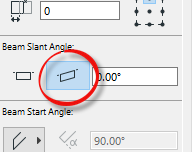
Change it back to the horizontal one.
Barry.
One of the forum moderators.
Versions 6.5 to 27
i7-10700 @ 2.9Ghz, 32GB ram, GeForce RTX 2060 (6GB), Windows 10
Lenovo Thinkpad - i7-1270P 2.20 GHz, 32GB RAM, Nvidia T550, Windows 11
Versions 6.5 to 27
i7-10700 @ 2.9Ghz, 32GB ram, GeForce RTX 2060 (6GB), Windows 10
Lenovo Thinkpad - i7-1270P 2.20 GHz, 32GB RAM, Nvidia T550, Windows 11
4 Replies 4
Barry Kelly
Moderator
Options
- Mark as New
- Bookmark
- Subscribe
- Mute
- Subscribe to RSS Feed
- Permalink
- Report Inappropriate Content
2022-05-10 08:21 AM
2022-05-10
08:21 AM
Are you sure you don't already have a beam selected?
That will grey out the geometry buttons.
Barry.
One of the forum moderators.
Versions 6.5 to 27
i7-10700 @ 2.9Ghz, 32GB ram, GeForce RTX 2060 (6GB), Windows 10
Lenovo Thinkpad - i7-1270P 2.20 GHz, 32GB RAM, Nvidia T550, Windows 11
Versions 6.5 to 27
i7-10700 @ 2.9Ghz, 32GB ram, GeForce RTX 2060 (6GB), Windows 10
Lenovo Thinkpad - i7-1270P 2.20 GHz, 32GB RAM, Nvidia T550, Windows 11
sooksealand
Contributor
Options
- Mark as New
- Bookmark
- Subscribe
- Mute
- Subscribe to RSS Feed
- Permalink
- Report Inappropriate Content
2022-05-10 08:50 AM
2022-05-10
08:50 AM
Thanks for the reply. No I'm creating new one. even if its existing beam surely have option to make it to be curved.
Barry Kelly
Moderator
Options
- Mark as New
- Bookmark
- Subscribe
- Mute
- Subscribe to RSS Feed
- Permalink
- Report Inappropriate Content
2022-05-10 08:56 AM - edited 2022-05-10 08:57 AM
2022-05-10
08:56 AM
@sooksealand wrote:
Thanks for the reply. No I'm creating new one. even if its existing beam surely have option to make it to be curved.
Yes, but you would do that with the pet palette options, not the geometry in the settings settings.
I can't think what else would make the geometry options go grey.
Yes I can.
you have the beam slant angle active.
Change it back to the horizontal one.
Barry.
One of the forum moderators.
Versions 6.5 to 27
i7-10700 @ 2.9Ghz, 32GB ram, GeForce RTX 2060 (6GB), Windows 10
Lenovo Thinkpad - i7-1270P 2.20 GHz, 32GB RAM, Nvidia T550, Windows 11
Versions 6.5 to 27
i7-10700 @ 2.9Ghz, 32GB ram, GeForce RTX 2060 (6GB), Windows 10
Lenovo Thinkpad - i7-1270P 2.20 GHz, 32GB RAM, Nvidia T550, Windows 11
sooksealand
Contributor
Options
- Mark as New
- Bookmark
- Subscribe
- Mute
- Subscribe to RSS Feed
- Permalink
- Report Inappropriate Content
2022-05-11 01:45 AM
2022-05-11
01:45 AM
Thank you so much. You're a legend!

Still looking?

Suggested topics
- Recurring dyld/Mach-O SIGBUS crash in Archicad 29 (v2025 FULL INT, Build 5101) in Installation & update
- walls show a single plane in Modeling
- Ci Tools Keynotes | Archicad Keynotes | Properties | Attributes in Project data & BIM
- Archicad Interactive Schedule shows a single multi-plane hip roof as four separate elements in Documentation
- Trying to calculate ACTUAL Wall Areas in Project data & BIM
