
Turn on suggestions
Auto-suggest helps you quickly narrow down your search results by suggesting possible matches as you type.
Showing results for
EN
Turn on suggestions
Auto-suggest helps you quickly narrow down your search results by suggesting possible matches as you type.
Showing results for
Options
- Subscribe to RSS Feed
- Mark Topic as New
- Mark Topic as Read
- Pin this post for me
- Bookmark
- Subscribe to Topic
- Mute
- Printer Friendly Page

pelly
Contributor
Options
- Mark as New
- Bookmark
- Subscribe
- Mute
- Subscribe to RSS Feed
- Permalink
- Report Inappropriate Content
2022-03-28 09:17 PM
building materials cutfills
2022-03-28
09:17 PM
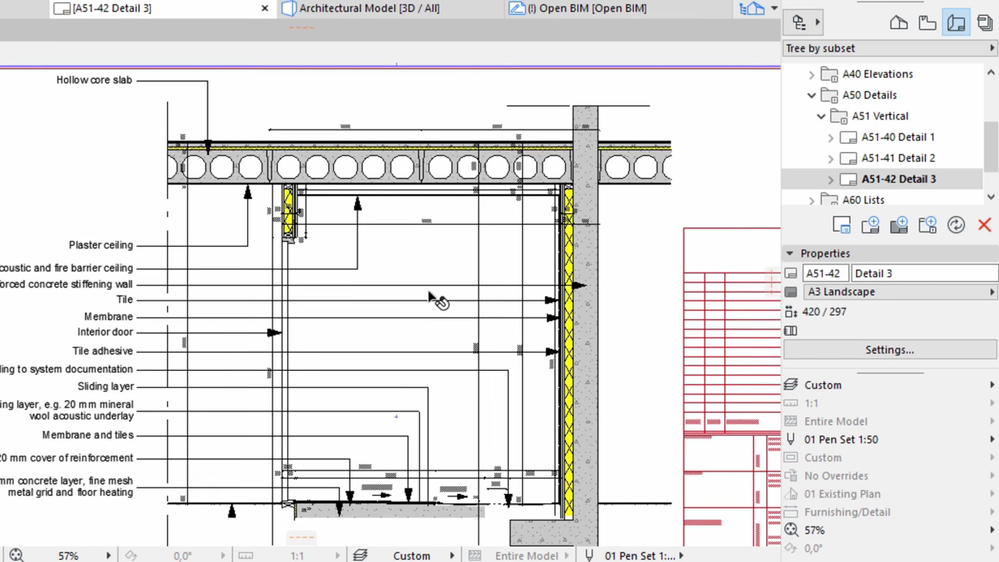
hi, i would like to know how to create cut fills for concretes like in the attached photo
Read-Only
4 Replies 4

Mahmoud Qenawi
Ace
Options
- Mark as New
- Bookmark
- Subscribe
- Mute
- Subscribe to RSS Feed
- Permalink
- Report Inappropriate Content
2022-03-29 01:51 AM
2022-03-29
01:51 AM
Hi @pelly , you can chose the element ( wall or column ) and open Building Materials dialogue either from options menu - Element Attributes - Building Materials or from Attributes Toolbar then Duplicate building material from New button and from Structure and appearance panel change two parameters as you wish , Cut Fill Foreground Pen & Cut Fill Background Pen.
AC 29 INT 4006/WIN 11
AMD Ryzen 7 5800H with Radeon Graphics 3.20 GHz 16.0 GB
AMD Ryzen 7 5800H with Radeon Graphics 3.20 GHz 16.0 GB
pelly
Contributor
Options
- Mark as New
- Bookmark
- Subscribe
- Mute
- Subscribe to RSS Feed
- Permalink
- Report Inappropriate Content
2022-03-29 04:51 PM
2022-03-29
04:51 PM
thanks man.

Eric Milberger
Advisor
Options
- Mark as New
- Bookmark
- Subscribe
- Mute
- Subscribe to RSS Feed
- Permalink
- Report Inappropriate Content
2022-04-20 05:32 PM
2022-04-20
05:32 PM
I thought there was a hollow core slab tool or object somewhere??
Eric Milberger, Architect | Master Planner
Mahmoud Qenawi
Ace
Options
- Mark as New
- Bookmark
- Subscribe
- Mute
- Subscribe to RSS Feed
- Permalink
- Report Inappropriate Content
2022-04-21 08:17 AM
2022-04-21
08:17 AM
You can use opening tool to achieve this voids in hollow core slab, I hope it can be done.
AC 29 INT 4006/WIN 11
AMD Ryzen 7 5800H with Radeon Graphics 3.20 GHz 16.0 GB
AMD Ryzen 7 5800H with Radeon Graphics 3.20 GHz 16.0 GB

Still looking?

Suggested topics
- After 3 years with Archicad, I'm honestly disappointed in General discussions
- How to structure prompts for AI Visualizer in Archicad 30 in AI solutions
- Ci Tools Keynotes | Archicad Keynotes | Properties | Attributes in Project data & BIM
- Renovation filter changing surface colors of walls in Modeling
- Name of a window building material in Collaboration with other software
