
Turn on suggestions
Auto-suggest helps you quickly narrow down your search results by suggesting possible matches as you type.
Showing results for
EN
Turn on suggestions
Auto-suggest helps you quickly narrow down your search results by suggesting possible matches as you type.
Showing results for
Options
- Subscribe to RSS Feed
- Mark Topic as New
- Mark Topic as Read
- Pin this post for me
- Bookmark
- Subscribe to Topic
- Mute
- Printer Friendly Page

Anonymous
Not applicable
Options
- Mark as New
- Bookmark
- Subscribe
- Mute
- Subscribe to RSS Feed
- Permalink
- Report Inappropriate Content
2021-03-08 01:56 AM
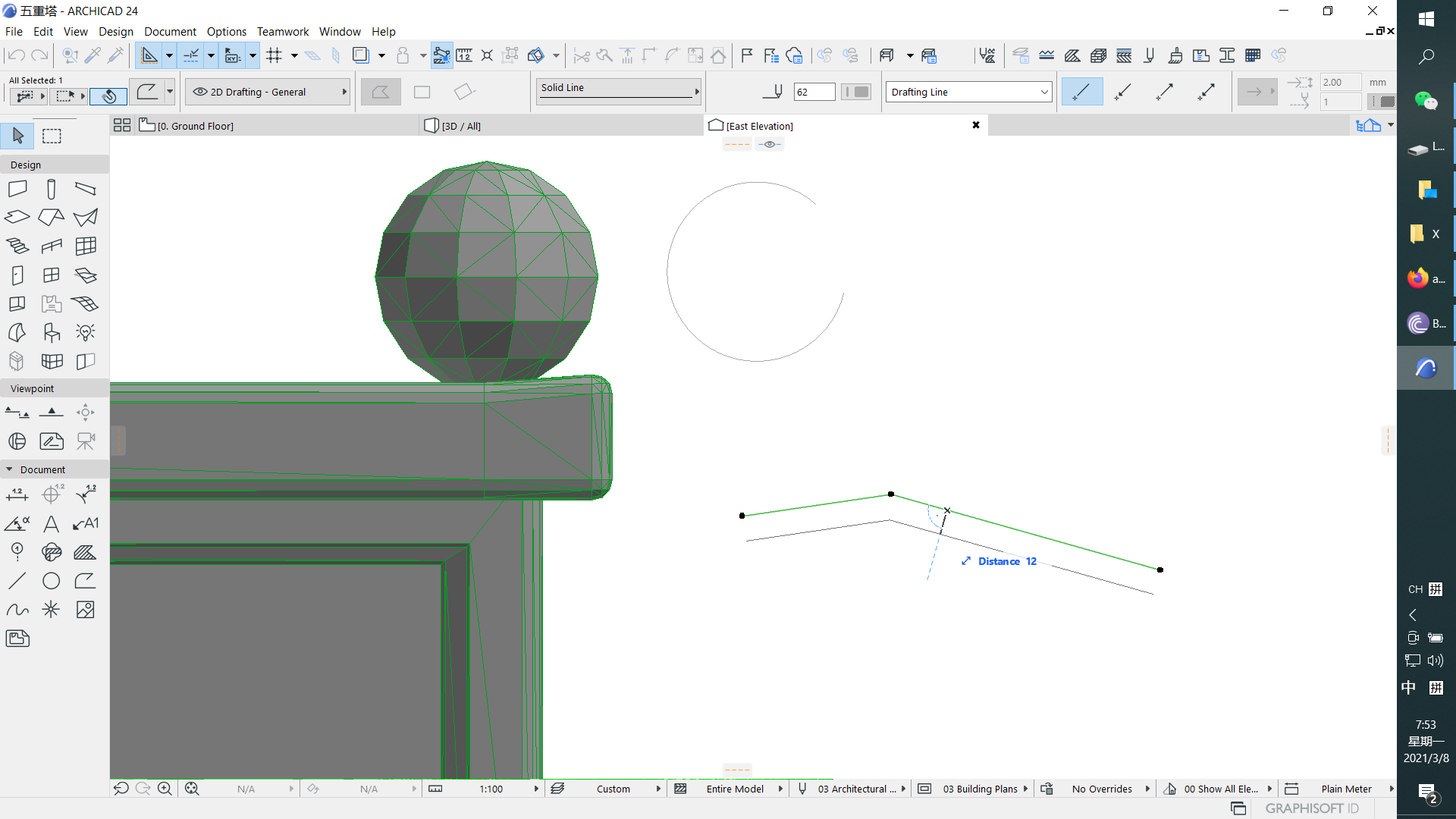
"offset“ not applicable to circle....
2021-03-08
01:56 AM
Please advice, thanks
Solved! Go to Solution.

1 Solution
Accepted Solutions

Barry Kelly
Moderator
Options
- Mark as New
- Bookmark
- Subscribe
- Mute
- Subscribe to RSS Feed
- Permalink
- Report Inappropriate Content
2021-03-08 08:13 AM
2021-03-08
08:13 AM
I assume that because it is a single arc, it is treated as an actual arc.
Arcs and circles do not have this offset edge option in the pet palette.
You can however use the offset tool.
See this post from just a little while ago.
https://archicad-talk.graphisoft.com/viewtopic.php?f=20&t=72001&p=322323#p322267
Barry.
Arcs and circles do not have this offset edge option in the pet palette.
You can however use the offset tool.
See this post from just a little while ago.
Barry.
One of the forum moderators.
Versions 6.5 to 27
i7-10700 @ 2.9Ghz, 32GB ram, GeForce RTX 2060 (6GB), Windows 10
Lenovo Thinkpad - i7-1270P 2.20 GHz, 32GB RAM, Nvidia T550, Windows 11
Versions 6.5 to 27
i7-10700 @ 2.9Ghz, 32GB ram, GeForce RTX 2060 (6GB), Windows 10
Lenovo Thinkpad - i7-1270P 2.20 GHz, 32GB RAM, Nvidia T550, Windows 11
Solution
4 Replies 4

Lingwisyer
Guru
Options
- Mark as New
- Bookmark
- Subscribe
- Mute
- Subscribe to RSS Feed
- Permalink
- Report Inappropriate Content
2021-03-08 02:26 AM
2021-03-08
02:26 AM
Select the edge of the arc, not the node?
| AC22-29 AUS 3200 | Help Those Help You - Add a Signature |
| Self-taught, bend it till it breaks | Creating a Thread |
| Win11 | i9 10850K | 64GB | RX6600 | Win11 | 7800X3D | 32GB | RTX5070TI |
Anonymous
Not applicable
Options
- Mark as New
- Bookmark
- Subscribe
- Mute
- Subscribe to RSS Feed
- Permalink
- Report Inappropriate Content
2021-03-08 07:45 AM


Barry Kelly
Moderator
Options
- Mark as New
- Bookmark
- Subscribe
- Mute
- Subscribe to RSS Feed
- Permalink
- Report Inappropriate Content
2021-03-08 08:13 AM
2021-03-08
08:13 AM
I assume that because it is a single arc, it is treated as an actual arc.
Arcs and circles do not have this offset edge option in the pet palette.
You can however use the offset tool.
See this post from just a little while ago.
https://archicad-talk.graphisoft.com/viewtopic.php?f=20&t=72001&p=322323#p322267
Barry.
Arcs and circles do not have this offset edge option in the pet palette.
You can however use the offset tool.
See this post from just a little while ago.
Barry.
One of the forum moderators.
Versions 6.5 to 27
i7-10700 @ 2.9Ghz, 32GB ram, GeForce RTX 2060 (6GB), Windows 10
Lenovo Thinkpad - i7-1270P 2.20 GHz, 32GB RAM, Nvidia T550, Windows 11
Versions 6.5 to 27
i7-10700 @ 2.9Ghz, 32GB ram, GeForce RTX 2060 (6GB), Windows 10
Lenovo Thinkpad - i7-1270P 2.20 GHz, 32GB RAM, Nvidia T550, Windows 11
Solution
Anonymous
Not applicable
Options
- Mark as New
- Bookmark
- Subscribe
- Mute
- Subscribe to RSS Feed
- Permalink
- Report Inappropriate Content
2021-03-08 08:47 AM
2021-03-08
08:47 AM
OK Thanks Lingwisyer,
Still looking?

Suggested topics
- Placed DWG Linetype Scale in Collaboration with other software
- marker head change in Modeling
- ID/Back reference text positioning, drawing title in Documentation
- Architect Vacancy - Dubai Based - ELE Interior Design - Archicad essential. in General discussions
- Thinking of Creating BIM Manual builder application. in General discussions
