
Turn on suggestions
Auto-suggest helps you quickly narrow down your search results by suggesting possible matches as you type.
Showing results for
EN
Turn on suggestions
Auto-suggest helps you quickly narrow down your search results by suggesting possible matches as you type.
Showing results for
Options
- Subscribe to RSS Feed
- Mark Topic as New
- Mark Topic as Read
- Pin this post for me
- Bookmark
- Subscribe to Topic
- Mute
- Printer Friendly Page

Anonymous
Not applicable
Options
- Mark as New
- Bookmark
- Subscribe
- Mute
- Subscribe to RSS Feed
- Permalink
- Report Inappropriate Content
2020-10-23
04:17 AM
- last edited on
2023-05-26
12:25 PM
by
 Rubia Torres
selection amongst beams at same location but various levels
2020-10-23
04:17 AM
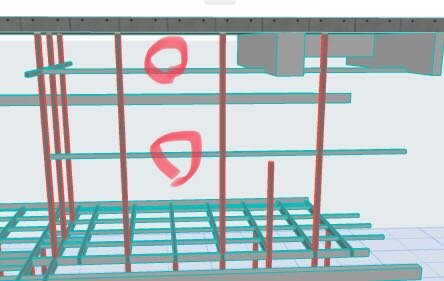
There are two beam at same location on plan but a different levels, how can I choose on plan from them? (in Revit press ALT may select one or other)
Thanks
Solved! Go to Solution.

1 Solution
Accepted Solutions

Barry Kelly
Moderator
Options
- Mark as New
- Bookmark
- Subscribe
- Mute
- Subscribe to RSS Feed
- Permalink
- Report Inappropriate Content
2020-10-23 04:38 AM
2020-10-23
04:38 AM
emailcopy wrote:
(in Revit press ALT may select one or other)
In Archicad it is TAB.
Hover over the beams and the pop-up info box will say "Multiple Elements (TAB)".
Please don't take offence (and keep asking questions), but by all of the basic questions you are asking, I think you should at least go trough the training guides for Archicad.
Barry.
One of the forum moderators.
Versions 6.5 to 27
i7-10700 @ 2.9Ghz, 32GB ram, GeForce RTX 2060 (6GB), Windows 10
Lenovo Thinkpad - i7-1270P 2.20 GHz, 32GB RAM, Nvidia T550, Windows 11
Versions 6.5 to 27
i7-10700 @ 2.9Ghz, 32GB ram, GeForce RTX 2060 (6GB), Windows 10
Lenovo Thinkpad - i7-1270P 2.20 GHz, 32GB RAM, Nvidia T550, Windows 11
Solution
2 Replies 2
Barry Kelly
Moderator
Options
- Mark as New
- Bookmark
- Subscribe
- Mute
- Subscribe to RSS Feed
- Permalink
- Report Inappropriate Content
2020-10-23 04:38 AM
2020-10-23
04:38 AM
emailcopy wrote:
(in Revit press ALT may select one or other)
In Archicad it is TAB.
Hover over the beams and the pop-up info box will say "Multiple Elements (TAB)".
Please don't take offence (and keep asking questions), but by all of the basic questions you are asking, I think you should at least go trough the training guides for Archicad.
Barry.
One of the forum moderators.
Versions 6.5 to 27
i7-10700 @ 2.9Ghz, 32GB ram, GeForce RTX 2060 (6GB), Windows 10
Lenovo Thinkpad - i7-1270P 2.20 GHz, 32GB RAM, Nvidia T550, Windows 11
Versions 6.5 to 27
i7-10700 @ 2.9Ghz, 32GB ram, GeForce RTX 2060 (6GB), Windows 10
Lenovo Thinkpad - i7-1270P 2.20 GHz, 32GB RAM, Nvidia T550, Windows 11
Solution
Anonymous
Not applicable
Options
- Mark as New
- Bookmark
- Subscribe
- Mute
- Subscribe to RSS Feed
- Permalink
- Report Inappropriate Content
2020-10-23 04:55 AM
2020-10-23
04:55 AM
I took Lynda.com but maybe need more training course
OK Thanks Barry
OK Thanks Barry
Still looking?

Suggested topics
- Archicad 30 Light mode: where did the contrast go? in General discussions
- Introducing the EasyBIM Add-On Suite for ArchiCAD in General discussions
- Parking layouts and solar parks in a site polygon in Libraries & objects
- Climate and sunpath objects for analysis presentation in Libraries & objects
- RCP graphics in Modeling
