
Turn on suggestions
Auto-suggest helps you quickly narrow down your search results by suggesting possible matches as you type.
Showing results for
EN
Turn on suggestions
Auto-suggest helps you quickly narrow down your search results by suggesting possible matches as you type.
Showing results for
- English
- :
- Forum
- :
- Project data & BIM
- :
- Re: AC26 Stair Bug: Cannot change renovation statu...
Options
- Subscribe to RSS Feed
- Mark Topic as New
- Mark Topic as Read
- Pin this post for me
- Bookmark
- Subscribe to Topic
- Mute
- Printer Friendly Page

Eduardo Rolon
Moderator
Options
- Mark as New
- Bookmark
- Subscribe
- Mute
- Subscribe to RSS Feed
- Permalink
- Report Inappropriate Content
2022-07-20
07:29 PM
- last edited on
2022-09-26
07:18 PM
by
 Oleksandra Vakariuk
AC26 Stair Bug: Cannot change renovation status with Palette
2022-07-20
07:29 PM
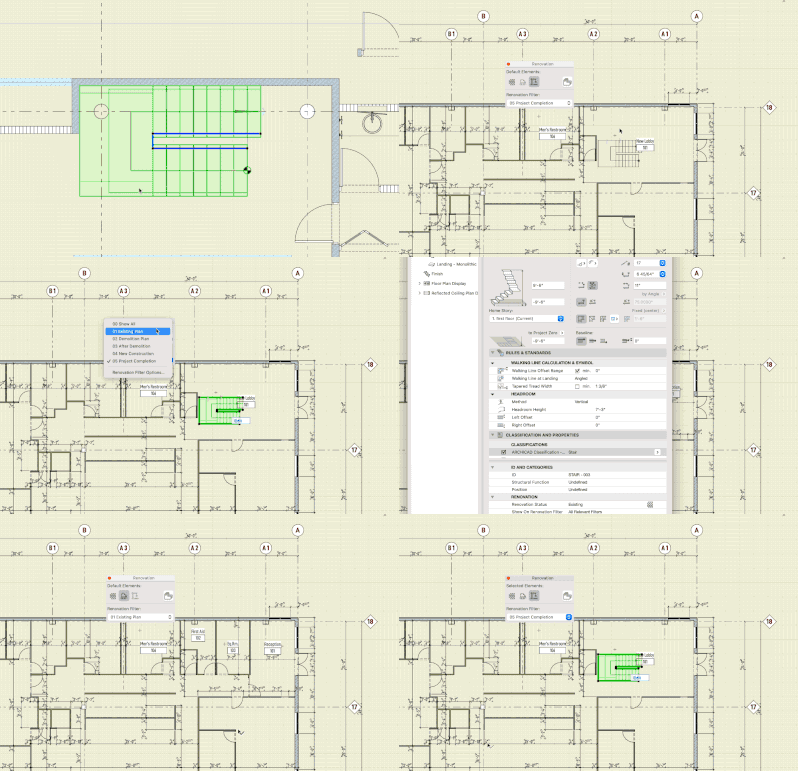
When you copy a stair from one AC26 file to other the only way to change its renovation status is by opening the Stair Settings dialogue, you cannot change it using the Palette.
This does not happen with newly created stairs.
Eduardo Rolón AIA NCARB
AC29 US/INT -> AC08
AC29 US/INT -> AC08
Mac Studio M4 Max 64GB ram, OS X 10.XX latest
Read-Only
Labels:
- Labels:
-
Project Management
5 Replies 5

Lee Hankins
Virtuoso
Options
- Mark as New
- Bookmark
- Subscribe
- Mute
- Subscribe to RSS Feed
- Permalink
- Report Inappropriate Content
2022-07-20 11:39 PM
2022-07-20
11:39 PM
Are they files ‘upgraded’ from 25?
Lee Hankins
ArchiCAD 4.5 - Archicad 29
macOS Tahoe (26.0)
ArchiCAD 4.5 - Archicad 29
macOS Tahoe (26.0)
Eduardo Rolon
Moderator
Options
- Mark as New
- Bookmark
- Subscribe
- Mute
- Subscribe to RSS Feed
- Permalink
- Report Inappropriate Content
2022-07-20 11:43 PM
2022-07-20
11:43 PM
The one I copied the stair from was updated from 25 the other was created in 26.
Eduardo Rolón AIA NCARB
AC29 US/INT -> AC08
AC29 US/INT -> AC08
Mac Studio M4 Max 64GB ram, OS X 10.XX latest
Lee Hankins
Virtuoso
Options
- Mark as New
- Bookmark
- Subscribe
- Mute
- Subscribe to RSS Feed
- Permalink
- Report Inappropriate Content
2022-07-21 08:03 AM
2022-07-21
08:03 AM
It looks like some kind of migration issue from 25-26 with stairs then. I avoid stairs at all costs so haven’t noticed anything. I can’t recall if any tweaks were made to the stair tool for 26 that could affect it.
Lee Hankins
ArchiCAD 4.5 - Archicad 29
macOS Tahoe (26.0)
ArchiCAD 4.5 - Archicad 29
macOS Tahoe (26.0)

Barry Kelly
Moderator
Options
- Mark as New
- Bookmark
- Subscribe
- Mute
- Subscribe to RSS Feed
- Permalink
- Report Inappropriate Content
2022-07-21 08:28 AM - edited 2022-07-21 08:30 AM
2022-07-21
08:28 AM
That seems to be because you are selecting the stair by the boundary and not selecting the stair by the baseline.
I just checked in 25 and it is the same there - it's not because you have copied the stair.
Still, I am not sure why you can't change with the renovation palette but still can in the stair settings when selected by the boundary.
Barry.
One of the forum moderators.
Versions 6.5 to 27
i7-10700 @ 2.9Ghz, 32GB ram, GeForce RTX 2060 (6GB), Windows 10
Lenovo Thinkpad - i7-1270P 2.20 GHz, 32GB RAM, Nvidia T550, Windows 11
Versions 6.5 to 27
i7-10700 @ 2.9Ghz, 32GB ram, GeForce RTX 2060 (6GB), Windows 10
Lenovo Thinkpad - i7-1270P 2.20 GHz, 32GB RAM, Nvidia T550, Windows 11
Eduardo Rolon
Moderator
Options
- Mark as New
- Bookmark
- Subscribe
- Mute
- Subscribe to RSS Feed
- Permalink
- Report Inappropriate Content
2022-07-21 01:53 PM
2022-07-21
01:53 PM
So I am "holding it wrong"…
😉
Eduardo Rolón AIA NCARB
AC29 US/INT -> AC08
AC29 US/INT -> AC08
Mac Studio M4 Max 64GB ram, OS X 10.XX latest

Didn't find the answer?
Check other topics in this Forum
Back to ForumRead the latest accepted solutions!
Accepted SolutionsStart a new conversation!

Suggested topics
- Inconsistent Wall Intersections – Same Walls, Different Behavior in Modeling
- new windows - existing wall - show dashed in elevations in Documentation
- Weird bolded ID numbers in door schedule in Documentation
- Renovation under Window Selection Settings in Documentation
- Zone tool gives the dreaded 'no closed polygon... etc' error message in Modeling
