Turn on suggestions
Auto-suggest helps you quickly narrow down your search results by suggesting possible matches as you type.
Showing results for
Turn on suggestions
Auto-suggest helps you quickly narrow down your search results by suggesting possible matches as you type.
Showing results for
- Graphisoft Community (INT)
- :
- Forum
- :
- Installation & update
- :
- Re: Fn + F2 Issue
Options
- Subscribe to RSS Feed
- Mark Topic as New
- Mark Topic as Read
- Pin this post for me
- Bookmark
- Subscribe to Topic
- Mute
- Printer Friendly Page
Installation & update
About program installation and update, hardware, operating systems, setup, etc.
SOLVED!
Alt + F2 Issue

Options
- Mark as New
- Bookmark
- Subscribe
- Mute
- Subscribe to RSS Feed
- Permalink
- Report Inappropriate Content
2023-04-02
04:18 PM
- last edited on
2023-05-20
01:01 AM
by
 Gordana Radonic
2023-04-02
04:18 PM
Hi Community,
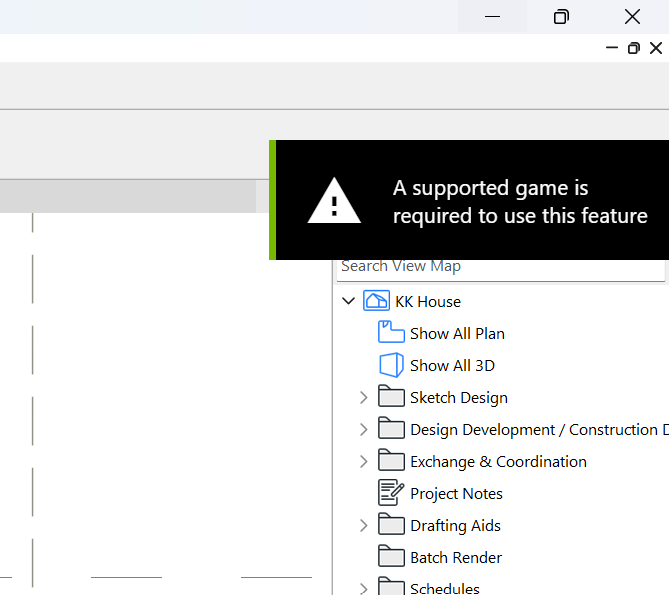
I have an issue with using Alt + F2 to hide or unhide reference drawings. My computer pops up "a supported game is required for this feature archicad". What can I do with this situation?
I am using Legion 5i pro 2022 series laptop.
Solved! Go to Solution.
Labels:
- Labels:
-
Performance
3 ACCEPTED SOLUTIONS
Accepted Solutions
Solution

Options
- Mark as New
- Bookmark
- Subscribe
- Mute
- Subscribe to RSS Feed
- Permalink
- Report Inappropriate Content
2023-04-11 03:15 AM
2023-04-11
03:15 AM
That doesn't look like an Archicad message to me.
Looks more like an operating system message or from another background program.
Is there another program running on your machine that is trapping the keyboard shortcuts?
That is what it looks like to me, another program is waiting for you to press ALT+F2.
Barry.
One of the forum moderators.
Versions 6.5 to 27
i7-10700 @ 2.9Ghz, 32GB ram, GeForce RTX 2060 (6GB), Windows 10
Lenovo Thinkpad - i7-1270P 2.20 GHz, 32GB RAM, Nvidia T550, Windows 11
Versions 6.5 to 27
i7-10700 @ 2.9Ghz, 32GB ram, GeForce RTX 2060 (6GB), Windows 10
Lenovo Thinkpad - i7-1270P 2.20 GHz, 32GB RAM, Nvidia T550, Windows 11
Solution
Options
- Mark as New
- Bookmark
- Subscribe
- Mute
- Subscribe to RSS Feed
- Permalink
- Report Inappropriate Content
2023-04-11 03:30 AM
2023-04-11
03:30 AM
@LuGine , as Ling suggests, GeForce experience has caused problems with Archicad in the past.
There should be some old posts about it here that can be found with a search if you want to go looking.
I have always disabled or deleted GeForce Experience from any machines I have used.
It really doesn't do anything that I found worthwhile.
Barry.
One of the forum moderators.
Versions 6.5 to 27
i7-10700 @ 2.9Ghz, 32GB ram, GeForce RTX 2060 (6GB), Windows 10
Lenovo Thinkpad - i7-1270P 2.20 GHz, 32GB RAM, Nvidia T550, Windows 11
Versions 6.5 to 27
i7-10700 @ 2.9Ghz, 32GB ram, GeForce RTX 2060 (6GB), Windows 10
Lenovo Thinkpad - i7-1270P 2.20 GHz, 32GB RAM, Nvidia T550, Windows 11
Solution
Options
- Mark as New
- Bookmark
- Subscribe
- Mute
- Subscribe to RSS Feed
- Permalink
- Report Inappropriate Content
2023-04-16 08:24 AM
2023-04-16
08:24 AM
Thanks @Barry Kelly and @Lingwisyer.
The issue was indeed caused by the background program (GeForce Experience). I looked on Youtube about turning off Geforce Experience. Below is the Youtube link, in case others have the same issue.
https://www.youtube.com/watch?v=LoQdIHr77e0
Best Regards,
Bong
6 REPLIES 6

Options
- Mark as New
- Bookmark
- Subscribe
- Mute
- Subscribe to RSS Feed
- Permalink
- Report Inappropriate Content
2023-04-03 03:27 AM
2023-04-03
03:27 AM
Alt + F2
Your current key combo is volume down?
| AC22-28 AUS 3110 | Help Those Help You - Add a Signature |
| Self-taught, bend it till it breaks | Creating a Thread |
| Win11 | i9 10850K | 64GB | RX6600 | Win11 | R5 2600 | 16GB | GTX1660 |
Options
- Mark as New
- Bookmark
- Subscribe
- Mute
- Subscribe to RSS Feed
- Permalink
- Report Inappropriate Content
2023-04-10 05:09 PM
2023-04-10
05:09 PM
Hi, Lingwisyer.
Sorry, I wrote the shortcut key wrong, it supposes to be Alt + F2 and the error still exists. Thanks.
Solution
Options
- Mark as New
- Bookmark
- Subscribe
- Mute
- Subscribe to RSS Feed
- Permalink
- Report Inappropriate Content
2023-04-11 03:15 AM
2023-04-11
03:15 AM
That doesn't look like an Archicad message to me.
Looks more like an operating system message or from another background program.
Is there another program running on your machine that is trapping the keyboard shortcuts?
That is what it looks like to me, another program is waiting for you to press ALT+F2.
Barry.
One of the forum moderators.
Versions 6.5 to 27
i7-10700 @ 2.9Ghz, 32GB ram, GeForce RTX 2060 (6GB), Windows 10
Lenovo Thinkpad - i7-1270P 2.20 GHz, 32GB RAM, Nvidia T550, Windows 11
Versions 6.5 to 27
i7-10700 @ 2.9Ghz, 32GB ram, GeForce RTX 2060 (6GB), Windows 10
Lenovo Thinkpad - i7-1270P 2.20 GHz, 32GB RAM, Nvidia T550, Windows 11
Options
- Mark as New
- Bookmark
- Subscribe
- Mute
- Subscribe to RSS Feed
- Permalink
- Report Inappropriate Content
2023-04-11 03:15 AM
2023-04-11
03:15 AM
That message would be from GForce Experience. It appears to be seeing AC as a game and hence enabling it's hotkeys. You could either remove said hoykeys, look through the settings to remove AC from it, or close it entirely.
Ling.
| AC22-28 AUS 3110 | Help Those Help You - Add a Signature |
| Self-taught, bend it till it breaks | Creating a Thread |
| Win11 | i9 10850K | 64GB | RX6600 | Win11 | R5 2600 | 16GB | GTX1660 |
Solution
Options
- Mark as New
- Bookmark
- Subscribe
- Mute
- Subscribe to RSS Feed
- Permalink
- Report Inappropriate Content
2023-04-11 03:30 AM
2023-04-11
03:30 AM
@LuGine , as Ling suggests, GeForce experience has caused problems with Archicad in the past.
There should be some old posts about it here that can be found with a search if you want to go looking.
I have always disabled or deleted GeForce Experience from any machines I have used.
It really doesn't do anything that I found worthwhile.
Barry.
One of the forum moderators.
Versions 6.5 to 27
i7-10700 @ 2.9Ghz, 32GB ram, GeForce RTX 2060 (6GB), Windows 10
Lenovo Thinkpad - i7-1270P 2.20 GHz, 32GB RAM, Nvidia T550, Windows 11
Versions 6.5 to 27
i7-10700 @ 2.9Ghz, 32GB ram, GeForce RTX 2060 (6GB), Windows 10
Lenovo Thinkpad - i7-1270P 2.20 GHz, 32GB RAM, Nvidia T550, Windows 11
Solution
Options
- Mark as New
- Bookmark
- Subscribe
- Mute
- Subscribe to RSS Feed
- Permalink
- Report Inappropriate Content
2023-04-16 08:24 AM
2023-04-16
08:24 AM
Thanks @Barry Kelly and @Lingwisyer.
The issue was indeed caused by the background program (GeForce Experience). I looked on Youtube about turning off Geforce Experience. Below is the Youtube link, in case others have the same issue.
https://www.youtube.com/watch?v=LoQdIHr77e0
Best Regards,
Bong

Suggested content
- Cineware by maxon add-on has unexpectedly closed. - Windows, all Archicad versions - Solution in Visualization
- LAND4 add-on // Current issues and possible ideas for alternatives in Modeling
- Section/Elevation Selection Settings revert to "Show Grid Elements by Name/Stories" as "Selected" in Documentation
- Separation line between slab and mesh not showing after boolean operation in Documentation
- window shedule- not saving manual text in Project data & BIM
Still looking?
