
Turn on suggestions
Auto-suggest helps you quickly narrow down your search results by suggesting possible matches as you type.
Showing results for
EN
Turn on suggestions
Auto-suggest helps you quickly narrow down your search results by suggesting possible matches as you type.
Showing results for
- English
- :
- Forum
- :
- Project data & BIM
- :
- Re: Archicad Template and Library - free download
Options
- Subscribe to RSS Feed
- Mark Topic as New
- Mark Topic as Read
- Pin this post for me
- Bookmark
- Subscribe to Topic
- Mute
- Printer Friendly Page

Podolsky
Ace
Options
- Mark as New
- Bookmark
- Subscribe
- Mute
- Subscribe to RSS Feed
- Permalink
- Report Inappropriate Content
2021-05-19
11:43 AM
- last edited on
2022-09-22
06:07 PM
by
 Oleksandra Vakariuk
ArchiCAD Template and Library - free download
2021-05-19
11:43 AM
Hi there!
I have decided to give a link to the template and library I have developed for projects I've been working on.
Feel free to download and review. Any comments are welcomed.
The Template was developed for UK. I used British standards: BS 8541-2:2011 and BS EN ISO 19650-2:2018
I though that Graphisoft UK might be interested (in time when I stared they had very weak template), but somehow they are too much ignorant about private developments.
GDL codes are password protected. I haven't considered yet to open the source. I also implemented library protection by connecting it to ArchiCAD licence number. Originally was idea that workers wouldn't take a library from the office and use it somewhere else. Currently I set, that library will work until September this year in any computer. But if someone want to use it in their practise - please write me, I can connect the library to your ArchiCAD license.
Also included Manual, that explains basics of the template.
This development is something that I didn't finish to develop and have to continue. I just stack in the middle because of health problems - I've got a disability.
If there are people who want to help me to continue this development - I would be more than happy.
Here is the link: https://www.dropbox.com/sh/pchebzqlv3qdwa5/AAB4CpKzRHzztFcPObHzuH4ja?dl=0
I have decided to give a link to the template and library I have developed for projects I've been working on.
Feel free to download and review. Any comments are welcomed.
The Template was developed for UK. I used British standards: BS 8541-2:2011 and BS EN ISO 19650-2:2018
I though that Graphisoft UK might be interested (in time when I stared they had very weak template), but somehow they are too much ignorant about private developments.
GDL codes are password protected. I haven't considered yet to open the source. I also implemented library protection by connecting it to ArchiCAD licence number. Originally was idea that workers wouldn't take a library from the office and use it somewhere else. Currently I set, that library will work until September this year in any computer. But if someone want to use it in their practise - please write me, I can connect the library to your ArchiCAD license.
Also included Manual, that explains basics of the template.
This development is something that I didn't finish to develop and have to continue. I just stack in the middle because of health problems - I've got a disability.
If there are people who want to help me to continue this development - I would be more than happy.
Here is the link: https://www.dropbox.com/sh/pchebzqlv3qdwa5/AAB4CpKzRHzztFcPObHzuH4ja?dl=0
Solved! Go to Solution.
71 Replies 71

Ahmed_K
Mentor
Options
- Mark as New
- Bookmark
- Subscribe
- Mute
- Subscribe to RSS Feed
- Permalink
- Report Inappropriate Content
2022-07-31 12:02 PM
2022-07-31
12:02 PM
Thank you so much !
there is so much effort behind this file ,
Get well soon !
AMD Ryzen 9 3900X, 32 GB RAM, RTX 3080 10 GB
Archicad 27
Windows 11 professional
https://www.behance.net/Nuance-Architects
Archicad 27
Windows 11 professional
https://www.behance.net/Nuance-Architects
 Rob
Rob
Graphisoft
Options
- Mark as New
- Bookmark
- Subscribe
- Mute
- Subscribe to RSS Feed
- Permalink
- Report Inappropriate Content
2022-08-04 12:26 PM
2022-08-04
12:26 PM
Nice work. Just a note. Layers in your template are not aligned with BS EN ISO 13567-2:2002, which is the standard for layers in the UK.
::rk
Podolsky
Ace
Options
- Mark as New
- Bookmark
- Subscribe
- Mute
- Subscribe to RSS Feed
- Permalink
- Report Inappropriate Content
2023-03-10 11:57 AM
2023-03-10
11:57 AM
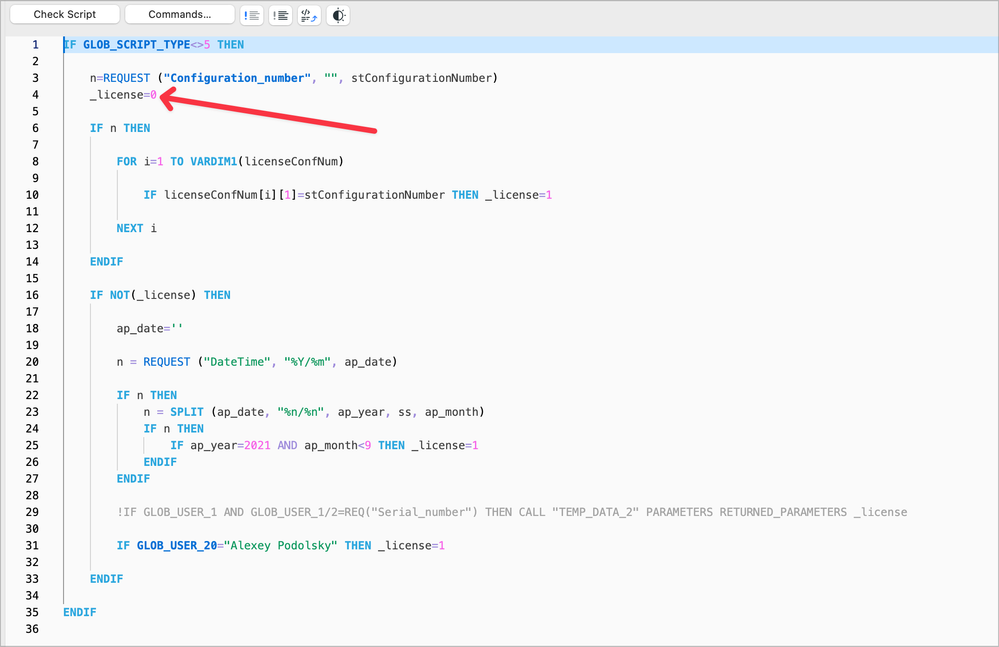
Hi there. I have been asked about how to unlock current library or purchase a full licence. I have stopped to sell licences and in general discontinued work on this library. Everyone who still interested to use this template and library - instruction how to remove licence protection: first extract LCF file (library container file). After extraction search for folder Macros. In this folder there is a file called LICENSE. Open this library part file using password neilsmith. Change Master Script to the line _licence=1
Save change to the file. After modification done - pack everything back to LCF.

ribva
Newcomer
Options
- Mark as New
- Bookmark
- Subscribe
- Mute
- Subscribe to RSS Feed
- Permalink
- Report Inappropriate Content
2023-05-22 12:01 PM
2023-05-22
12:01 PM
Thank you for your generosity! Great job!

alma-nac_adam
Participant
Options
- Mark as New
- Bookmark
- Subscribe
- Mute
- Subscribe to RSS Feed
- Permalink
- Report Inappropriate Content
2023-08-07 06:41 PM
2023-08-07
06:41 PM
Hi Alexey/ All,
Great package of work and really keen to try it out. I've extracted the the files, located LICENSE and opened using the password.
Could anyone clarify/ screenshot a step by step of how to complete the next steps of changing the master script and saving the changes.
Much appreciated!
Adam

Lingwisyer
Guru
Options
- Mark as New
- Bookmark
- Subscribe
- Mute
- Subscribe to RSS Feed
- Permalink
- Report Inappropriate Content
2023-08-08 03:16 AM
2023-08-08
03:16 AM
Just use search to find the parameter "_licence" in the Master Script and change it's value.
| AC22-29 AUS 3200 | Help Those Help You - Add a Signature |
| Self-taught, bend it till it breaks | Creating a Thread |
| Win11 | i9 10850K | 64GB | RX6600 | Win11 | 7800X3D | 32GB | RTX5070TI |

kryha_skresla
Contributor
Options
- Mark as New
- Bookmark
- Subscribe
- Mute
- Subscribe to RSS Feed
- Permalink
- Report Inappropriate Content
2023-09-22 10:03 AM
2023-09-22
10:03 AM
Skillfully work!
I've just shortly read your Manual, and it's looking great. Especially GDL improving — I love it.
Can you add a 3D section screenshot of this detail, too? I'm wondering look at it 🙂

jarla
Participant
Options
- Mark as New
- Bookmark
- Subscribe
- Mute
- Subscribe to RSS Feed
- Permalink
- Report Inappropriate Content
2024-01-09 10:27 AM
2024-01-09
10:27 AM
First of all, let me add my thanks to you @Podolsky for this amazing resource, which definitely ranks as one of the best I have seen on these boards in the 15 or so years since I first joined. Also wishing you the best of health!
For any of those struggling with unlocking the 'LICENSE' file
Assuming that …
- You have managed to extract the library (File > Libraries and Object > Extract a Container…)
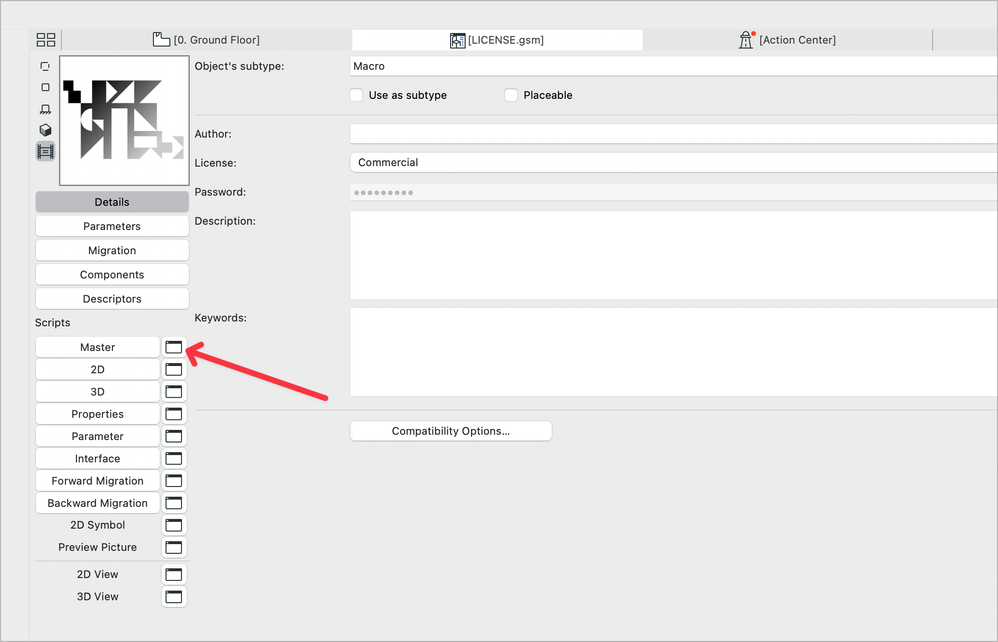
- Located the 'LICENSE' file in the folder called 'Macros'
- Opened the LICENSE file, using the password neilsmith (File > Libraries and Objects > Open Object …)
- Clicked to open the Master script
- … you will then see lots of instances of "_licence", in various forms
- You need to change the one at line 4 from _license=0 to _license=1
- Close and save the 'LICENSE.gsm' file
- Repackage your now-unlocked library (File > Libraries and Objects > Create Container …)
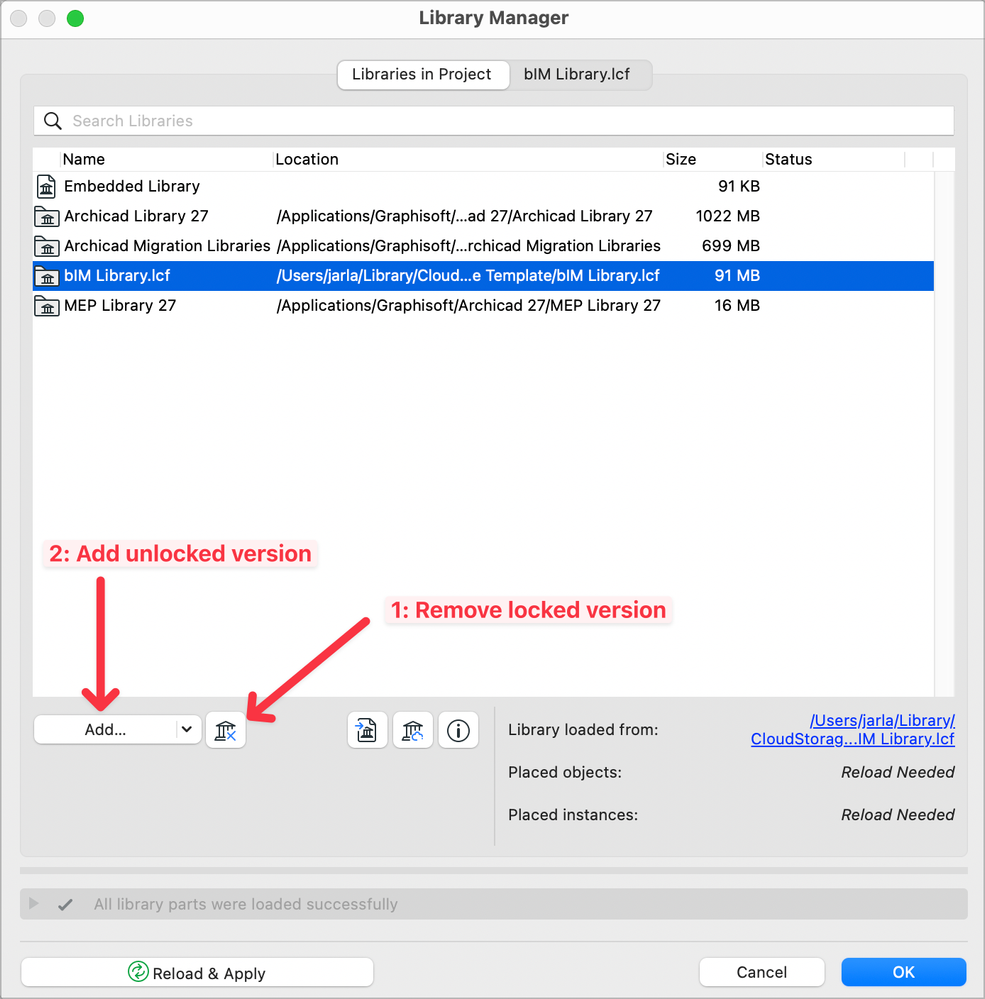
( Like this: https://community.graphisoft.com/t5/Libraries-objects/How-to-create-a-Library-Container-File-LCF/ta-... ) - If you still have the original library loaded, remove it
- Then add the unlocked version of the library
The last thing to do is come back here and thank @Podolsky !
Archicad 27 UKI / MacOS Sonoma
Previously Vectorworks 5 to 2008 / Archicad 12 to 20 / Vectorworks 2019 to 2024
Used to be 'amonle' on these boards back in the day.
Previously Vectorworks 5 to 2008 / Archicad 12 to 20 / Vectorworks 2019 to 2024
Used to be 'amonle' on these boards back in the day.

maboyzana
Contributor
Options
- Mark as New
- Bookmark
- Subscribe
- Mute
- Subscribe to RSS Feed
- Permalink
- Report Inappropriate Content
2024-03-30 02:08 AM
2024-03-30
02:08 AM
Good day @Podolsky and everyone, I am a recent graduate from South Africa and I would like to familiarize myself with the template, can anyone please make a video of the extraction of the license as I am struggling to do it myself,
Thank you in advance

Martin Jules
Mentor
Options
- Mark as New
- Bookmark
- Subscribe
- Mute
- Subscribe to RSS Feed
- Permalink
- Report Inappropriate Content
2024-03-30 04:31 AM
2024-03-30
04:31 AM
For Windows, you can open the manual with Microsoft Word.
Martin Luther Jules
AC 10-29 (Full)
Asus | 64 GB RAM | Windows 11
AC 10-29 (Full)
Asus | 64 GB RAM | Windows 11

Didn't find the answer?
Check other topics in this Forum
Back to ForumRead the latest accepted solutions!
Accepted SolutionsStart a new conversation!

Suggested topics
- Need Archicad Drafting? I Can Help! in General discussions
- How to structure prompts for AI Visualizer in Archicad 30 in AI solutions
- Climate and sunpath objects for analysis presentation in Libraries & objects
- Custom objects become invalid when downgraded from AC29 to 27 in Libraries & objects
- Missing libraries from TEMPLATE file in Libraries & objects
