
Turn on suggestions
Auto-suggest helps you quickly narrow down your search results by suggesting possible matches as you type.
Showing results for
EN
Turn on suggestions
Auto-suggest helps you quickly narrow down your search results by suggesting possible matches as you type.
Showing results for
- English
- :
- Forum
- :
- Project data & BIM
- :
- Re: Building Material Property and string handling...
Options
- Subscribe to RSS Feed
- Mark Topic as New
- Mark Topic as Read
- Pin this post for me
- Bookmark
- Subscribe to Topic
- Mute
- Printer Friendly Page

gdford
Advisor
Options
- Mark as New
- Bookmark
- Subscribe
- Mute
- Subscribe to RSS Feed
- Permalink
- Report Inappropriate Content
2022-09-29
08:21 PM
- last edited on
2025-01-30
10:37 AM
by
 Aruzhan Ilaikova
Building Material Property and string handling expressions
2022-09-29
08:21 PM
I am trying to use an expression to do basic string handling on the Building Material All property
SPLIT(Building Material, "-", 2)
also tried SPLITLEFT & RIGHT
this does not generate an error and it does not work.
Any Thoughts??
Thanks
Gary Ford
Self Employed - Modeling, Estimating, Construction
Archicad 12-26
AMD Ryzen 9 5900X 12-Core Processor
3701 Mhz, 12 Core(s), 24 Logical Processor(s)
(RAM) 128 GB
NVIDIA RTX A2000
Self Employed - Modeling, Estimating, Construction
Archicad 12-26
AMD Ryzen 9 5900X 12-Core Processor
3701 Mhz, 12 Core(s), 24 Logical Processor(s)
(RAM) 128 GB
NVIDIA RTX A2000
Read-Only
Labels:
8 Replies 8

Kevin Lee
Advocate
Options
- Mark as New
- Bookmark
- Subscribe
- Mute
- Subscribe to RSS Feed
- Permalink
- Report Inappropriate Content
2022-09-30 12:34 AM
2022-09-30
12:34 AM
As long as you choose "String" as the data type, shouldn't be a problem
Kevin Lee | Director of Technology | BIM
TZG Architects
ARCHICAD 29 | GDL | Python | Rhino.GH | Solibri | Twinmotion
Certified Graphisoft BIM Manger (2024)
TZG Architects
ARCHICAD 29 | GDL | Python | Rhino.GH | Solibri | Twinmotion
Certified Graphisoft BIM Manger (2024)

J_Tucks
Booster
Options
- Mark as New
- Bookmark
- Subscribe
- Mute
- Subscribe to RSS Feed
- Permalink
- Report Inappropriate Content
2022-09-30 09:40 AM
2022-09-30
09:40 AM
@gdford could it be that your delimeter is set to 2? Meaning that it will split after the second “-“ that it finds? This would be display ‘CCC’ in the following building material: AAA - BBB - CCC.
If you wanted it to display BBB you would need to use SPLIT and set the delimiter to 1, or SPLITLEFT if you wanted AAA.
If it’s neither of the above, perhaps share a screenshot of your property expression and the building material name that you have set.
ARCHICAD 25 - Mac OS Monterey - MacBook Pro 2.3Ghz Quad-Core Intel Core i7 16gb DDR3

kmitotk
Expert
Options
- Mark as New
- Bookmark
- Subscribe
- Mute
- Subscribe to RSS Feed
- Permalink
- Report Inappropriate Content
2022-09-30 01:36 PM
2022-09-30
01:36 PM
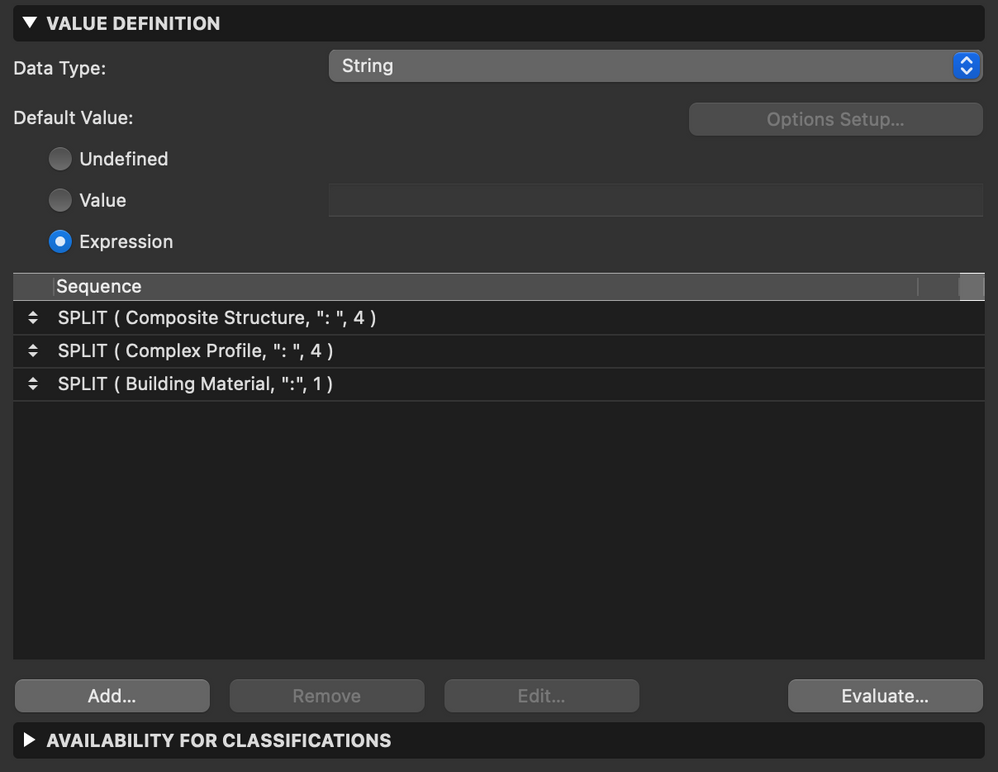
That expression only works with single Building Material elements. If you wanted to split and return a part of all BM names from multiple BM elements such as Composites then there's another way to do it.
Kei Mito
MITO architecture + design
Architect | Graphisoft Certified BIM Manager
ArchiCAD 29 JPN/USA/INT | Windows 11
J_Tucks
Booster
Options
- Mark as New
- Bookmark
- Subscribe
- Mute
- Subscribe to RSS Feed
- Permalink
- Report Inappropriate Content
2022-09-30 02:32 PM
2022-09-30
02:32 PM
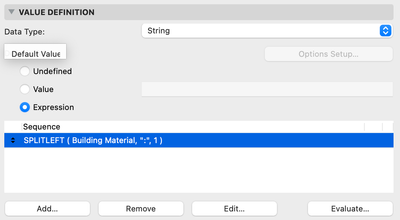
Just by adding the rules as a sequence I assume?
ARCHICAD 25 - Mac OS Monterey - MacBook Pro 2.3Ghz Quad-Core Intel Core i7 16gb DDR3
gdford
Advisor
Options
- Mark as New
- Bookmark
- Subscribe
- Mute
- Subscribe to RSS Feed
- Permalink
- Report Inappropriate Content
2022-09-30 04:34 PM
2022-09-30
04:34 PM
Interesting - I will give that a look see.
Thanks!
Gary Ford
Self Employed - Modeling, Estimating, Construction
Archicad 12-26
AMD Ryzen 9 5900X 12-Core Processor
3701 Mhz, 12 Core(s), 24 Logical Processor(s)
(RAM) 128 GB
NVIDIA RTX A2000
Self Employed - Modeling, Estimating, Construction
Archicad 12-26
AMD Ryzen 9 5900X 12-Core Processor
3701 Mhz, 12 Core(s), 24 Logical Processor(s)
(RAM) 128 GB
NVIDIA RTX A2000
gdford
Advisor
Options
- Mark as New
- Bookmark
- Subscribe
- Mute
- Subscribe to RSS Feed
- Permalink
- Report Inappropriate Content
2022-09-30 04:35 PM
2022-09-30
04:35 PM
yep - I tried setting it to 0, 1, and 2 - none of that works
Gary Ford
Self Employed - Modeling, Estimating, Construction
Archicad 12-26
AMD Ryzen 9 5900X 12-Core Processor
3701 Mhz, 12 Core(s), 24 Logical Processor(s)
(RAM) 128 GB
NVIDIA RTX A2000
Self Employed - Modeling, Estimating, Construction
Archicad 12-26
AMD Ryzen 9 5900X 12-Core Processor
3701 Mhz, 12 Core(s), 24 Logical Processor(s)
(RAM) 128 GB
NVIDIA RTX A2000
gdford
Advisor
Options
- Mark as New
- Bookmark
- Subscribe
- Mute
- Subscribe to RSS Feed
- Permalink
- Report Inappropriate Content
2022-09-30 05:36 PM
2022-09-30
05:36 PM
SPLIT(Building Material ..... does not work - the other examples do work
Gary Ford
Self Employed - Modeling, Estimating, Construction
Archicad 12-26
AMD Ryzen 9 5900X 12-Core Processor
3701 Mhz, 12 Core(s), 24 Logical Processor(s)
(RAM) 128 GB
NVIDIA RTX A2000
Self Employed - Modeling, Estimating, Construction
Archicad 12-26
AMD Ryzen 9 5900X 12-Core Processor
3701 Mhz, 12 Core(s), 24 Logical Processor(s)
(RAM) 128 GB
NVIDIA RTX A2000
kmitotk
Expert
Options
- Mark as New
- Bookmark
- Subscribe
- Mute
- Subscribe to RSS Feed
- Permalink
- Report Inappropriate Content
2022-10-03 03:50 AM - edited 2022-10-03 04:08 AM
2022-10-03
03:50 AM
Your expression [SPLIT(Building Material, "-", 2)] should work only when the element is made of a single building material, otherwise it wouldn't.
Kei Mito
MITO architecture + design
Architect | Graphisoft Certified BIM Manager
ArchiCAD 29 JPN/USA/INT | Windows 11

Didn't find the answer?
Check other topics in this Forum
Back to ForumRead the latest accepted solutions!
Accepted SolutionsStart a new conversation!

Suggested topics
- if else if in expressions in General discussions
- Property Expression Split with " as delimiter in Project data & BIM
- Component Schedule Expression Limitation (Need Help plz) in Project data & BIM
- Component Schedule issue in Project data & BIM
- Expression-based properties not exporting with IFC translator from hotlinked modules. in Project data & BIM
