
Turn on suggestions
Auto-suggest helps you quickly narrow down your search results by suggesting possible matches as you type.
Showing results for
EN
Turn on suggestions
Auto-suggest helps you quickly narrow down your search results by suggesting possible matches as you type.
Showing results for
- English
- :
- Forum
- :
- Project data & BIM
- :
- Re: Can info from Objects / Fills draw on a worksh...
Options
- Subscribe to RSS Feed
- Mark Topic as New
- Mark Topic as Read
- Pin this post for me
- Bookmark
- Subscribe to Topic
- Mute
- Printer Friendly Page

Patrick Hayes
Booster
Options
- Mark as New
- Bookmark
- Subscribe
- Mute
- Subscribe to RSS Feed
- Permalink
- Report Inappropriate Content
2022-11-04
04:57 AM
- last edited on
2025-01-30
12:25 PM
by
 Aruzhan Ilaikova
Can info from Objects / Fills draw on a worksheet be scheduled?
2022-11-04
04:57 AM
Hi all,
I was just wanting to see if anyone had any bright ideas on how to audit elements draw on a Worksheet (or any "workspace" outside of the storey structure really. Schedules seem to only be able to find elements placed in the storey structure of the file.
I haven't dipped into Lists so I'm hoping there may be a solution there.
What we are wanting to do is just a general sweep of our template details to check what library parts are in use and ensure correct fills have been used etc on our worksheets.
Thanks!
Patrick
Associate | Law Architects
Melbourne, Australia
Melbourne, Australia
Solved! Go to Solution.
Solved
Labels:
- Labels:
-
Attributes
-
Templates
16 Replies 16

Barry Kelly
Moderator
Options
- Mark as New
- Bookmark
- Subscribe
- Mute
- Subscribe to RSS Feed
- Permalink
- Report Inappropriate Content
2022-11-08 04:02 AM
2022-11-08
04:02 AM
The old 'List Scheme' can look for fills in elevations and worksheets.
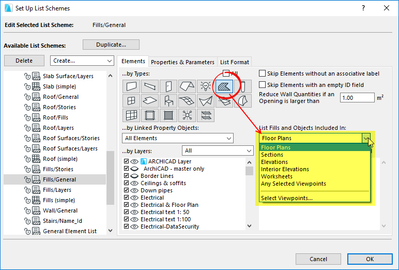
It is so long ago that I used it, that I can't remember how it was all set up.
I can say it does still work, but it is very old and hasn't been supported for some number of years.
New tools like the stairs, rails, openings aren't included.
I am not sure about the updated curtain walls (although I think they are OK), beams and columns.
But fills and objects should work fine still.
I wouldn't be surprised though if this functionality is removed in future versions just to clean up the program.
But that is pure speculation on my part.
Barry.
One of the forum moderators.
Versions 6.5 to 27
i7-10700 @ 2.9Ghz, 32GB ram, GeForce RTX 2060 (6GB), Windows 10
Lenovo Thinkpad - i7-1270P 2.20 GHz, 32GB RAM, Nvidia T550, Windows 11
Versions 6.5 to 27
i7-10700 @ 2.9Ghz, 32GB ram, GeForce RTX 2060 (6GB), Windows 10
Lenovo Thinkpad - i7-1270P 2.20 GHz, 32GB RAM, Nvidia T550, Windows 11
Patrick Hayes
Booster
Options
- Mark as New
- Bookmark
- Subscribe
- Mute
- Subscribe to RSS Feed
- Permalink
- Report Inappropriate Content
2022-11-08 04:43 AM
2022-11-08
04:43 AM
Thanks Barry,
I have never dipped into lists but always assumed they were a potential way to look under the bonnet of a file.
I'm getting some kind of BIMcloud library issue by the looks of things which is stopping me creating a new List Scheme, might have to do a bit more reading into how it's setup.
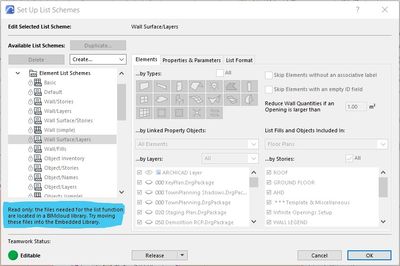
Anyway thanks for pointing me in that direction.
Cheers,
Patrick
Associate | Law Architects
Melbourne, Australia
Melbourne, Australia
Barry Kelly
Moderator
Options
- Mark as New
- Bookmark
- Subscribe
- Mute
- Subscribe to RSS Feed
- Permalink
- Report Inappropriate Content
2022-11-08 05:03 AM
2022-11-08
05:03 AM
The lists were pre-BIMcloud.
The schemes need to be editable so I guess they can't be in the BIMcloud library.
They would need to be in an office library that all users have access to (as mine are - I don't use BIMcloud).
Any amendments made are made to those files in the office library, so all users get the changes with a library re-load.
They could be saved in the Embedded library, but they would only be good for that one file.
Barry.
One of the forum moderators.
Versions 6.5 to 27
i7-10700 @ 2.9Ghz, 32GB ram, GeForce RTX 2060 (6GB), Windows 10
Lenovo Thinkpad - i7-1270P 2.20 GHz, 32GB RAM, Nvidia T550, Windows 11
Versions 6.5 to 27
i7-10700 @ 2.9Ghz, 32GB ram, GeForce RTX 2060 (6GB), Windows 10
Lenovo Thinkpad - i7-1270P 2.20 GHz, 32GB RAM, Nvidia T550, Windows 11
Patrick Hayes
Booster
Options
- Mark as New
- Bookmark
- Subscribe
- Mute
- Subscribe to RSS Feed
- Permalink
- Report Inappropriate Content
2022-11-08 06:16 AM
2022-11-08
06:16 AM
In that case I think you're right about lists being on a cull list somewhere in Graphisoft HQ....
Associate | Law Architects
Melbourne, Australia
Melbourne, Australia

gdford
Advisor
Options
- Mark as New
- Bookmark
- Subscribe
- Mute
- Subscribe to RSS Feed
- Permalink
- Report Inappropriate Content
2022-11-26 02:54 PM
2022-11-26
02:54 PM
You can do exactly what you what to do if you stop using worksheets and start using a series of stories below the project foundation. All you have to do is copy and paste and you can immediately start using schedules to check the work. If you stop using fills and start using zero thickness morphs you will have even more scheduling options because with morphs you can add custom properties and classifications which give you the ability of drill down to a greater level of detail without being trapped with only the fill name and fill ID. If you don't really want this to exist in every model then you can save it out as a hotlike file and then attach it to any project as needed. There is no BIM in worksheets. They are only good for dumb data. I agree it would be sweet if there was a way to focus a schedule to a specific worksheet, but it want happen in our lifetime.
Gary Ford
Self Employed - Modeling, Estimating, Construction
Archicad 12-26
AMD Ryzen 9 5900X 12-Core Processor
3701 Mhz, 12 Core(s), 24 Logical Processor(s)
(RAM) 128 GB
NVIDIA RTX A2000
Self Employed - Modeling, Estimating, Construction
Archicad 12-26
AMD Ryzen 9 5900X 12-Core Processor
3701 Mhz, 12 Core(s), 24 Logical Processor(s)
(RAM) 128 GB
NVIDIA RTX A2000

TaniavH
Advocate
Options
- Mark as New
- Bookmark
- Subscribe
- Mute
- Subscribe to RSS Feed
- Permalink
- Report Inappropriate Content
2026-03-25 07:14 PM
2026-03-25
07:14 PM
We needed to do this today, and I have just tested it (albeit only finding this thread 4 years later) and it does work, but it's a little clunky.
- duplicate an existing element list scheme and name it immediately (it will not let you rename it afterwards - dumb)
- select fills and worksheets per Barry's image above
- by default it wants to use a list template object, but I have yet to find that - so you can use a "Text List"
- also by default it wants to combine fills with the same property so you want to select items in separate rows
- it produces a basic list
I'll add to this once I find the list graphic template...it would be nice to have the ability to format this a little...

TaniavH
Advocate
Options
- Mark as New
- Bookmark
- Subscribe
- Mute
- Subscribe to RSS Feed
- Permalink
- Report Inappropriate Content
2026-03-25 07:18 PM
2026-03-25
07:18 PM
ok looks like the LISTSET.TXT file template has not been around for many versions, but if all you want it the data, I guess you could pretty it up in excel or something...

- « Previous
-
- 1
- 2
- Next »
- « Previous
-
- 1
- 2
- Next »
Didn't find the answer?
Check other topics in this Forum
Back to ForumRead the latest accepted solutions!
Accepted SolutionsStart a new conversation!

Suggested topics
- Some free useful objects: Road signs, parametric pathway, roof crickets, crowds in Libraries & objects
- Detailing | Better methods of 2d drafting, creation of Blocks , Detail Elements , 2d Objects in Documentation
- Classification of the 2d object lost after copy between worksheets/details. in Project data & BIM
- Unable to edit overide in "Ci tools Doors _ Schedule" Object - Door and Window Schedule all Dashed in Libraries & objects
- Grid disappears from Worksheet in Documentation
