
Turn on suggestions
Auto-suggest helps you quickly narrow down your search results by suggesting possible matches as you type.
Showing results for
EN
Turn on suggestions
Auto-suggest helps you quickly narrow down your search results by suggesting possible matches as you type.
Showing results for
- English
- :
- Forum
- :
- Project data & BIM
- :
- Re: Dialog window layers in Archicad 26
Options
- Subscribe to RSS Feed
- Mark Topic as New
- Mark Topic as Read
- Pin this post for me
- Bookmark
- Subscribe to Topic
- Mute
- Printer Friendly Page

_Salmon
Booster
Options
- Mark as New
- Bookmark
- Subscribe
- Mute
- Subscribe to RSS Feed
- Permalink
- Report Inappropriate Content
2022-09-27
01:08 PM
- last edited on
2022-10-04
03:13 PM
by
 Oleksandra Vakariuk
Dialog window layers in Archicad 26
2022-09-27
01:08 PM
Hi,
i've just start to work in Archicad 26 and i'm experiencing something basic but painful stuff.
Until Archicad 25, the layer dialog box was enough big to see the whole name of the layer.
But now, in Archicad 26.. the dialog box is too short!!
How do you see the name of the layer to pick?
placing the cursor over each layer and waiting for the name preview to appear?
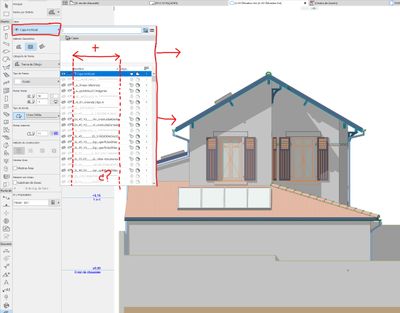
Since AC6
Win10pro / Intel Xeon E5-1650v4 / 128Gb DDR4 2400 MHz ECC REG / NVIDIA GeForce GTX 1080 / SSD Toshiba 512GB M.2
Win10pro / Intel Xeon E5-1650v4 / 128Gb DDR4 2400 MHz ECC REG / NVIDIA GeForce GTX 1080 / SSD Toshiba 512GB M.2
Solved! Go to Solution.
1 Solution
Accepted Solutions

runxel
Moderator
Options
- Mark as New
- Bookmark
- Subscribe
- Mute
- Subscribe to RSS Feed
- Permalink
- Report Inappropriate Content
2022-09-27 01:17 PM
2022-09-27
01:17 PM
Will be fixed in the next update.
Lucas Becker | AC 29 on Mac (Sequoia) | Graphisoft Insider Panelist | Akroter.io – high-end GDL objects | Author of Runxel's Archicad Wiki | Editor at SelfGDL | Developer of the GDL plugin for Sublime Text
My List of AC shortcomings & bugs | I Will Piledrive You If You Mention AI Again |
POSIWID – The Purpose Of a System Is What It Does /// «Furthermore, I consider that Carth... yearly releases must be destroyed»
My List of AC shortcomings & bugs | I Will Piledrive You If You Mention AI Again |
POSIWID – The Purpose Of a System Is What It Does /// «Furthermore, I consider that Carth... yearly releases must be destroyed»
1 Reply 1
runxel
Moderator
Options
- Mark as New
- Bookmark
- Subscribe
- Mute
- Subscribe to RSS Feed
- Permalink
- Report Inappropriate Content
2022-09-27 01:17 PM
2022-09-27
01:17 PM
Will be fixed in the next update.
Lucas Becker | AC 29 on Mac (Sequoia) | Graphisoft Insider Panelist | Akroter.io – high-end GDL objects | Author of Runxel's Archicad Wiki | Editor at SelfGDL | Developer of the GDL plugin for Sublime Text
My List of AC shortcomings & bugs | I Will Piledrive You If You Mention AI Again |
POSIWID – The Purpose Of a System Is What It Does /// «Furthermore, I consider that Carth... yearly releases must be destroyed»
My List of AC shortcomings & bugs | I Will Piledrive You If You Mention AI Again |
POSIWID – The Purpose Of a System Is What It Does /// «Furthermore, I consider that Carth... yearly releases must be destroyed»

Didn't find the answer?
Check other topics in this Forum
Back to ForumRead the latest accepted solutions!
Accepted SolutionsStart a new conversation!

Suggested topics
- Archicad Doors and Windows with IfcOpeningElement in Project data & BIM
- Issues with 3Dconnexxion CadMouse Pro Wireless in Installation & update
- Enscape 4.3 Not Showing in Archicad 29 – Missing Enscape Plugin in Installation & update
- Keynot labels and Quick Layers in Documentation
- Ci Tools Keynotes | Archicad Keynotes | Properties | Attributes in Project data & BIM
