
Turn on suggestions
Auto-suggest helps you quickly narrow down your search results by suggesting possible matches as you type.
Showing results for
EN
Turn on suggestions
Auto-suggest helps you quickly narrow down your search results by suggesting possible matches as you type.
Showing results for
- English
- :
- Forum
- :
- Project data & BIM
- :
- Door Schedule - Frontstore door
Options
- Subscribe to RSS Feed
- Mark Topic as New
- Mark Topic as Read
- Pin this post for me
- Bookmark
- Subscribe to Topic
- Mute
- Printer Friendly Page

Gisele
Advocate
Options
- Mark as New
- Bookmark
- Subscribe
- Mute
- Subscribe to RSS Feed
- Permalink
- Report Inappropriate Content
2023-03-24 03:49 PM
Door Schedule - Frontstore door
2023-03-24
03:49 PM
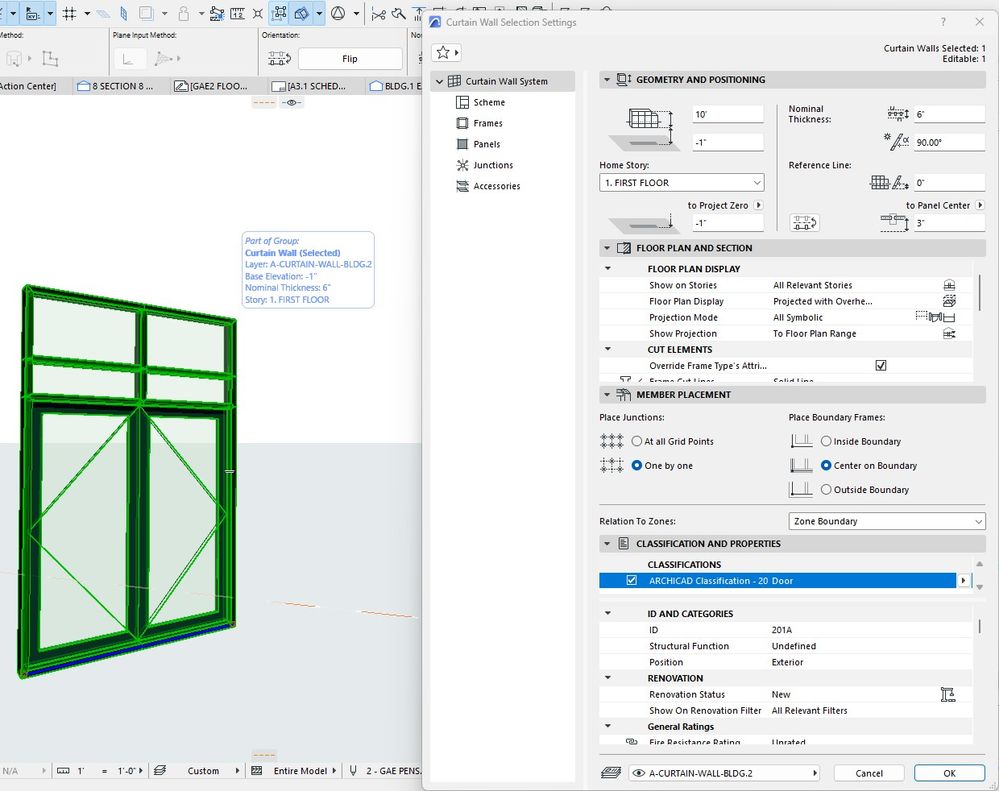
How to make a door that is part of a front store show in the door schedule?
AC 26 - 5002 USA FULL
Win11 Pro 22H2 - 13th Gen Intel(R) Core(TM) i9-13900KF 3.00 GHz - 64 GB - 64-bit operating system, x64-based processor
Win11 Pro 22H2 - 13th Gen Intel(R) Core(TM) i9-13900KF 3.00 GHz - 64 GB - 64-bit operating system, x64-based processor
Solved! Go to Solution.
1 Solution
Accepted Solutions

 Laszlo Nagy
Community Admin
Options
- Mark as New
- Bookmark
- Subscribe
- Mute
- Subscribe to RSS Feed
- Permalink
- Report Inappropriate Content
2023-03-27 11:09 PM
2023-03-27
11:09 PM
Create the Storefront using the Curtain Wall tool, and use the "Curtain Wall Panel - Door" Favorite or similar to place Doors into it.
Make sure the Doors in the Curtain Wall are classified as "Door", just as other Door elements.
Then, in the Door schedule, you should schedule elements that are found in the "Door" branch of the Archicad Classification. Actually, in the INT version, the "IES-03 Door Schedule" Schedule of the default Archicad Template does it that way. You can check out its Criteria for reference.
Loving Archicad since 1995 - Find Archicad Tips at x.com/laszlonagy
AMD Ryzen9 5900X CPU, 64 GB RAM 3600 MHz, Nvidia GTX 1060 6GB, 500 GB NVMe SSD
2x28" (2560x1440), Windows 10 PRO ENG, Ac20-Ac29
AMD Ryzen9 5900X CPU, 64 GB RAM 3600 MHz, Nvidia GTX 1060 6GB, 500 GB NVMe SSD
2x28" (2560x1440), Windows 10 PRO ENG, Ac20-Ac29
2 Replies 2
Laszlo Nagy
Community Admin
Options
- Mark as New
- Bookmark
- Subscribe
- Mute
- Subscribe to RSS Feed
- Permalink
- Report Inappropriate Content
2023-03-27 11:09 PM
2023-03-27
11:09 PM
Create the Storefront using the Curtain Wall tool, and use the "Curtain Wall Panel - Door" Favorite or similar to place Doors into it.
Make sure the Doors in the Curtain Wall are classified as "Door", just as other Door elements.
Then, in the Door schedule, you should schedule elements that are found in the "Door" branch of the Archicad Classification. Actually, in the INT version, the "IES-03 Door Schedule" Schedule of the default Archicad Template does it that way. You can check out its Criteria for reference.
Loving Archicad since 1995 - Find Archicad Tips at x.com/laszlonagy
AMD Ryzen9 5900X CPU, 64 GB RAM 3600 MHz, Nvidia GTX 1060 6GB, 500 GB NVMe SSD
2x28" (2560x1440), Windows 10 PRO ENG, Ac20-Ac29
AMD Ryzen9 5900X CPU, 64 GB RAM 3600 MHz, Nvidia GTX 1060 6GB, 500 GB NVMe SSD
2x28" (2560x1440), Windows 10 PRO ENG, Ac20-Ac29
Gisele
Advocate
Options
- Mark as New
- Bookmark
- Subscribe
- Mute
- Subscribe to RSS Feed
- Permalink
- Report Inappropriate Content
2023-03-27 11:19 PM
2023-03-27
11:19 PM
Thank you.
AC 26 - 5002 USA FULL
Win11 Pro 22H2 - 13th Gen Intel(R) Core(TM) i9-13900KF 3.00 GHz - 64 GB - 64-bit operating system, x64-based processor
Win11 Pro 22H2 - 13th Gen Intel(R) Core(TM) i9-13900KF 3.00 GHz - 64 GB - 64-bit operating system, x64-based processor

Didn't find the answer?
Check other topics in this Forum
Back to ForumRead the latest accepted solutions!
Accepted SolutionsStart a new conversation!

Suggested topics
- Missing elevations of doors when making a door schedule in Documentation
- Replace door thickness on just the door schedule with Expression Editor in Project data & BIM
- Ci Tools Keynotes | Archicad Keynotes | Properties | Attributes in Project data & BIM
- Doors and Windows Schedule Automatic Dimension Button not Responding in Project data & BIM
- Possible wish about locking properties in Project data & BIM
