
Turn on suggestions
Auto-suggest helps you quickly narrow down your search results by suggesting possible matches as you type.
Showing results for
EN
Turn on suggestions
Auto-suggest helps you quickly narrow down your search results by suggesting possible matches as you type.
Showing results for
- English
- :
- Forum
- :
- Project data & BIM
- :
- Re: How do I select & deselect all layers in the l...
Options
- Subscribe to RSS Feed
- Mark Topic as New
- Mark Topic as Read
- Pin this post for me
- Bookmark
- Subscribe to Topic
- Mute
- Printer Friendly Page

yimyammer
Booster
Options
- Mark as New
- Bookmark
- Subscribe
- Mute
- Subscribe to RSS Feed
- Permalink
- Report Inappropriate Content
2022-08-12
03:37 AM
- last edited on
2022-09-22
07:44 PM
by
 Oleksandra Vakariuk
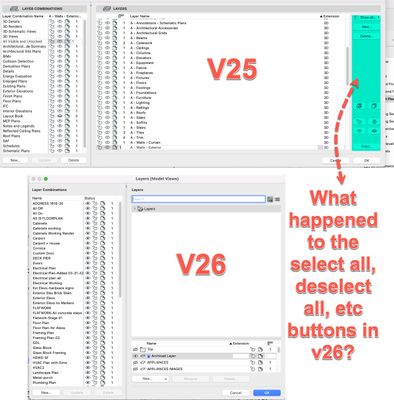
How do I select & deselect all layers in the layer palette in V26?
2022-08-12
03:37 AM
I LOVE the ability to create folders in layers, attributes, etc and have been asking for this for 10+ years
however I cant find the select and deselect all buttons in the new version, where'd they go & how do. we do it in V26?
see attached picture
Solved! Go to Solution.
Solved
Labels:
- Labels:
-
Attributes
3 Solutions
Accepted Solutions

Lee Hankins
Virtuoso
Options
- Mark as New
- Bookmark
- Subscribe
- Mute
- Subscribe to RSS Feed
- Permalink
- Report Inappropriate Content
2022-08-12 07:26 AM
2022-08-12
07:26 AM

Eduardo Rolon
Moderator
Options
- Mark as New
- Bookmark
- Subscribe
- Mute
- Subscribe to RSS Feed
- Permalink
- Report Inappropriate Content
2022-08-13 12:49 AM
2022-08-13
12:49 AM
Also, workflow prior to 26 to select all Layers:
- Open Layers Palette
- Click on Select All
In 26
- Open Layers Palette
- Click on a Layer
- Right click and choose select All
- or CMD+A
---
When it was reported as a Bug they indicated that it was only one more click.
When informed that that was not true then it was placed on "long term backlog".
and then Marketing keeps shouting that 26 purpose is to minimize work for architects.
😡
Eduardo Rolón AIA NCARB
AC29 US/INT -> AC08
AC29 US/INT -> AC08
Mac Studio M4 Max 64GB ram, OS X 10.XX latest

Jeff Thompson
Enthusiast
Options
- Mark as New
- Bookmark
- Subscribe
- Mute
- Subscribe to RSS Feed
- Permalink
- Report Inappropriate Content
2023-06-22 08:37 PM
2023-06-22
08:37 PM
There are a thousand ways to use Archicad, or any program for that matter. I tend to agree with JDux, why remove it, it wasn't hurting anybody. In fact, it helped users. I think it should be noted that there are users of the program with all different levels of expertise. The owner of my company doesn't know every last little thing in Archicad, he just knows just enough to get himself in trouble. When I hear him say, why did they get rid of the "select all" and "deselect all" buttons in the layer dialog box, that's maybe something they shouldn't have messed with or taken out. I showed him the alternate solution, ctrl-a, but he thought it was stupid and hopes that it will be put back in soon. Meaning the next version...hint, hint... All I'm saying is he's the one that pays for the program... Just saying...
Project Manager
Rutledge Maul Architects, PS Inc., Seattle, WA
Windows 11 Pro, HP Pavilion Gaming Desktop 790, Intel(R) Core(TM) i7-8700 CPU @ 3.20GHz 3.19 GHz, 32.0 GB RAM, 64-bit operating system.
Archicad 28 - Graphisoft Forward
Rutledge Maul Architects, PS Inc., Seattle, WA
Windows 11 Pro, HP Pavilion Gaming Desktop 790, Intel(R) Core(TM) i7-8700 CPU @ 3.20GHz 3.19 GHz, 32.0 GB RAM, 64-bit operating system.
Archicad 28 - Graphisoft Forward
17 Replies 17

Barry Kelly
Moderator
Options
- Mark as New
- Bookmark
- Subscribe
- Mute
- Subscribe to RSS Feed
- Permalink
- Report Inappropriate Content
2022-08-12 04:49 AM
2022-08-12
04:49 AM
@yimyammer wrote:
I LOVE the ability to create folders in layers, attributes, etc and have been asking for this for 10+ years
Are you sure about that?
What happens when an attribute (say a layer) can belong to more than one folder?
Which one do you put it in?
Attributes need the ability to belong to more than just one folder.
@yimyammer wrote:
however I cant find the select and deselect all buttons in the new version, where'd they go & how do. we do it in V26?
Funny how you get used to those buttons - even though we never really needed them.
CTRL+A is select all (I am not sure what it is on a Mac).
Then just click a selected layer to unselect all and leave just that layer selected.
Barry.
One of the forum moderators.
Versions 6.5 to 27
i7-10700 @ 2.9Ghz, 32GB ram, GeForce RTX 2060 (6GB), Windows 10
Lenovo Thinkpad - i7-1270P 2.20 GHz, 32GB RAM, Nvidia T550, Windows 11
Versions 6.5 to 27
i7-10700 @ 2.9Ghz, 32GB ram, GeForce RTX 2060 (6GB), Windows 10
Lenovo Thinkpad - i7-1270P 2.20 GHz, 32GB RAM, Nvidia T550, Windows 11
Lee Hankins
Virtuoso
Options
- Mark as New
- Bookmark
- Subscribe
- Mute
- Subscribe to RSS Feed
- Permalink
- Report Inappropriate Content
2022-08-12 07:26 AM
2022-08-12
07:26 AM
It’s cmd+a on a mac. 🙂
Lee Hankins
ArchiCAD 4.5 - Archicad 29
macOS Tahoe (26.0)
ArchiCAD 4.5 - Archicad 29
macOS Tahoe (26.0)

JohnJay
Expert
Options
- Mark as New
- Bookmark
- Subscribe
- Mute
- Subscribe to RSS Feed
- Permalink
- Report Inappropriate Content
2022-08-12 01:54 PM
2022-08-12
01:54 PM
@Barry Kelly wrote:Are you sure about that?
What happens when an attribute (say a layer) can belong to more than one folder?
Which one do you put it in?
Attributes need the ability to belong to more than just one folder.
For me folders are useful when I have variations to consider
1 main folder - used as you would use layers in previous versions of AC
Then as many folders as needed to consider different design ideas...
Is that not the intended use?
AC27 | i7990x | RTX4070 | W10
Barry Kelly
Moderator
Options
- Mark as New
- Bookmark
- Subscribe
- Mute
- Subscribe to RSS Feed
- Permalink
- Report Inappropriate Content
2022-08-12 02:26 PM - edited 2022-08-12 04:28 PM
2022-08-12
02:26 PM
But you can't have attributes in different folders depending on your design options.
An attribute will belong to one folder and that is it.
Consider the layer combinations.
A single layer can be turned on in any number of layer combinations.
That's what we need for folders.
A single attribute (layer for example) can belong to more than one folder.
You have to know where it is to find it, or you just use the list view or search which negates the need of folders anyway.
Of course it all depends on how you structure your folders, but I think it is very limiting if an attribute can only belong to one folder.
Barry.
One of the forum moderators.
Versions 6.5 to 27
i7-10700 @ 2.9Ghz, 32GB ram, GeForce RTX 2060 (6GB), Windows 10
Lenovo Thinkpad - i7-1270P 2.20 GHz, 32GB RAM, Nvidia T550, Windows 11
Versions 6.5 to 27
i7-10700 @ 2.9Ghz, 32GB ram, GeForce RTX 2060 (6GB), Windows 10
Lenovo Thinkpad - i7-1270P 2.20 GHz, 32GB RAM, Nvidia T550, Windows 11
yimyammer
Booster
Options
- Mark as New
- Bookmark
- Subscribe
- Mute
- Subscribe to RSS Feed
- Permalink
- Report Inappropriate Content
2022-08-12 02:42 PM
2022-08-12
02:42 PM
yes I'm sure about it, I'd rather have the problem you mentioned than no folders at all. If its that important, I can duplicate the attribute and put one in each folder
thx for confirming those buttons are gone, wanted to make sure it wasn't some simple setting I was unaware like it typically is in my case

Mahmoud Qenawi
Ace
Options
- Mark as New
- Bookmark
- Subscribe
- Mute
- Subscribe to RSS Feed
- Permalink
- Report Inappropriate Content
2022-08-12 08:13 PM - edited 2022-08-12 08:13 PM
2022-08-12
08:13 PM
Hi @yimyammer, can you tell me why folders while there’re combos? I respect your wish but I only need to know why folders, thx.
AC 29 INT 4006/WIN 11
AMD Ryzen 7 5800H with Radeon Graphics 3.20 GHz 16.0 GB
AMD Ryzen 7 5800H with Radeon Graphics 3.20 GHz 16.0 GB
Eduardo Rolon
Moderator
Options
- Mark as New
- Bookmark
- Subscribe
- Mute
- Subscribe to RSS Feed
- Permalink
- Report Inappropriate Content
2022-08-13 12:49 AM
2022-08-13
12:49 AM
Also, workflow prior to 26 to select all Layers:
- Open Layers Palette
- Click on Select All
In 26
- Open Layers Palette
- Click on a Layer
- Right click and choose select All
- or CMD+A
---
When it was reported as a Bug they indicated that it was only one more click.
When informed that that was not true then it was placed on "long term backlog".
and then Marketing keeps shouting that 26 purpose is to minimize work for architects.
😡
Eduardo Rolón AIA NCARB
AC29 US/INT -> AC08
AC29 US/INT -> AC08
Mac Studio M4 Max 64GB ram, OS X 10.XX latest
yimyammer
Booster
Options
- Mark as New
- Bookmark
- Subscribe
- Mute
- Subscribe to RSS Feed
- Permalink
- Report Inappropriate Content
2022-08-13 01:10 AM - edited 2022-08-13 01:11 AM
2022-08-13
01:10 AM
I use an insane number of layers in order to accomplish a lot of different goals and it becomes tedious to scroll through a list of 200 layers when I can group them into 15 or 20 folders and open and close as needed.
I realize there are some efficiencies I could gain by reducing the number of layers I use and as I further delve into the depths of Archicad I take advantage of whatever I find to reduce the number of layers (like setting one layer for walls and merely classifying the wall as exiting, to be demolished or new).
I am a home builder and CPA that does my own drawings so I probably use the program in ways most architects don't care about. My end goal is to have so many objects and schedules pre-defined with actual cost figures and manufacturers data & pricing that by simply drawing and using these objects and schedules I can see what the entire building cost will be as I draw. This saves me an enormous amount of time doing actual estimates, quantity takeoffs, etc from the plans after the fact.

Rex Maximilian
Mentor
Options
- Mark as New
- Bookmark
- Subscribe
- Mute
- Subscribe to RSS Feed
- Permalink
- Report Inappropriate Content
2022-08-13 04:02 AM
2022-08-13
04:02 AM
At this point, Graphisoft should be paying us all as beta testers, not the other way around... and remember, they "raised" the price of subscription on us.
Rex Maximilian, Honolulu, USA - www.rexmaximilian.com
ArchiCAD 28/29 (user since 3.4, 1991)
16" MacBook Pro; M4 Max (2024), 48GB RAM, 1 TB SSD, 32-Core GPU
Apple Vision Pro w/ BIMx
Creator of the Maximilian ArchiCAD Template System
ArchiCAD 28/29 (user since 3.4, 1991)
16" MacBook Pro; M4 Max (2024), 48GB RAM, 1 TB SSD, 32-Core GPU
Apple Vision Pro w/ BIMx
Creator of the Maximilian ArchiCAD Template System

Didn't find the answer?
Check other topics in this Forum
Back to ForumRead the latest accepted solutions!
Accepted SolutionsStart a new conversation!
Suggested topics
- Using Design Options to control 2D Documentation visibility for different disciplines in Documentation
- Archicad28 slows to beachball when using QuickLayer palette in 3d window on macOS in General discussions
- Layers enhancements in Project data & BIM
- Wishes - Read Only? in Our Community
- BIMx visibility by selections in BIMx
