
Turn on suggestions
Auto-suggest helps you quickly narrow down your search results by suggesting possible matches as you type.
Showing results for
EN
Turn on suggestions
Auto-suggest helps you quickly narrow down your search results by suggesting possible matches as you type.
Showing results for
- English
- :
- Forum
- :
- Project data & BIM
- :
- Re: How do I set up the zone schedule?
Options
- Subscribe to RSS Feed
- Mark Topic as New
- Mark Topic as Read
- Pin this post for me
- Bookmark
- Subscribe to Topic
- Mute
- Printer Friendly Page

LeeJaeYoung
Virtuoso
Options
- Mark as New
- Bookmark
- Subscribe
- Mute
- Subscribe to RSS Feed
- Permalink
- Report Inappropriate Content
2022-10-21 09:06 AM
How do I set up the zone schedule?
2022-10-21
09:06 AM
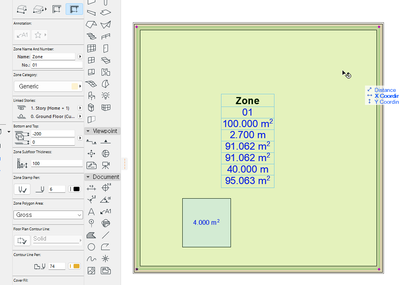
It has an area of 10X10. It is based on the REFERENCE LINE (center of the core), and I am trying to subtract the area with FILL.
But how do I set it up in SCHEDULE?
Measured Area can be used as the area of the wall centerline.
The area of the Fill minus the area cannot be obtained.
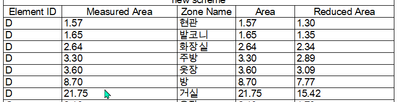
21.7454 - 5.3200 = 16.4254

AC27 on window 11
Solved! Go to Solution.
1 Solution
Accepted Solutions

Barry Kelly
Moderator
Options
- Mark as New
- Bookmark
- Subscribe
- Mute
- Subscribe to RSS Feed
- Permalink
- Report Inappropriate Content
2022-10-21 11:51 AM
2022-10-21
11:51 AM
Because your wall are inside the zone boundary, they will also be deducted from the measured area.
Try a zone with no walls (manual zone).
In that last image where you have shown the zone and you have added a fill, make sure you now 'Update' the zone.
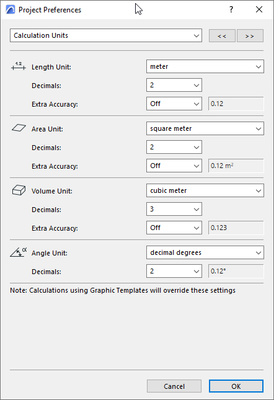
Schedule units are in the 'Calculation' units, not the 'Working' units.
Barry.
One of the forum moderators.
Versions 6.5 to 27
i7-10700 @ 2.9Ghz, 32GB ram, GeForce RTX 2060 (6GB), Windows 10
Lenovo Thinkpad - i7-1270P 2.20 GHz, 32GB RAM, Nvidia T550, Windows 11
Versions 6.5 to 27
i7-10700 @ 2.9Ghz, 32GB ram, GeForce RTX 2060 (6GB), Windows 10
Lenovo Thinkpad - i7-1270P 2.20 GHz, 32GB RAM, Nvidia T550, Windows 11
12 Replies 12
Barry Kelly
Moderator
Options
- Mark as New
- Bookmark
- Subscribe
- Mute
- Subscribe to RSS Feed
- Permalink
- Report Inappropriate Content
2022-10-21 10:54 AM
2022-10-21
10:54 AM
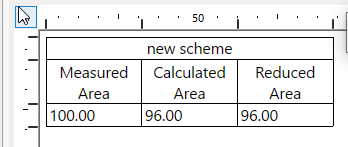
The 'Reduced area' and 'Calculated Area' fields in the schedule should give you the correct values.
It is working for me.
Barry.
One of the forum moderators.
Versions 6.5 to 27
i7-10700 @ 2.9Ghz, 32GB ram, GeForce RTX 2060 (6GB), Windows 10
Lenovo Thinkpad - i7-1270P 2.20 GHz, 32GB RAM, Nvidia T550, Windows 11
Versions 6.5 to 27
i7-10700 @ 2.9Ghz, 32GB ram, GeForce RTX 2060 (6GB), Windows 10
Lenovo Thinkpad - i7-1270P 2.20 GHz, 32GB RAM, Nvidia T550, Windows 11
Barry Kelly
Moderator
Options
- Mark as New
- Bookmark
- Subscribe
- Mute
- Subscribe to RSS Feed
- Permalink
- Report Inappropriate Content
2022-10-21 10:56 AM
2022-10-21
10:56 AM
But because you are taking your zones to the centres of the wall, the reduced and calculated areas are probably being affected by the wall areas as well.
Barry.
One of the forum moderators.
Versions 6.5 to 27
i7-10700 @ 2.9Ghz, 32GB ram, GeForce RTX 2060 (6GB), Windows 10
Lenovo Thinkpad - i7-1270P 2.20 GHz, 32GB RAM, Nvidia T550, Windows 11
Versions 6.5 to 27
i7-10700 @ 2.9Ghz, 32GB ram, GeForce RTX 2060 (6GB), Windows 10
Lenovo Thinkpad - i7-1270P 2.20 GHz, 32GB RAM, Nvidia T550, Windows 11
LeeJaeYoung
Virtuoso
Options
- Mark as New
- Bookmark
- Subscribe
- Mute
- Subscribe to RSS Feed
- Permalink
- Report Inappropriate Content
2022-10-21 11:44 AM
2022-10-21
11:44 AM
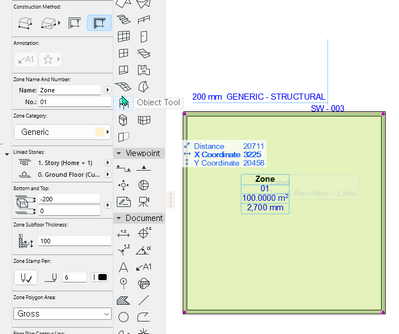



1. 100 - 4 = 96
2. Where is the unit of Schedule specified?
I can't adjust them one by one...
It should not happen suddenly and then change again.
I'd appreciate it if you could tell me exactly which one it is.
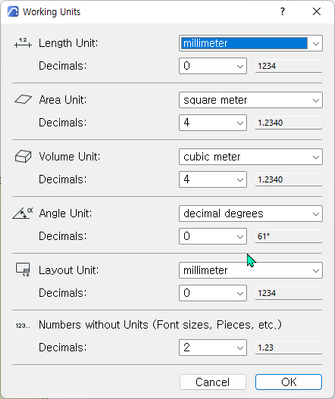
calculate unit
plain millimeter
AC27 on window 11
LeeJaeYoung
Virtuoso
Options
- Mark as New
- Bookmark
- Subscribe
- Mute
- Subscribe to RSS Feed
- Permalink
- Report Inappropriate Content
2022-10-21 11:46 AM
2022-10-21
11:46 AM
can you show me how you did it
AC27 on window 11
Barry Kelly
Moderator
Options
- Mark as New
- Bookmark
- Subscribe
- Mute
- Subscribe to RSS Feed
- Permalink
- Report Inappropriate Content
2022-10-21 11:51 AM
2022-10-21
11:51 AM
Because your wall are inside the zone boundary, they will also be deducted from the measured area.
Try a zone with no walls (manual zone).
In that last image where you have shown the zone and you have added a fill, make sure you now 'Update' the zone.
Schedule units are in the 'Calculation' units, not the 'Working' units.
Barry.
One of the forum moderators.
Versions 6.5 to 27
i7-10700 @ 2.9Ghz, 32GB ram, GeForce RTX 2060 (6GB), Windows 10
Lenovo Thinkpad - i7-1270P 2.20 GHz, 32GB RAM, Nvidia T550, Windows 11
Versions 6.5 to 27
i7-10700 @ 2.9Ghz, 32GB ram, GeForce RTX 2060 (6GB), Windows 10
Lenovo Thinkpad - i7-1270P 2.20 GHz, 32GB RAM, Nvidia T550, Windows 11
Barry Kelly
Moderator
Options
- Mark as New
- Bookmark
- Subscribe
- Mute
- Subscribe to RSS Feed
- Permalink
- Report Inappropriate Content
2022-10-21 11:54 AM
2022-10-21
11:54 AM

Barry.
One of the forum moderators.
Versions 6.5 to 27
i7-10700 @ 2.9Ghz, 32GB ram, GeForce RTX 2060 (6GB), Windows 10
Lenovo Thinkpad - i7-1270P 2.20 GHz, 32GB RAM, Nvidia T550, Windows 11
Versions 6.5 to 27
i7-10700 @ 2.9Ghz, 32GB ram, GeForce RTX 2060 (6GB), Windows 10
Lenovo Thinkpad - i7-1270P 2.20 GHz, 32GB RAM, Nvidia T550, Windows 11
LeeJaeYoung
Virtuoso
Options
- Mark as New
- Bookmark
- Subscribe
- Mute
- Subscribe to RSS Feed
- Permalink
- Report Inappropriate Content
2022-10-21 12:18 PM
2022-10-21
12:18 PM
If I don't have a wall, I can get the same price as you.
However, it should not be calculated based on the wall reference line.
The solution is not to convert.
Because everything is changed to the standard inside the wall, you have to move it back to the center line or draw a new one.
If you turn off the wall, an error is handled, and if you turn it on, the wall becomes a problem in the calculation.
It seems to me that only manual, not automatic, is possible. Is this correct?
AC27 on window 11
LeeJaeYoung
Virtuoso
Options
- Mark as New
- Bookmark
- Subscribe
- Mute
- Subscribe to RSS Feed
- Permalink
- Report Inappropriate Content
2022-10-21 12:32 PM
2022-10-21
12:32 PM
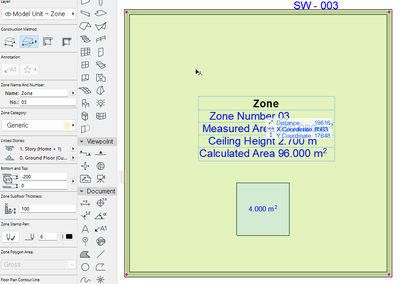
this is the only way
thank you
AC27 on window 11
LeeJaeYoung
Virtuoso
Options
- Mark as New
- Bookmark
- Subscribe
- Mute
- Subscribe to RSS Feed
- Permalink
- Report Inappropriate Content
2022-10-21 12:45 PM
2022-10-21
12:45 PM
Disabling automatics, which will be used most by most people, is the difficult part for me to understand.
AC27 on window 11

Didn't find the answer?
Check other topics in this Forum
Back to ForumRead the latest accepted solutions!
Accepted SolutionsStart a new conversation!

Suggested topics
- automatic sill line in window schedule in Project data & BIM
- Some free useful objects: Road signs, parametric pathway, roof crickets, crowds in Libraries & objects
- Composite wall labels in wall type schedules - please in Documentation
- Surface / Component Schedule Bug: Automatic Column Wrapping Ignores Folded Geometry and Returns Flat in Project data & BIM
- Missing elevations of doors when making a door schedule in Documentation
