
Turn on suggestions
Auto-suggest helps you quickly narrow down your search results by suggesting possible matches as you type.
Showing results for
EN
Turn on suggestions
Auto-suggest helps you quickly narrow down your search results by suggesting possible matches as you type.
Showing results for
- English
- :
- Forum
- :
- Project data & BIM
- :
- How to flip the "2d plan preview" of doors in sche...
Options
- Subscribe to RSS Feed
- Mark Topic as New
- Mark Topic as Read
- Pin this post for me
- Bookmark
- Subscribe to Topic
- Mute
- Printer Friendly Page

ej
Contributor
Options
- Mark as New
- Bookmark
- Subscribe
- Mute
- Subscribe to RSS Feed
- Permalink
- Report Inappropriate Content
2023-10-02 12:29 PM
How to flip the "2d plan preview" of doors in schedules?
2023-10-02
12:29 PM
Hello,
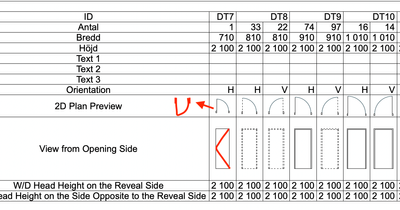
I want to flip the "2d plan preview" of doors in a schedule, thus the floor plan preview would display the hinge on the same side as the "View from opening side", is this possible?
AC 25
macOSmontery (12.3)
Solved! Go to Solution.
1 Solution
Accepted Solutions

Barry Kelly
Moderator
Options
- Mark as New
- Bookmark
- Subscribe
- Mute
- Subscribe to RSS Feed
- Permalink
- Report Inappropriate Content
2023-10-03 03:51 AM
2023-10-03
03:51 AM
@runxel wrote:
Hey Barry, I think it should actually work…
I have no Archicad in front of me right now, but GLOB_PREVIEW_MODE is the thing the OP is looking for. It would give “2” in the IS.
Sure you can do it in GDL, but I didn't want to mention that.
It means ej will have to edit the default library objects (possibly every door and not just a macro?) - I am assuming ej is using default library doors.
Then if ej re-saves the original objects, they will have to go through the same process if there is a library update or for each new version.
Barry.
One of the forum moderators.
Versions 6.5 to 27
i7-10700 @ 2.9Ghz, 32GB ram, GeForce RTX 2060 (6GB), Windows 10
Lenovo Thinkpad - i7-1270P 2.20 GHz, 32GB RAM, Nvidia T550, Windows 11
Versions 6.5 to 27
i7-10700 @ 2.9Ghz, 32GB ram, GeForce RTX 2060 (6GB), Windows 10
Lenovo Thinkpad - i7-1270P 2.20 GHz, 32GB RAM, Nvidia T550, Windows 11
5 Replies 5
Barry Kelly
Moderator
Options
- Mark as New
- Bookmark
- Subscribe
- Mute
- Subscribe to RSS Feed
- Permalink
- Report Inappropriate Content
2023-10-02 01:23 PM
2023-10-02
01:23 PM
The plan view can not be rotated.
It is simply the default 2D view of the door object as it has been scripted with left or right handing.
Barry.
One of the forum moderators.
Versions 6.5 to 27
i7-10700 @ 2.9Ghz, 32GB ram, GeForce RTX 2060 (6GB), Windows 10
Lenovo Thinkpad - i7-1270P 2.20 GHz, 32GB RAM, Nvidia T550, Windows 11
Versions 6.5 to 27
i7-10700 @ 2.9Ghz, 32GB ram, GeForce RTX 2060 (6GB), Windows 10
Lenovo Thinkpad - i7-1270P 2.20 GHz, 32GB RAM, Nvidia T550, Windows 11

runxel
Moderator
Options
- Mark as New
- Bookmark
- Subscribe
- Mute
- Subscribe to RSS Feed
- Permalink
- Report Inappropriate Content
2023-10-02 07:56 PM
2023-10-02
07:56 PM
Hey Barry, I think it should actually work…
I have no Archicad in front of me right now, but GLOB_PREVIEW_MODE is the thing the OP is looking for. It would give “2” in the IS.
«GeometricDescriptionLucas» | Lucas Becker | AC 30 on Mac (Sequoia) | Graphisoft Insider Panelist | Akroter.io – high-end GDL objects | Author of Runxel's Archicad Wiki | Editor at SelfGDL | Developer of the GDL plugin for Sublime Text
My List of AC shortcomings & bugs | I Will Piledrive You If You Mention AI Again |
POSIWID – The Purpose Of a System Is What It Does /// «Furthermore, I consider that Carth... yearly releases must be destroyed»
My List of AC shortcomings & bugs | I Will Piledrive You If You Mention AI Again |
POSIWID – The Purpose Of a System Is What It Does /// «Furthermore, I consider that Carth... yearly releases must be destroyed»
Barry Kelly
Moderator
Options
- Mark as New
- Bookmark
- Subscribe
- Mute
- Subscribe to RSS Feed
- Permalink
- Report Inappropriate Content
2023-10-03 03:51 AM
2023-10-03
03:51 AM
@runxel wrote:
Hey Barry, I think it should actually work…
I have no Archicad in front of me right now, but GLOB_PREVIEW_MODE is the thing the OP is looking for. It would give “2” in the IS.
Sure you can do it in GDL, but I didn't want to mention that.
It means ej will have to edit the default library objects (possibly every door and not just a macro?) - I am assuming ej is using default library doors.
Then if ej re-saves the original objects, they will have to go through the same process if there is a library update or for each new version.
Barry.
One of the forum moderators.
Versions 6.5 to 27
i7-10700 @ 2.9Ghz, 32GB ram, GeForce RTX 2060 (6GB), Windows 10
Lenovo Thinkpad - i7-1270P 2.20 GHz, 32GB RAM, Nvidia T550, Windows 11
Versions 6.5 to 27
i7-10700 @ 2.9Ghz, 32GB ram, GeForce RTX 2060 (6GB), Windows 10
Lenovo Thinkpad - i7-1270P 2.20 GHz, 32GB RAM, Nvidia T550, Windows 11
runxel
Moderator
Options
- Mark as New
- Bookmark
- Subscribe
- Mute
- Subscribe to RSS Feed
- Permalink
- Report Inappropriate Content
2023-10-03 07:12 PM
2023-10-03
07:12 PM
Yeah, you're right. I'm sorry, @Barry Kelly + @ej.
I was somehow under the impression we're talking about GDL programming and ej's own doors..... 🤦🏻♂️ My bad!
So to conclude: It's possible, just not really for the everyday user, sadly.
«GeometricDescriptionLucas» | Lucas Becker | AC 30 on Mac (Sequoia) | Graphisoft Insider Panelist | Akroter.io – high-end GDL objects | Author of Runxel's Archicad Wiki | Editor at SelfGDL | Developer of the GDL plugin for Sublime Text
My List of AC shortcomings & bugs | I Will Piledrive You If You Mention AI Again |
POSIWID – The Purpose Of a System Is What It Does /// «Furthermore, I consider that Carth... yearly releases must be destroyed»
My List of AC shortcomings & bugs | I Will Piledrive You If You Mention AI Again |
POSIWID – The Purpose Of a System Is What It Does /// «Furthermore, I consider that Carth... yearly releases must be destroyed»
ej
Contributor
Options
- Mark as New
- Bookmark
- Subscribe
- Mute
- Subscribe to RSS Feed
- Permalink
- Report Inappropriate Content
2023-10-09 03:52 PM
2023-10-09
03:52 PM
Thanks for the responses!
Yea, im using standard library doors,
its nice to know you can change it but I will not create my own doors for now.
AC 25
macOSmontery (12.3)

Didn't find the answer?
Check other topics in this Forum
Back to ForumRead the latest accepted solutions!
Accepted SolutionsStart a new conversation!

Suggested topics
- ToDo list - Archicad free addon in General discussions
- Concrete column not subtracted from brick wall in Component Volume (Net) Schedule in Project data & BIM
- Editing zones within schedules in Project data & BIM
- After 3 years with Archicad, I'm honestly disappointed in General discussions
- How can I combine model data and schedule totals into one building data summary table? in Project data & BIM
