
Turn on suggestions
Auto-suggest helps you quickly narrow down your search results by suggesting possible matches as you type.
Showing results for
EN
Turn on suggestions
Auto-suggest helps you quickly narrow down your search results by suggesting possible matches as you type.
Showing results for
- English
- :
- Forum
- :
- Project data & BIM
- :
- Re: I'm trying to type it, but it doesn't work. Wh...
Options
- Subscribe to RSS Feed
- Mark Topic as New
- Mark Topic as Read
- Pin this post for me
- Bookmark
- Subscribe to Topic
- Mute
- Printer Friendly Page

LeeJaeYoung
Virtuoso
Options
- Mark as New
- Bookmark
- Subscribe
- Mute
- Subscribe to RSS Feed
- Permalink
- Report Inappropriate Content
2023-03-29 08:03 PM - edited 2023-03-29 08:41 PM
I'm trying to type it, but it doesn't work. What should I do?
2023-03-29
08:03 PM
I'm trying to type it, but it doesn't work. What should I do?
Even if you try to make a selection in 3D, it doesn't work.
What should I do?
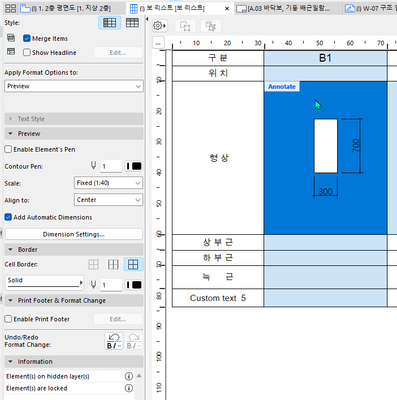
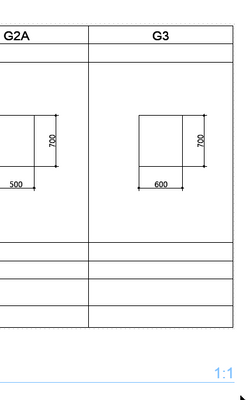
The scale is 1:1
I want to make it 1:40, but what should I do?

AC27 on window 11
Solved! Go to Solution.
1 Solution
Accepted Solutions

Barry Kelly
Moderator
Options
- Mark as New
- Bookmark
- Subscribe
- Mute
- Subscribe to RSS Feed
- Permalink
- Report Inappropriate Content
2023-03-31 09:59 AM - edited 2023-03-31 10:00 AM
2023-03-31
09:59 AM
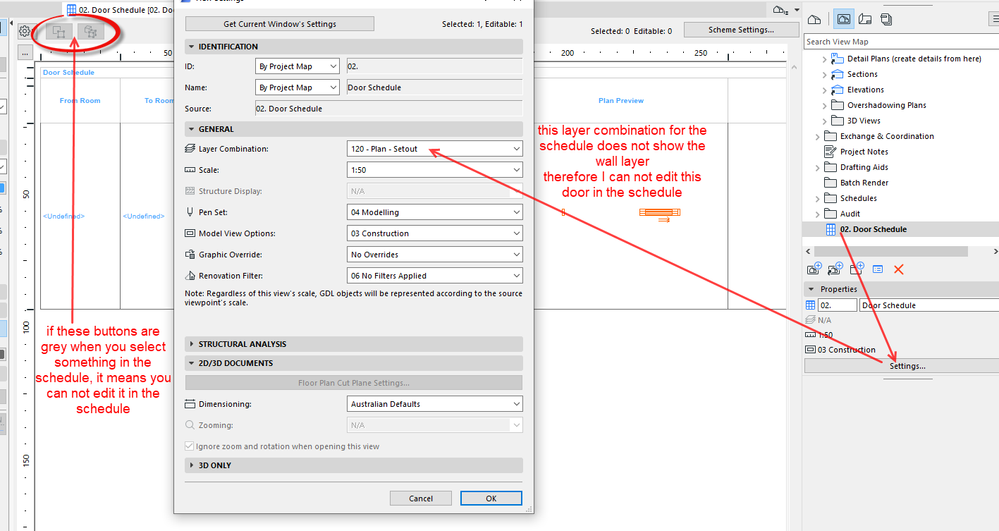
The layer combination you are using for your schedule view, probably does not show the layer your element is on.
You will still see what is scheduled, but you won't be able to edit it.
You can tell that you can't edit it because the buttons to select in plan or 3D are greyed out.
Barry.
One of the forum moderators.
Versions 6.5 to 27
i7-10700 @ 2.9Ghz, 32GB ram, GeForce RTX 2060 (6GB), Windows 10
Lenovo Thinkpad - i7-1270P 2.20 GHz, 32GB RAM, Nvidia T550, Windows 11
Versions 6.5 to 27
i7-10700 @ 2.9Ghz, 32GB ram, GeForce RTX 2060 (6GB), Windows 10
Lenovo Thinkpad - i7-1270P 2.20 GHz, 32GB RAM, Nvidia T550, Windows 11
6 Replies 6

Jeff Griffin
Enthusiast
Options
- Mark as New
- Bookmark
- Subscribe
- Mute
- Subscribe to RSS Feed
- Permalink
- Report Inappropriate Content
2023-03-31 06:40 AM
2023-03-31
06:40 AM
I'll take a shot at your first question by asking you another question. Is the element you are trying to schedule locked, or on a locked layer?
iMac 27 (2020) 3.8 GHz Core i7; 128 GB RAM; Radeon Pro 5700 XT 16 GB GPU (macOS Sequoia)
MacBook Pro M1 Max; 64 GB RAM; 10CPU/32GPU cores (macOS Sequoia)
ArchiCAD 29/28/27 USA Full (back when Full used to mean Full) (latest builds). User since AC12 (2008).
MacBook Pro M1 Max; 64 GB RAM; 10CPU/32GPU cores (macOS Sequoia)
ArchiCAD 29/28/27 USA Full (back when Full used to mean Full) (latest builds). User since AC12 (2008).
LeeJaeYoung
Virtuoso
Options
- Mark as New
- Bookmark
- Subscribe
- Mute
- Subscribe to RSS Feed
- Permalink
- Report Inappropriate Content
2023-03-31 07:25 AM
2023-03-31
07:25 AM
1. Where do you mean it is locked?
What can I see to solve it?
AC27 on window 11
Barry Kelly
Moderator
Options
- Mark as New
- Bookmark
- Subscribe
- Mute
- Subscribe to RSS Feed
- Permalink
- Report Inappropriate Content
2023-03-31 09:59 AM - edited 2023-03-31 10:00 AM
2023-03-31
09:59 AM
The layer combination you are using for your schedule view, probably does not show the layer your element is on.
You will still see what is scheduled, but you won't be able to edit it.
You can tell that you can't edit it because the buttons to select in plan or 3D are greyed out.
Barry.
One of the forum moderators.
Versions 6.5 to 27
i7-10700 @ 2.9Ghz, 32GB ram, GeForce RTX 2060 (6GB), Windows 10
Lenovo Thinkpad - i7-1270P 2.20 GHz, 32GB RAM, Nvidia T550, Windows 11
Versions 6.5 to 27
i7-10700 @ 2.9Ghz, 32GB ram, GeForce RTX 2060 (6GB), Windows 10
Lenovo Thinkpad - i7-1270P 2.20 GHz, 32GB RAM, Nvidia T550, Windows 11
Jeff Griffin
Enthusiast
Options
- Mark as New
- Bookmark
- Subscribe
- Mute
- Subscribe to RSS Feed
- Permalink
- Report Inappropriate Content
2023-03-31 11:18 AM
2023-03-31
11:18 AM
Elements could be locked two ways that I'm aware of.
1.) Layer Manager
2.) Edit > Locking > Lock
iMac 27 (2020) 3.8 GHz Core i7; 128 GB RAM; Radeon Pro 5700 XT 16 GB GPU (macOS Sequoia)
MacBook Pro M1 Max; 64 GB RAM; 10CPU/32GPU cores (macOS Sequoia)
ArchiCAD 29/28/27 USA Full (back when Full used to mean Full) (latest builds). User since AC12 (2008).
MacBook Pro M1 Max; 64 GB RAM; 10CPU/32GPU cores (macOS Sequoia)
ArchiCAD 29/28/27 USA Full (back when Full used to mean Full) (latest builds). User since AC12 (2008).
LeeJaeYoung
Virtuoso
Options
- Mark as New
- Bookmark
- Subscribe
- Mute
- Subscribe to RSS Feed
- Permalink
- Report Inappropriate Content
2023-03-31 11:33 AM
2023-03-31
11:33 AM
thank you Today too ^^
I knew that hardships made me grow more.
I found out that the layers in the schedule can have an effect like this.
AC27 on window 11
LeeJaeYoung
Virtuoso
Options
- Mark as New
- Bookmark
- Subscribe
- Mute
- Subscribe to RSS Feed
- Permalink
- Report Inappropriate Content
2023-03-31
11:37 AM
- last edited on
2023-04-04
01:30 PM
by
 Laszlo Nagy
2023-03-31
11:37 AM
thank you
In my case, I had a problem with the layer combination, and thanks to Barry's advice, I understood how to set the pen thickness and hatch change in the schedule.
AC27 on window 11

Didn't find the answer?
Check other topics in this Forum
Back to ForumRead the latest accepted solutions!
Accepted SolutionsStart a new conversation!

