
Turn on suggestions
Auto-suggest helps you quickly narrow down your search results by suggesting possible matches as you type.
Showing results for
EN
Turn on suggestions
Auto-suggest helps you quickly narrow down your search results by suggesting possible matches as you type.
Showing results for
- English
- :
- Forum
- :
- Project data & BIM
- :
- I want to make a schedule for the curtain wall.
Options
- Subscribe to RSS Feed
- Mark Topic as New
- Mark Topic as Read
- Pin this post for me
- Bookmark
- Subscribe to Topic
- Mute
- Printer Friendly Page

LeeJaeYoung
Virtuoso
Options
- Mark as New
- Bookmark
- Subscribe
- Mute
- Subscribe to RSS Feed
- Permalink
- Report Inappropriate Content
2022-09-25
08:29 PM
- last edited on
2023-05-19
11:48 PM
by
 Gordana Radonic
I want to make a schedule for the curtain wall.
2022-09-25
08:29 PM
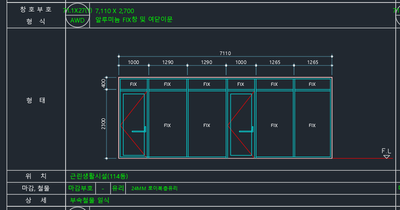
I am trying to make a door like this.
1. Is it possible in windows?
2. It didn't work, so I made a curtain wall.
However, I would like to have it come out on the same schedule as above.
What should I do?
AC27 on window 11
Solved! Go to Solution.
1 Solution
Accepted Solutions

ryejuan
Advisor
Options
- Mark as New
- Bookmark
- Subscribe
- Mute
- Subscribe to RSS Feed
- Permalink
- Report Inappropriate Content
2022-09-26 12:07 PM - edited 2022-09-26 12:16 PM
2022-09-26
12:07 PM
can share you the basics of it.
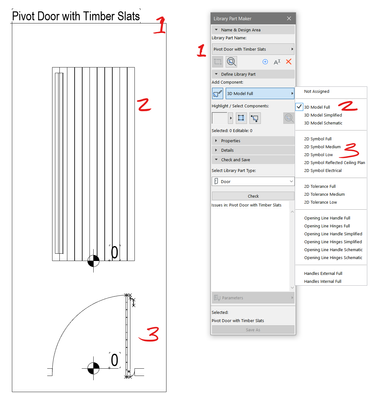
1. you create a label of the type of door or window you want then all the elements within the box is what will be exported 3d and 2d.
2. select and identify all your 3d elements. (make sure your level markers are aligned in both 2d and 3d)
3. select and identify your 2d symbols. (make sure your level markers are aligned in both 2d and 3d)
select the library part type then save as. Hope it helps you.
In the end what is your Objective? ArchiCAD 9 onwards
CPU: i9-14900K @ 3.2Ghz; GPU: GeForce RTX 5080 super (16GB); SSD: XPG GAMMIX S70 1TB; RAM: 64GB @ 4200MT/s.
WINDOWS 11 PRO
CPU: i9-14900K @ 3.2Ghz; GPU: GeForce RTX 5080 super (16GB); SSD: XPG GAMMIX S70 1TB; RAM: 64GB @ 4200MT/s.
WINDOWS 11 PRO
8 Replies 8
ryejuan
Advisor
Options
- Mark as New
- Bookmark
- Subscribe
- Mute
- Subscribe to RSS Feed
- Permalink
- Report Inappropriate Content
2022-09-26 05:17 AM
2022-09-26
05:17 AM
I think the best way is to use LMP if you really want to schedule it this way.
In the end what is your Objective? ArchiCAD 9 onwards
CPU: i9-14900K @ 3.2Ghz; GPU: GeForce RTX 5080 super (16GB); SSD: XPG GAMMIX S70 1TB; RAM: 64GB @ 4200MT/s.
WINDOWS 11 PRO
CPU: i9-14900K @ 3.2Ghz; GPU: GeForce RTX 5080 super (16GB); SSD: XPG GAMMIX S70 1TB; RAM: 64GB @ 4200MT/s.
WINDOWS 11 PRO
LeeJaeYoung
Virtuoso
Options
- Mark as New
- Bookmark
- Subscribe
- Mute
- Subscribe to RSS Feed
- Permalink
- Report Inappropriate Content
2022-09-26
05:34 AM
- last edited on
2022-09-27
08:04 PM
by
Laszlo Nagy
2022-09-26
05:34 AM
Are you sure you are not talking about Library Part Maker?
AC27 on window 11
ryejuan
Advisor
Options
- Mark as New
- Bookmark
- Subscribe
- Mute
- Subscribe to RSS Feed
- Permalink
- Report Inappropriate Content
2022-09-26 05:36 AM
2022-09-26
05:36 AM
Yes, I am talking about the library part maker.
In the end what is your Objective? ArchiCAD 9 onwards
CPU: i9-14900K @ 3.2Ghz; GPU: GeForce RTX 5080 super (16GB); SSD: XPG GAMMIX S70 1TB; RAM: 64GB @ 4200MT/s.
WINDOWS 11 PRO
CPU: i9-14900K @ 3.2Ghz; GPU: GeForce RTX 5080 super (16GB); SSD: XPG GAMMIX S70 1TB; RAM: 64GB @ 4200MT/s.
WINDOWS 11 PRO
LeeJaeYoung
Virtuoso
Options
- Mark as New
- Bookmark
- Subscribe
- Mute
- Subscribe to RSS Feed
- Permalink
- Report Inappropriate Content
2022-09-26 10:14 AM
2022-09-26
10:14 AM
I'm trying to study, but I can't find a video tutorial. How should I approach it?
The documentation doesn't make sense. ^^
AC27 on window 11
ryejuan
Advisor
Options
- Mark as New
- Bookmark
- Subscribe
- Mute
- Subscribe to RSS Feed
- Permalink
- Report Inappropriate Content
2022-09-26 12:07 PM - edited 2022-09-26 12:16 PM
2022-09-26
12:07 PM
can share you the basics of it.
1. you create a label of the type of door or window you want then all the elements within the box is what will be exported 3d and 2d.
2. select and identify all your 3d elements. (make sure your level markers are aligned in both 2d and 3d)
3. select and identify your 2d symbols. (make sure your level markers are aligned in both 2d and 3d)
select the library part type then save as. Hope it helps you.
In the end what is your Objective? ArchiCAD 9 onwards
CPU: i9-14900K @ 3.2Ghz; GPU: GeForce RTX 5080 super (16GB); SSD: XPG GAMMIX S70 1TB; RAM: 64GB @ 4200MT/s.
WINDOWS 11 PRO
CPU: i9-14900K @ 3.2Ghz; GPU: GeForce RTX 5080 super (16GB); SSD: XPG GAMMIX S70 1TB; RAM: 64GB @ 4200MT/s.
WINDOWS 11 PRO
LeeJaeYoung
Virtuoso
Options
- Mark as New
- Bookmark
- Subscribe
- Mute
- Subscribe to RSS Feed
- Permalink
- Report Inappropriate Content
2022-09-26 01:58 PM
2022-09-26
01:58 PM
1. What is number 2 made of?
2. How do you tell the difference between the door and the door frame in No. 2?
Aww glass ^^
3. What was number 3 made of? Line, pline, filll
4. If you increase the size like door 25, does the size of the door frame not change and the width of the door is adjusted? The custom door is relatively large and has to be made every time...
AC27 on window 11
ryejuan
Advisor
Options
- Mark as New
- Bookmark
- Subscribe
- Mute
- Subscribe to RSS Feed
- Permalink
- Report Inappropriate Content
2022-09-26 03:09 PM
2022-09-26
03:09 PM
1. --- You are modeling in a plan view, number 2 is made of slabs then you assign the depth of it and materials.
2. --- You model and assign materials to it, can be slab or morph (I totally find it easy to control slabs unless got complicated design then go for morph)
3. --- Number 3 is made of lines, fills all the 2d elements.
4. ---- I haven't come across where you can edit the size of the door or frame in a parametric way like GDL, basically I save a copy of "Door & Windows LMP" then every time I need to do modifications I load that pln file.
In the end what is your Objective? ArchiCAD 9 onwards
CPU: i9-14900K @ 3.2Ghz; GPU: GeForce RTX 5080 super (16GB); SSD: XPG GAMMIX S70 1TB; RAM: 64GB @ 4200MT/s.
WINDOWS 11 PRO
CPU: i9-14900K @ 3.2Ghz; GPU: GeForce RTX 5080 super (16GB); SSD: XPG GAMMIX S70 1TB; RAM: 64GB @ 4200MT/s.
WINDOWS 11 PRO
LeeJaeYoung
Virtuoso
Options
- Mark as New
- Bookmark
- Subscribe
- Mute
- Subscribe to RSS Feed
- Permalink
- Report Inappropriate Content
2022-09-26 03:43 PM
2022-09-26
03:43 PM
I understand with your advice.
I understood it as custom window < LPM < GDL.
AC27 on window 11

Didn't find the answer?
Check other topics in this Forum
Back to ForumRead the latest accepted solutions!
Accepted SolutionsStart a new conversation!

Suggested topics
- New to Archicad - how to use Curtain Wall on an S-shape in Modeling
- Composite wall labels in wall type schedules - please in Documentation
- Surface / Component Schedule Bug: Automatic Column Wrapping Ignores Folded Geometry and Returns Flat in Project data & BIM
- Angled Beam End Cut in Plan View in Modeling
- Railing and Curtain Wall in Modeling
