
Turn on suggestions
Auto-suggest helps you quickly narrow down your search results by suggesting possible matches as you type.
Showing results for
EN
Turn on suggestions
Auto-suggest helps you quickly narrow down your search results by suggesting possible matches as you type.
Showing results for
- English
- :
- Forum
- :
- Project data & BIM
- :
- Re: Revision ID
Options
- Subscribe to RSS Feed
- Mark Topic as New
- Mark Topic as Read
- Pin this post for me
- Bookmark
- Subscribe to Topic
- Mute
- Printer Friendly Page

apeksha311
Participant
Options
- Mark as New
- Bookmark
- Subscribe
- Mute
- Subscribe to RSS Feed
- Permalink
- Report Inappropriate Content
2022-09-28
06:31 PM
- last edited on
2023-05-20
12:11 AM
by
 Gordana Radonic
Revision ID
2022-09-28
06:31 PM
I created a duplicate view on a separate sheet. The first image shows the correct revision bubbles. But when I duplicated the same exact view in another sheet the revision ID change completely.
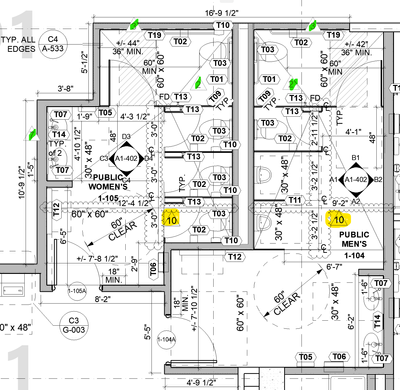
This is the numbers that should show up as revision IDs for its respective bubbles.
Now, this is the clip when I duplicate it to another layout
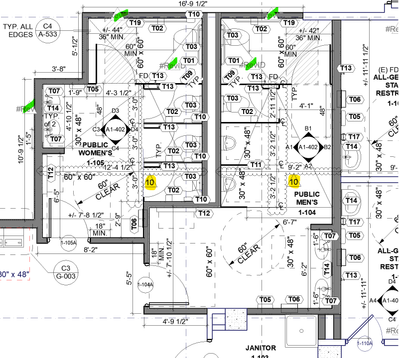
Thank you.
Labels:
- Labels:
-
Revision Management
3 Replies 3

DGSketcher
Legend
Options
- Mark as New
- Bookmark
- Subscribe
- Mute
- Subscribe to RSS Feed
- Permalink
- Report Inappropriate Content
2022-09-28 06:51 PM
2022-09-28
06:51 PM
Assuming the marks are still Change Markers and haven't been exploded in the other layout then you just need to select each one and relink it to the relevant revision. The corrupt marks were probably "Source" references, you now need the new duplicates to be "Linked"
Apple iMac Intel i9 / macOS Sonoma / AC27UKI (most recent builds.. if they work)
apeksha311
Participant
Options
- Mark as New
- Bookmark
- Subscribe
- Mute
- Subscribe to RSS Feed
- Permalink
- Report Inappropriate Content
2022-09-28 06:59 PM
2022-09-28
06:59 PM
These change markers are not in layout they are in model space. So yes they are not exploded and they are linked to the right transmittal set.
The bubbles are sourcing revision ID information and not change ID marker number.

danielleL
Contributor
Options
- Mark as New
- Bookmark
- Subscribe
- Mute
- Subscribe to RSS Feed
- Permalink
- Report Inappropriate Content
2022-12-02 10:40 AM
2022-12-02
10:40 AM
Hi,
You can go to Transmittal Set Details dialog box for the current Transmittal Set, the'Create New Revision in all Included Layouts' is always checked for a project's first Transmittal Set. This will assign a new revision ID for every layout you've added regardless if it doesn't contain any changes. Uncheck this setting and I hope it works.
---------
ArchiCAD 18-26 | Twinmotion 2022
Mac Mini (M1, 2020) | macOS Monterey | Apple M1
HP Victus | Windows 11 | 16.0 GB RAM | AMD Ryzen 7 5800H with Radeon Graphics 3.20 GHz
ArchiCAD 18-26 | Twinmotion 2022
Mac Mini (M1, 2020) | macOS Monterey | Apple M1
HP Victus | Windows 11 | 16.0 GB RAM | AMD Ryzen 7 5800H with Radeon Graphics 3.20 GHz

Didn't find the answer?
Check other topics in this Forum
Back to ForumRead the latest accepted solutions!
Accepted SolutionsStart a new conversation!

