
Turn on suggestions
Auto-suggest helps you quickly narrow down your search results by suggesting possible matches as you type.
Showing results for
EN
Turn on suggestions
Auto-suggest helps you quickly narrow down your search results by suggesting possible matches as you type.
Showing results for
- English
- :
- Forum
- :
- Project data & BIM
- :
- Wall buildup type change in associative way instea...
Options
- Subscribe to RSS Feed
- Mark Topic as New
- Mark Topic as Read
- Pin this post for me
- Bookmark
- Subscribe to Topic
- Mute
- Printer Friendly Page

cs_ryl
Booster
Options
- Mark as New
- Bookmark
- Subscribe
- Mute
- Subscribe to RSS Feed
- Permalink
- Report Inappropriate Content
2022-05-13
02:25 AM
- last edited on
2025-01-14
09:26 PM
by
 Laszlo Nagy
Wall buildup type change in associative way instead of independently
2022-05-13
02:25 AM
Hi All,
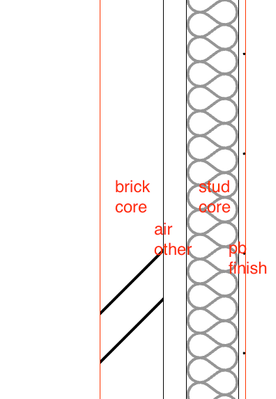
I've encountered an issue where a composite wall profile has Brick+Air+Stud+Interior Finish in it. When I change the Type of the Brick to Core, the Air also changes with it, and when I change the Air Type to Other, then Stud follows the change too.
This is very strange as somehow it's behaving in an associated manner which isn't what I want. See screenshot below:

Anyone has come across this issue and knows how to resolve it? Cheers!
AC23 AUSTRALIA
MacBook Pro M1 2020 8GB Memory | macOS Monterey 12.3.1
MacBook Pro M1 2020 8GB Memory | macOS Monterey 12.3.1
Solved! Go to Solution.
1 Solution
Accepted Solutions

Barry Kelly
Moderator
Options
- Mark as New
- Bookmark
- Subscribe
- Mute
- Subscribe to RSS Feed
- Permalink
- Report Inappropriate Content
2022-05-13 03:15 AM
2022-05-13
03:15 AM
They are all dependent on each other, and they have a hierarchy - 'core', 'other' then 'finish'.
When you have multiple skins, you can surround a 'core' with 'other' or 'finish', but you can't have 'other' of 'finish' surrounded by 'cores'.
Everything between 2 'core' skins must be 'cores'.
Everything between 2 'other' skins must be 'core' or 'other' - you can not have a 'finish' on the inside of a wall.
You can have what ever you like between 2 'finishes' so long as the 'cores' are inside the 'others'.
So basically 'finish' can only be on the outside (you can have as many 'finish' skins as you want ('finish' next to 'finish' is fine).
Then 'other' skins can be inside the 'finish' skins and 'core' must be inside them all.
I look at it that the 'core' is the strongest skin, then 'other' and 'finish' is the weakest.
The weaker skins can not go between any stronger skins.
I hope that is clearer than mud.🤣
Barry.
One of the forum moderators.
Versions 6.5 to 27
i7-10700 @ 2.9Ghz, 32GB ram, GeForce RTX 2060 (6GB), Windows 10
Lenovo Thinkpad - i7-1270P 2.20 GHz, 32GB RAM, Nvidia T550, Windows 11
Versions 6.5 to 27
i7-10700 @ 2.9Ghz, 32GB ram, GeForce RTX 2060 (6GB), Windows 10
Lenovo Thinkpad - i7-1270P 2.20 GHz, 32GB RAM, Nvidia T550, Windows 11
Solution
12 Replies 12
Barry Kelly
Moderator
Options
- Mark as New
- Bookmark
- Subscribe
- Mute
- Subscribe to RSS Feed
- Permalink
- Report Inappropriate Content
2022-05-13 03:15 AM
2022-05-13
03:15 AM
They are all dependent on each other, and they have a hierarchy - 'core', 'other' then 'finish'.
When you have multiple skins, you can surround a 'core' with 'other' or 'finish', but you can't have 'other' of 'finish' surrounded by 'cores'.
Everything between 2 'core' skins must be 'cores'.
Everything between 2 'other' skins must be 'core' or 'other' - you can not have a 'finish' on the inside of a wall.
You can have what ever you like between 2 'finishes' so long as the 'cores' are inside the 'others'.
So basically 'finish' can only be on the outside (you can have as many 'finish' skins as you want ('finish' next to 'finish' is fine).
Then 'other' skins can be inside the 'finish' skins and 'core' must be inside them all.
I look at it that the 'core' is the strongest skin, then 'other' and 'finish' is the weakest.
The weaker skins can not go between any stronger skins.
I hope that is clearer than mud.🤣
Barry.
One of the forum moderators.
Versions 6.5 to 27
i7-10700 @ 2.9Ghz, 32GB ram, GeForce RTX 2060 (6GB), Windows 10
Lenovo Thinkpad - i7-1270P 2.20 GHz, 32GB RAM, Nvidia T550, Windows 11
Versions 6.5 to 27
i7-10700 @ 2.9Ghz, 32GB ram, GeForce RTX 2060 (6GB), Windows 10
Lenovo Thinkpad - i7-1270P 2.20 GHz, 32GB RAM, Nvidia T550, Windows 11
Solution

Lingwisyer
Guru
Options
- Mark as New
- Bookmark
- Subscribe
- Mute
- Subscribe to RSS Feed
- Permalink
- Report Inappropriate Content
2022-05-13 03:33 AM
2022-05-13
03:33 AM
As AC sees it, all your cavity wall spaces are Core, which is not very intuitive...
| AC22-29 AUS 3200 | Help Those Help You - Add a Signature |
| Self-taught, bend it till it breaks | Creating a Thread |
| Win11 | i9 10850K | 64GB | RX6600 | Win11 | 7800X3D | 32GB | RTX5070TI |
cs_ryl
Booster
Options
- Mark as New
- Bookmark
- Subscribe
- Mute
- Subscribe to RSS Feed
- Permalink
- Report Inappropriate Content
2022-05-13 05:01 AM
2022-05-13
05:01 AM
Very interesting - first time I heard of this (though I'm fairly new to AC)!
I assume that only applies to composite walls then, as in the complex profile it can be setup as intended in my description earlier i.e. weak skin can be inside cores. See below screenshot as an example:
So does it mean that in order to set things up the way I intend them to be, I will have to convert all composite profiles to complex? This doesn't sound very convenient if at all. Is there another work around?
AC23 AUSTRALIA
MacBook Pro M1 2020 8GB Memory | macOS Monterey 12.3.1
MacBook Pro M1 2020 8GB Memory | macOS Monterey 12.3.1
cs_ryl
Booster
Options
- Mark as New
- Bookmark
- Subscribe
- Mute
- Subscribe to RSS Feed
- Permalink
- Report Inappropriate Content
2022-05-13 05:01 AM
2022-05-13
05:01 AM
I know! not very helpful...
AC23 AUSTRALIA
MacBook Pro M1 2020 8GB Memory | macOS Monterey 12.3.1
MacBook Pro M1 2020 8GB Memory | macOS Monterey 12.3.1
cs_ryl
Booster
Options
- Mark as New
- Bookmark
- Subscribe
- Mute
- Subscribe to RSS Feed
- Permalink
- Report Inappropriate Content
2022-05-13 05:11 AM
2022-05-13
05:11 AM
to follow up further - the idea or drawing I'm trying to create is a slab setout drawing with core only walls showing above at 50% transparent to give a bit more context. In this instance we'd like to show both the external brick walls as well as stud framings, esp. when slab edges are set to the face of stud frames.
AC23 AUSTRALIA
MacBook Pro M1 2020 8GB Memory | macOS Monterey 12.3.1
MacBook Pro M1 2020 8GB Memory | macOS Monterey 12.3.1
Barry Kelly
Moderator
Options
- Mark as New
- Bookmark
- Subscribe
- Mute
- Subscribe to RSS Feed
- Permalink
- Report Inappropriate Content
2022-05-13 05:57 AM
2022-05-13
05:57 AM
What is wrong with the cavity being a core?
If it is an empty fill and transparent material, you won't see it anywhere.
All of my cavities are cores and I have never come across any issues.
In fact my cavity (or air space) is one of my strongest building materials, as generally I never want it breached by any other construction.
So I consider it a 'core' element of my wall.
Otherwise I guess you will have to use complex profiles as you discovered.
As they can be any shape (not just flat skins next to each other) you can set any fill as core, other or finish.
Barry.
One of the forum moderators.
Versions 6.5 to 27
i7-10700 @ 2.9Ghz, 32GB ram, GeForce RTX 2060 (6GB), Windows 10
Lenovo Thinkpad - i7-1270P 2.20 GHz, 32GB RAM, Nvidia T550, Windows 11
Versions 6.5 to 27
i7-10700 @ 2.9Ghz, 32GB ram, GeForce RTX 2060 (6GB), Windows 10
Lenovo Thinkpad - i7-1270P 2.20 GHz, 32GB RAM, Nvidia T550, Windows 11
cs_ryl
Booster
Options
- Mark as New
- Bookmark
- Subscribe
- Mute
- Subscribe to RSS Feed
- Permalink
- Report Inappropriate Content
2022-05-13 06:02 AM - edited 2022-05-13 06:03 AM
2022-05-13
06:02 AM
Fair enough @Barry Kelly. I suppose I wanted the plan to have that clear distinction of what's being "hatched" in grey can be labelled as "cores", and that cavity in this instance will just be "thin air". A bit like what's working with the complex profile below (slab edge location is to be updated)

AC23 AUSTRALIA
MacBook Pro M1 2020 8GB Memory | macOS Monterey 12.3.1
MacBook Pro M1 2020 8GB Memory | macOS Monterey 12.3.1
Barry Kelly
Moderator
Options
- Mark as New
- Bookmark
- Subscribe
- Mute
- Subscribe to RSS Feed
- Permalink
- Report Inappropriate Content
2022-05-13 06:13 AM
2022-05-13
06:13 AM
I have never had the need to label anything as 'core'.
Nor 'other' or 'finish' come to that.
None of that will affect schedules.
Barry.
One of the forum moderators.
Versions 6.5 to 27
i7-10700 @ 2.9Ghz, 32GB ram, GeForce RTX 2060 (6GB), Windows 10
Lenovo Thinkpad - i7-1270P 2.20 GHz, 32GB RAM, Nvidia T550, Windows 11
Versions 6.5 to 27
i7-10700 @ 2.9Ghz, 32GB ram, GeForce RTX 2060 (6GB), Windows 10
Lenovo Thinkpad - i7-1270P 2.20 GHz, 32GB RAM, Nvidia T550, Windows 11
cs_ryl
Booster
Options
- Mark as New
- Bookmark
- Subscribe
- Mute
- Subscribe to RSS Feed
- Permalink
- Report Inappropriate Content
2022-05-13 06:18 AM - edited 2022-05-13 06:28 AM
2022-05-13
06:18 AM
It will not affect schedule - just graphically I wanted to have that distinction
AC23 AUSTRALIA
MacBook Pro M1 2020 8GB Memory | macOS Monterey 12.3.1
MacBook Pro M1 2020 8GB Memory | macOS Monterey 12.3.1

Didn't find the answer?
Check other topics in this Forum
Back to ForumRead the latest accepted solutions!
Accepted SolutionsStart a new conversation!

Suggested topics
- Window with adjustable frame extensions (jamb) and automatic insulation return – AC29 / GDL in Modeling
- Zones for Massing Model and for Space Planning in Documentation
- Architect Vacancy - Dubai Based - ELE Interior Design - Archicad essential. in General discussions
- Railing Tool: "Change Associative Segments/Nodes to Static" in Modeling
- Modeling Historic Door Details in Libraries & objects
