
Turn on suggestions
Auto-suggest helps you quickly narrow down your search results by suggesting possible matches as you type.
Showing results for
EN
Turn on suggestions
Auto-suggest helps you quickly narrow down your search results by suggesting possible matches as you type.
Showing results for
- English
- :
- Forum
- :
- Teamwork & BIMcloud
- :
- BIMcloud Basic Library question
Options
- Subscribe to RSS Feed
- Mark Topic as New
- Mark Topic as Read
- Pin this post for me
- Bookmark
- Subscribe to Topic
- Mute
- Printer Friendly Page

tranobago
Participant
Options
- Mark as New
- Bookmark
- Subscribe
- Mute
- Subscribe to RSS Feed
- Permalink
- Report Inappropriate Content
2023-12-01 10:51 AM
BIMcloud Basic Library question
2023-12-01
10:51 AM
I'm working on some standards for my office and I created some materials with textures but I can't figure out how to upload these to a running BIM server in our office.
I have a specific detail library hosted on the server. I could delete it and upload the updated one with said materials but that seems complicated.
1 Reply 1

Dave Seabury
Expert
Options
- Mark as New
- Bookmark
- Subscribe
- Mute
- Subscribe to RSS Feed
- Permalink
- Report Inappropriate Content
2023-12-01 04:12 PM
2023-12-01
04:12 PM
Tranobago
On your server let's assume that you have a folder "Office Library" that
was up loaded from a project or directly from an office computer. open this
folder and add the new materials then
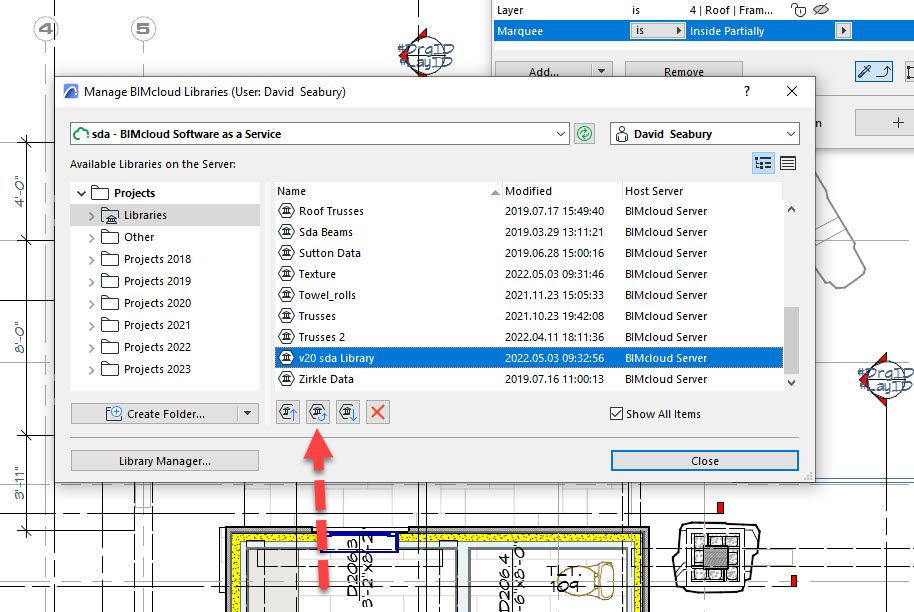
Libraries and Objects > Manage BIMcloud Libraries... Update BIMcloud Library with local copy
This will update the server library, when you are done, you will be prompted to reload the library
in your current project.
David
AC 19-26 Windows 10 64 bit, Dell Prercision 7820, Xeon Silver 2414R ( 12 Cores), 64 GB Ram, Quadro RTX 4000 8GB

Didn't find the answer?
Check other topics in this Forum
Back to ForumRead the latest accepted solutions!
Accepted SolutionsStart a new conversation!

Suggested topics
- Welcome to our AI Solutions forum | Guidelines for participating in AI solutions
- Linking and Managing Office Custom Libraries in Libraries & objects
- FAIL: New Libpack Concept in Libraries & objects
- Missng libraries in Teamwork with education license in Teamwork & BIMcloud
- Wall reference line location and Reference GDL door in Grasshopper in Parametric design
