
Turn on suggestions
Auto-suggest helps you quickly narrow down your search results by suggesting possible matches as you type.
Showing results for
EN
Turn on suggestions
Auto-suggest helps you quickly narrow down your search results by suggesting possible matches as you type.
Showing results for
- English
- :
- Forum
- :
- Visualization
- :
- surface material not applied to rendering
Options
- Subscribe to RSS Feed
- Mark Topic as New
- Mark Topic as Read
- Pin this post for me
- Bookmark
- Subscribe to Topic
- Mute
- Printer Friendly Page

Anonymous
Not applicable
Options
- Mark as New
- Bookmark
- Subscribe
- Mute
- Subscribe to RSS Feed
- Permalink
- Report Inappropriate Content
2021-06-24
03:49 AM
- last edited on
2023-05-26
02:54 PM
by
 Rubia Torres
surface material not applied to rendering
2021-06-24
03:49 AM
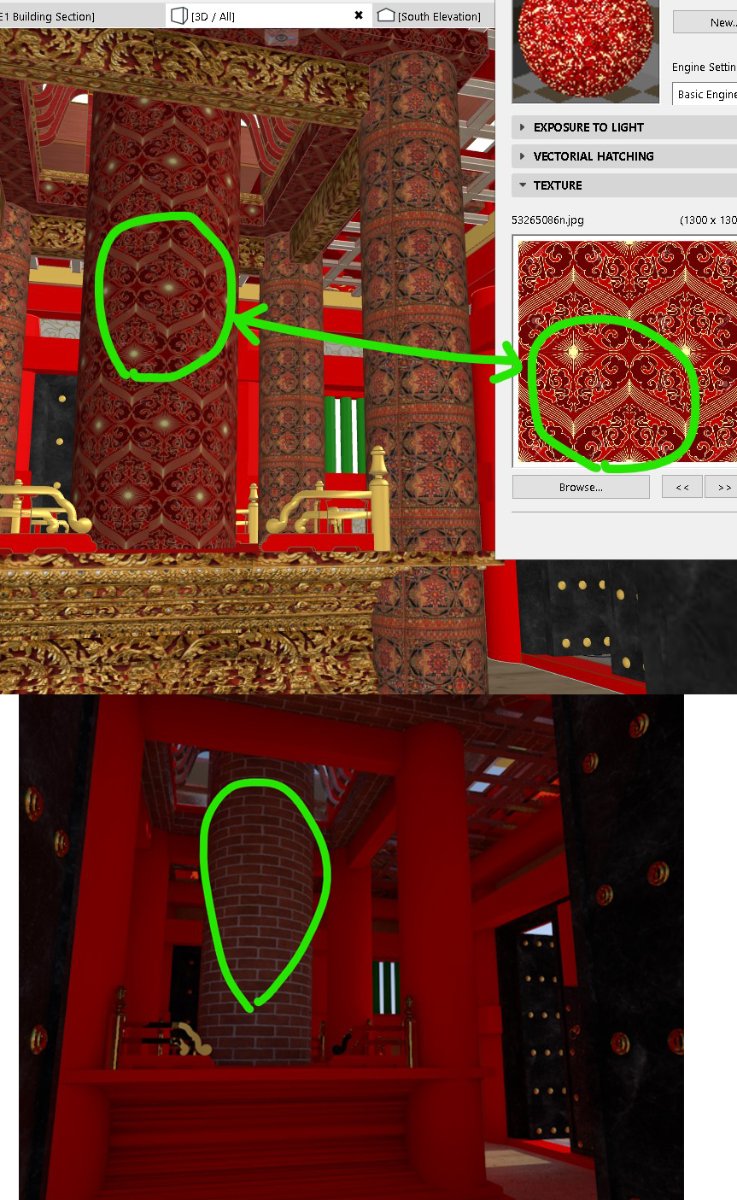
I used external jpg texture as surface naterial, but they are unable to appear in the rendering.
Please advice
Solved! Go to Solution.

1 Solution
Accepted Solutions

Barry Kelly
Moderator
Options
- Mark as New
- Bookmark
- Subscribe
- Mute
- Subscribe to RSS Feed
- Permalink
- Report Inappropriate Content
2021-06-24 04:49 AM
2021-06-24
04:49 AM
The surface material you see in Archicad, is set in the OpenGL (Internal or Basic Engine) of the surface setting.
When you render you are probably using Cinerender?
You need to alter the Cinerender surface settings to be what you want - they use 2 completely different settings.
There is a button to 'Match' the OpenGL settings if you don't want to change them manually, but you may get ordinary results as it will just create a basic material match.
There are many advanced settings in Cinerender to make the surfaces look much better.
Barry.
When you render you are probably using Cinerender?
You need to alter the Cinerender surface settings to be what you want - they use 2 completely different settings.
There is a button to 'Match' the OpenGL settings if you don't want to change them manually, but you may get ordinary results as it will just create a basic material match.
There are many advanced settings in Cinerender to make the surfaces look much better.
Barry.
One of the forum moderators.
Versions 6.5 to 27
i7-10700 @ 2.9Ghz, 32GB ram, GeForce RTX 2060 (6GB), Windows 10
Lenovo Thinkpad - i7-1270P 2.20 GHz, 32GB RAM, Nvidia T550, Windows 11
Versions 6.5 to 27
i7-10700 @ 2.9Ghz, 32GB ram, GeForce RTX 2060 (6GB), Windows 10
Lenovo Thinkpad - i7-1270P 2.20 GHz, 32GB RAM, Nvidia T550, Windows 11
Solution
2 Replies 2
Barry Kelly
Moderator
Options
- Mark as New
- Bookmark
- Subscribe
- Mute
- Subscribe to RSS Feed
- Permalink
- Report Inappropriate Content
2021-06-24 04:49 AM
2021-06-24
04:49 AM
The surface material you see in Archicad, is set in the OpenGL (Internal or Basic Engine) of the surface setting.
When you render you are probably using Cinerender?
You need to alter the Cinerender surface settings to be what you want - they use 2 completely different settings.
There is a button to 'Match' the OpenGL settings if you don't want to change them manually, but you may get ordinary results as it will just create a basic material match.
There are many advanced settings in Cinerender to make the surfaces look much better.
Barry.
When you render you are probably using Cinerender?
You need to alter the Cinerender surface settings to be what you want - they use 2 completely different settings.
There is a button to 'Match' the OpenGL settings if you don't want to change them manually, but you may get ordinary results as it will just create a basic material match.
There are many advanced settings in Cinerender to make the surfaces look much better.
Barry.
One of the forum moderators.
Versions 6.5 to 27
i7-10700 @ 2.9Ghz, 32GB ram, GeForce RTX 2060 (6GB), Windows 10
Lenovo Thinkpad - i7-1270P 2.20 GHz, 32GB RAM, Nvidia T550, Windows 11
Versions 6.5 to 27
i7-10700 @ 2.9Ghz, 32GB ram, GeForce RTX 2060 (6GB), Windows 10
Lenovo Thinkpad - i7-1270P 2.20 GHz, 32GB RAM, Nvidia T550, Windows 11
Solution
Anonymous
Not applicable
Options
- Mark as New
- Bookmark
- Subscribe
- Mute
- Subscribe to RSS Feed
- Permalink
- Report Inappropriate Content
2021-06-24 05:05 AM
2021-06-24
05:05 AM
OK Thanks Barry
Didn't find the answer?
Check other topics in this Forum
Back to ForumRead the latest accepted solutions!
Accepted SolutionsStart a new conversation!

Suggested topics
- solid element operatin failing in Modeling
- Component Schedule Expression Limitation (Need Help plz) in Project data & BIM
- Silpu Render for Archicad: photoreal AI renders from your live view, in about a minute (free to try) in General discussions
- Archicad 29 regression - Complex Profile fill orientation bug has returned in Modeling
- Why Does My Surface Appear Half Dark After Applying It to the Model? in Modeling
