I think that if we could separate the layers of a single wall into different layers, as in VectorWorks for example, there would be no need for this. The problem is that we have to create several walls in order to manage certain visibility settings.
Although others have said similar things to what I am going to say, I'd rather say it anyway.
No, I don't think separating layers of walls would be the best solution. It might work, but would not follow construction methodology. Most Architects tend to think same as the builder. First we build a wall, then we put a cladding or or any other cover on it. Model them as separate layers, but wish to have the option to link the separate components as and when necessary. (Once upon a time there was an idea to build parent-child relationships between elements, but it died...)
It is just more natural to model things in the order they are built, rather than model a very complex wall with all added layers and the peel it back like an onion.
If we wanted to do so, we could use the complex profiles with a series of modifiers, but let's be honest, that is just way too complicated.
In summary, please do not make Archicad more complicated than it already is. Most people are happy to gasp the idea of turning layers on and off. everything else is just added complexity.
Unless the parent-child idea can be fully developed, making doors/windows behave like Openings would do a great job.
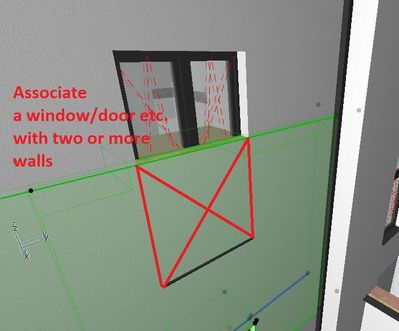
The issue at hand here isn't about seperating anything, it is about the ability to connect a door/window to more than one wall in Z-direction. It is about solving issues with windows that go beyond the story they are modeled in (as in split-level for instance).
The current need to add an extra opening only to make the 2D plan show what is being build, doesn't add up. It is prone for mistakes as moving the windows on the home story doesn't make the opening on the other stories follow it automatically.
Walls that span multiple stories don't have the option of symbolic cut. If your wall is outside the floor plan range, it becomes invisible in bottom or top story. I have this situation in a project and there is no way to have all 3 conditions simultaneous with just 1 wall object: floor plan display in all floors, windows/doors visible in corresponding stories, wall is offset from story level outside the floor plan range. A refinement of the display logic would be nice 😉
And remember you can overlay plan views in the layouts, so if there is a wall above or below a storey, it is possible to show it by overlaying a view of the wall from another storey.
I am not saying it is a perfect solution and you may need to set up layer combinations so you can isolate just the walls you want.
@Barry Kelly mostly in models with multiple buildings with different story levels. this particular project has 3 buildings with the same story structure but different story heights and refence levels.


 Submitted