
Turn on suggestions
Auto-suggest helps you quickly narrow down your search results by suggesting possible matches as you type.
Showing results for
EN
Turn on suggestions
Auto-suggest helps you quickly narrow down your search results by suggesting possible matches as you type.
Showing results for
- English
- :
- Forum
- :
- Documentation
- :
- Add a custom property to the Zones Classifications...
Options
- Subscribe to RSS Feed
- Mark Topic as New
- Mark Topic as Read
- Pin this post for me
- Bookmark
- Subscribe to Topic
- Mute
- Printer Friendly Page

Gisele
Advocate
Options
- Mark as New
- Bookmark
- Subscribe
- Mute
- Subscribe to RSS Feed
- Permalink
- Report Inappropriate Content
2023-09-22 04:46 PM
Add a custom property to the Zones Classifications and Properties?
2023-09-22
04:46 PM
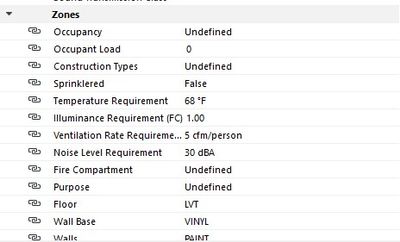
How to add a custom property to the Zones' Classifications and Properties?
AC 26 - 5002 USA FULL
Win11 Pro 22H2 - 13th Gen Intel(R) Core(TM) i9-13900KF 3.00 GHz - 64 GB - 64-bit operating system, x64-based processor
Win11 Pro 22H2 - 13th Gen Intel(R) Core(TM) i9-13900KF 3.00 GHz - 64 GB - 64-bit operating system, x64-based processor
Solved! Go to Solution.
2 Solutions
Accepted Solutions

Dave Seabury
Expert
Options
- Mark as New
- Bookmark
- Subscribe
- Mute
- Subscribe to RSS Feed
- Permalink
- Report Inappropriate Content
2023-09-22 07:11 PM
2023-09-22
07:11 PM
Gisele
Right click on the "Zones" title, New Property
David
AC 19-26 Windows 10 64 bit, Dell Prercision 7820, Xeon Silver 2414R ( 12 Cores), 64 GB Ram, Quadro RTX 4000 8GB
Dave Seabury
Expert
Options
- Mark as New
- Bookmark
- Subscribe
- Mute
- Subscribe to RSS Feed
- Permalink
- Report Inappropriate Content
2023-09-22 09:54 PM
2023-09-22
09:54 PM
See attached
AC 19-26 Windows 10 64 bit, Dell Prercision 7820, Xeon Silver 2414R ( 12 Cores), 64 GB Ram, Quadro RTX 4000 8GB
4 Replies 4
Dave Seabury
Expert
Options
- Mark as New
- Bookmark
- Subscribe
- Mute
- Subscribe to RSS Feed
- Permalink
- Report Inappropriate Content
2023-09-22 07:11 PM
2023-09-22
07:11 PM
Gisele
Right click on the "Zones" title, New Property
David
AC 19-26 Windows 10 64 bit, Dell Prercision 7820, Xeon Silver 2414R ( 12 Cores), 64 GB Ram, Quadro RTX 4000 8GB
Gisele
Advocate
Options
- Mark as New
- Bookmark
- Subscribe
- Mute
- Subscribe to RSS Feed
- Permalink
- Report Inappropriate Content
2023-09-22 09:37 PM
2023-09-22
09:37 PM
David,
The default Zones tool has 15 properties under Classification and Properties. I want to add a custom property that I will call Main Area.
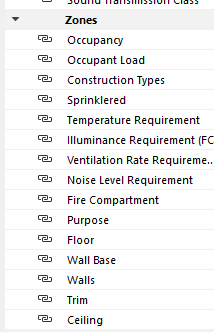
AC 26 - 5002 USA FULL
Win11 Pro 22H2 - 13th Gen Intel(R) Core(TM) i9-13900KF 3.00 GHz - 64 GB - 64-bit operating system, x64-based processor
Win11 Pro 22H2 - 13th Gen Intel(R) Core(TM) i9-13900KF 3.00 GHz - 64 GB - 64-bit operating system, x64-based processor
Dave Seabury
Expert
Options
- Mark as New
- Bookmark
- Subscribe
- Mute
- Subscribe to RSS Feed
- Permalink
- Report Inappropriate Content
2023-09-22 09:54 PM
Gisele
Advocate
Options
- Mark as New
- Bookmark
- Subscribe
- Mute
- Subscribe to RSS Feed
- Permalink
- Report Inappropriate Content
2023-09-22 10:56 PM - edited 2023-09-22 11:02 PM
2023-09-22
10:56 PM
Thx!
AC 26 - 5002 USA FULL
Win11 Pro 22H2 - 13th Gen Intel(R) Core(TM) i9-13900KF 3.00 GHz - 64 GB - 64-bit operating system, x64-based processor
Win11 Pro 22H2 - 13th Gen Intel(R) Core(TM) i9-13900KF 3.00 GHz - 64 GB - 64-bit operating system, x64-based processor

Still looking?

Suggested topics
- Properties: Trailing Zeros in Documentation
- Add-on to automatically track/stamp elements with Teamwork user + date/time + create/reserve/edit in Teamwork & BIMcloud
- Ci Tools Keynotes | Archicad Keynotes | Properties | Attributes in Project data & BIM
- Property Expression Split with " as delimiter in Project data & BIM
- Possible wish about locking properties in Project data & BIM
