
Turn on suggestions
Auto-suggest helps you quickly narrow down your search results by suggesting possible matches as you type.
Showing results for
EN
Turn on suggestions
Auto-suggest helps you quickly narrow down your search results by suggesting possible matches as you type.
Showing results for
- English
- :
- Forum
- :
- Documentation
- :
- Re: Archicad narrows the fonts
Options
- Subscribe to RSS Feed
- Mark Topic as New
- Mark Topic as Read
- Pin this post for me
- Bookmark
- Subscribe to Topic
- Mute
- Printer Friendly Page

olga_kots
Contributor
Options
- Mark as New
- Bookmark
- Subscribe
- Mute
- Subscribe to RSS Feed
- Permalink
- Report Inappropriate Content
2022-05-28
04:50 PM
- last edited on
2022-09-28
01:15 PM
by
 Oleksandra Vakariuk
Archicad narrows the fonts
2022-05-28
04:50 PM
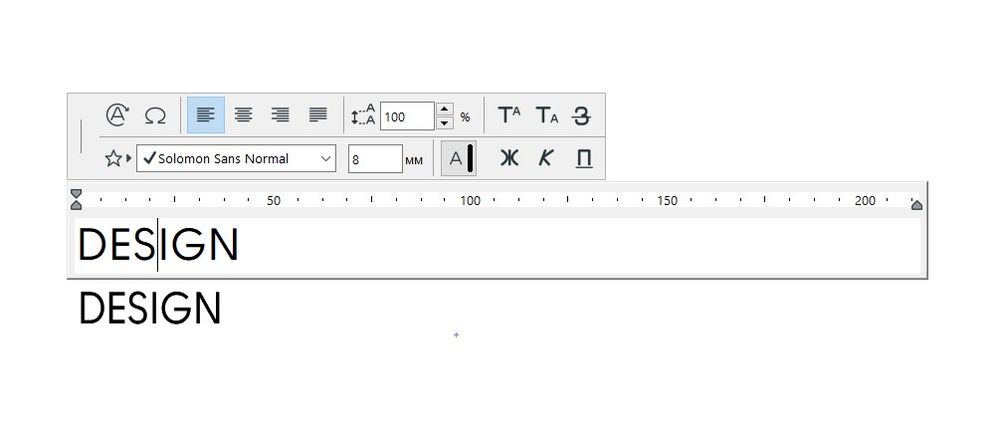
I does the same thing with all fonts, even the standart ones as ARIAL.
On the screenshot here I show how the same font looks while typing and after closing the typing box.
I've tried the monitor resizing to 100%.
Please help.
OLGA_KOTLYAROVA
Solved! Go to Solution.
1 Solution
Accepted Solutions

David Maudlin
Rockstar
Options
- Mark as New
- Bookmark
- Subscribe
- Mute
- Subscribe to RSS Feed
- Permalink
- Report Inappropriate Content
2022-05-29 12:51 PM
2022-05-29
12:51 PM
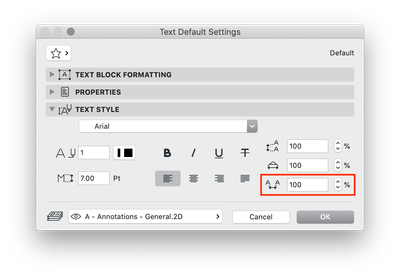
In the Text Settings dialog box, check the spacing value.
You should add a Signature to your Profile (click the Profile button near the top of this page) with your Archicad version and operating system (see mine for an example) for more accurate help in this forum.
David
David Maudlin / Architect
www.davidmaudlin.com
Digital Architecture
AC29 USA Perpetual • Mac mini M4 Pro OSX15 | 64 gb ram • MacBook Pro M3 Pro OSX14 | 36 gb ram
www.davidmaudlin.com
Digital Architecture
AC29 USA Perpetual • Mac mini M4 Pro OSX15 | 64 gb ram • MacBook Pro M3 Pro OSX14 | 36 gb ram
3 Replies 3
David Maudlin
Rockstar
Options
- Mark as New
- Bookmark
- Subscribe
- Mute
- Subscribe to RSS Feed
- Permalink
- Report Inappropriate Content
2022-05-29 12:51 PM
2022-05-29
12:51 PM
In the Text Settings dialog box, check the spacing value.
You should add a Signature to your Profile (click the Profile button near the top of this page) with your Archicad version and operating system (see mine for an example) for more accurate help in this forum.
David
David Maudlin / Architect
www.davidmaudlin.com
Digital Architecture
AC29 USA Perpetual • Mac mini M4 Pro OSX15 | 64 gb ram • MacBook Pro M3 Pro OSX14 | 36 gb ram
www.davidmaudlin.com
Digital Architecture
AC29 USA Perpetual • Mac mini M4 Pro OSX15 | 64 gb ram • MacBook Pro M3 Pro OSX14 | 36 gb ram
olga_kots
Contributor
Options
- Mark as New
- Bookmark
- Subscribe
- Mute
- Subscribe to RSS Feed
- Permalink
- Report Inappropriate Content
2022-05-29 07:25 PM
2022-05-29
07:25 PM
Thank you!
It was set to 90% ! (no idea why))
OLGA_KOTLYAROVA
olga_kots
Contributor
Options
- Mark as New
- Bookmark
- Subscribe
- Mute
- Subscribe to RSS Feed
- Permalink
- Report Inappropriate Content
2022-10-23 08:07 AM
2022-10-23
08:07 AM
Thank you!
OLGA_KOTLYAROVA

Still looking?
Suggested topics
- Stair Tool fails to generate U-shaped winder stair with a narrow (10cm) inner gap (Archicad 29) in Modeling
- Fonts not displaying corectly in archicad 29 in Documentation
- Scale UI in Installation & update
- Text/font errors when publishing pdf:s in Documentation
- Explode PDF - Font Recognition in Documentation
