
Turn on suggestions
Auto-suggest helps you quickly narrow down your search results by suggesting possible matches as you type.
Showing results for
EN
Turn on suggestions
Auto-suggest helps you quickly narrow down your search results by suggesting possible matches as you type.
Showing results for
- English
- :
- Forum
- :
- Documentation
- :
- Re: ELEMENT ID MANAGER ORDER ISSUE
Options
- Subscribe to RSS Feed
- Mark Topic as New
- Mark Topic as Read
- Pin this post for me
- Bookmark
- Subscribe to Topic
- Mute
- Printer Friendly Page

Samuel1997
Booster
Options
- Mark as New
- Bookmark
- Subscribe
- Mute
- Subscribe to RSS Feed
- Permalink
- Report Inappropriate Content
2022-07-19 12:48 AM
ELEMENT ID MANAGER ORDER ISSUE
2022-07-19
12:48 AM
Having issues with the Element ID Manager , its assigning ID's to windows in either Descending order (Reversed) or if shut down, and reopened, it is in origin placement order. The last unsolved thread on this was in 2014.
Any Input is helpful, thanks guys
AC19/24/26 | Win11 | 12th gen i-7 | 32GB | RTX 3070 Ti
Solved! Go to Solution.
Solved
Read-Only
1 Solution
Accepted Solutions

Barry Kelly
Moderator
Options
- Mark as New
- Bookmark
- Subscribe
- Mute
- Subscribe to RSS Feed
- Permalink
- Report Inappropriate Content
2022-07-19 03:59 AM
2022-07-19
03:59 AM
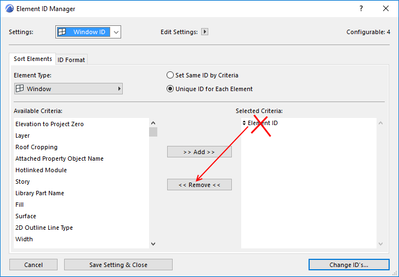
In your Element ID Manager, make sure 'Element ID' is not in the selected criteria list.
It is there by default.
If it is, then the IDs will not be re-numbered.
Barry.
One of the forum moderators.
Versions 6.5 to 27
i7-10700 @ 2.9Ghz, 32GB ram, GeForce RTX 2060 (6GB), Windows 10
Lenovo Thinkpad - i7-1270P 2.20 GHz, 32GB RAM, Nvidia T550, Windows 11
Versions 6.5 to 27
i7-10700 @ 2.9Ghz, 32GB ram, GeForce RTX 2060 (6GB), Windows 10
Lenovo Thinkpad - i7-1270P 2.20 GHz, 32GB RAM, Nvidia T550, Windows 11
6 Replies 6

Lee Hankins
Virtuoso
Options
- Mark as New
- Bookmark
- Subscribe
- Mute
- Subscribe to RSS Feed
- Permalink
- Report Inappropriate Content
2022-07-19 01:10 AM
2022-07-19
01:10 AM
I keep finding this with Zones. If you reassign all the ID’s to something different to why you want and then run the element ID manager again it should then number them in the order you want.
Lee Hankins
ArchiCAD 4.5 - Archicad 29
macOS Tahoe (26.0)
ArchiCAD 4.5 - Archicad 29
macOS Tahoe (26.0)
Samuel1997
Booster
Options
- Mark as New
- Bookmark
- Subscribe
- Mute
- Subscribe to RSS Feed
- Permalink
- Report Inappropriate Content
2022-07-19 02:00 AM
2022-07-19
02:00 AM
I tried changing the selection order, numbering display, (and resetting each of the window ID's independently obviously) still the file changes at random each time it is opened.
AC19/24/26 | Win11 | 12th gen i-7 | 32GB | RTX 3070 Ti

Eduardo Rolon
Moderator
Options
- Mark as New
- Bookmark
- Subscribe
- Mute
- Subscribe to RSS Feed
- Permalink
- Report Inappropriate Content
2022-07-19 03:35 AM
2022-07-19
03:35 AM
IIRC This bug has never been solved since AC12 I think. It is always in backlog
Eduardo Rolón AIA NCARB
AC29 US/INT -> AC08
AC29 US/INT -> AC08
Mac Studio M4 Max 64GB ram, OS X 10.XX latest
Samuel1997
Booster
Options
- Mark as New
- Bookmark
- Subscribe
- Mute
- Subscribe to RSS Feed
- Permalink
- Report Inappropriate Content
2022-07-19 03:42 AM
2022-07-19
03:42 AM
That's insane, is there any information on it, we are unable to run proficient window schedules if each window must be individually ID'd. And i cant even work out how to remove the bug from the template pln we use, without knowing the cause.
AC19/24/26 | Win11 | 12th gen i-7 | 32GB | RTX 3070 Ti
Barry Kelly
Moderator
Options
- Mark as New
- Bookmark
- Subscribe
- Mute
- Subscribe to RSS Feed
- Permalink
- Report Inappropriate Content
2022-07-19 03:59 AM
2022-07-19
03:59 AM
In your Element ID Manager, make sure 'Element ID' is not in the selected criteria list.
It is there by default.
If it is, then the IDs will not be re-numbered.
Barry.
One of the forum moderators.
Versions 6.5 to 27
i7-10700 @ 2.9Ghz, 32GB ram, GeForce RTX 2060 (6GB), Windows 10
Lenovo Thinkpad - i7-1270P 2.20 GHz, 32GB RAM, Nvidia T550, Windows 11
Versions 6.5 to 27
i7-10700 @ 2.9Ghz, 32GB ram, GeForce RTX 2060 (6GB), Windows 10
Lenovo Thinkpad - i7-1270P 2.20 GHz, 32GB RAM, Nvidia T550, Windows 11
Samuel1997
Booster
Options
- Mark as New
- Bookmark
- Subscribe
- Mute
- Subscribe to RSS Feed
- Permalink
- Report Inappropriate Content
2022-07-19 04:49 AM
2022-07-19
04:49 AM
Barry you Ripper, thankyou kindly that was doing my head in. Seems to be working for now! Would not have considered taking out the criteria of the operation as the solution.
Kind Regards Samuel H.
AC19/24/26 | Win11 | 12th gen i-7 | 32GB | RTX 3070 Ti

Still looking?

Suggested topics
- Issues with 3Dconnexxion CadMouse Pro Wireless in Installation & update
- BIMcloud Basic 2026.1 – Activate button does not open Graphisoft ID activation in Teamwork & BIMcloud
- Detailing | Better methods of 2d drafting, creation of Blocks , Detail Elements , 2d Objects in Documentation
- Can not connect to BIMCloud in Teamwork & BIMcloud
- Archicad becomes completely unresponsive when using "Expand all below" in Layout Book in Documentation
