
Turn on suggestions
Auto-suggest helps you quickly narrow down your search results by suggesting possible matches as you type.
Showing results for
EN
Turn on suggestions
Auto-suggest helps you quickly narrow down your search results by suggesting possible matches as you type.
Showing results for
- English
- :
- Forum
- :
- Documentation
- :
- Graphic Overide help
Options
- Subscribe to RSS Feed
- Mark Topic as New
- Mark Topic as Read
- Pin this post for me
- Bookmark
- Subscribe to Topic
- Mute
- Printer Friendly Page

Too Long
Advocate
Options
- Mark as New
- Bookmark
- Subscribe
- Mute
- Subscribe to RSS Feed
- Permalink
- Report Inappropriate Content
2020-09-29
08:10 AM
- last edited on
2023-05-30
12:24 PM
by
 Rubia Torres
Graphic Overide help
2020-09-29
08:10 AM
Iis it possible to create a GO rule so the walls in floor plan looks like this?
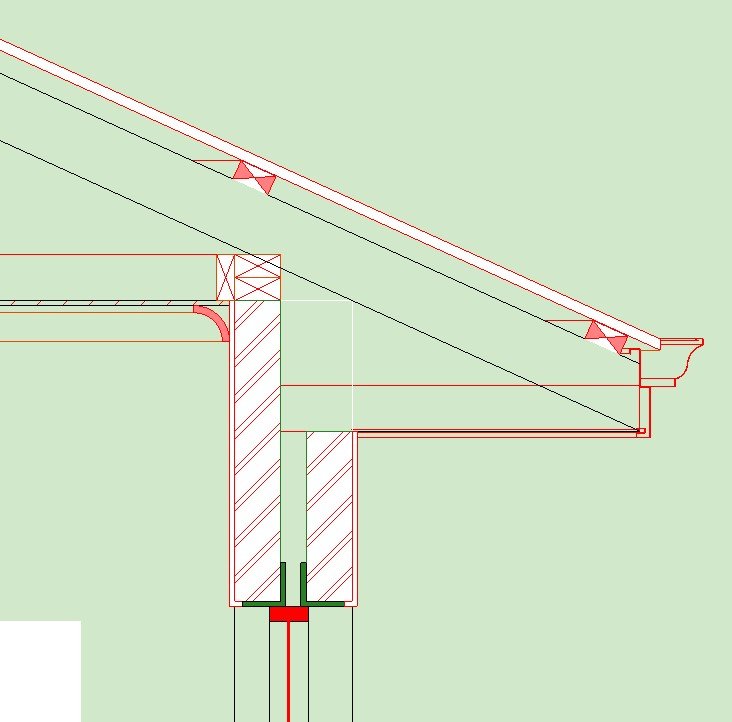
and the section looks like this:
The issue im having is that the cavity gest filled along with the wall in plan per below?
thanks all.
AC26 AUS Full


5 Replies 5

LucaP
Advocate
Options
- Mark as New
- Bookmark
- Subscribe
- Mute
- Subscribe to RSS Feed
- Permalink
- Report Inappropriate Content
2020-09-29 08:32 AM
2020-09-29
08:32 AM
Hi,
The reason why the whole wall gets overridden is unfortunately how GO works - it overrides whole element.
There is a workaround though - BM (Building Materials) are using specific pens to display hatching. You could create a pen set where both fill pen and fill background pen for wall's main BM are "brown" (like in your example) and that is how you would get Solid fill for a wall leaving cavity transparent.
You can find pen numbers in BM settings (I recommend not overriding them in there but instead create special pen set for the view you want)

The reason why the whole wall gets overridden is unfortunately how GO works - it overrides whole element.
There is a workaround though - BM (Building Materials) are using specific pens to display hatching. You could create a pen set where both fill pen and fill background pen for wall's main BM are "brown" (like in your example) and that is how you would get Solid fill for a wall leaving cavity transparent.
You can find pen numbers in BM settings (I recommend not overriding them in there but instead create special pen set for the view you want)
Łukasz Pietraszko
ArchiCAD 28 PL, since AC20 | WIN 11 Pro
Intel Core i7-14700K 3.4 GHz | 64 GB RAM | NVIDIA GeForce RTX 4070 SUPER 12 GB | 2 TB SSD
ArchiCAD 28 PL, since AC20 | WIN 11 Pro
Intel Core i7-14700K 3.4 GHz | 64 GB RAM | NVIDIA GeForce RTX 4070 SUPER 12 GB | 2 TB SSD
Too Long
Advocate
Options
- Mark as New
- Bookmark
- Subscribe
- Mute
- Subscribe to RSS Feed
- Permalink
- Report Inappropriate Content
2020-09-29 08:36 AM
2020-09-29
08:36 AM
Thanks.
So itll be a separate pen set for the floor plan and a separate pen set for sections?
Is this right?
AC26 AUS Full
So itll be a separate pen set for the floor plan and a separate pen set for sections?
Is this right?
AC26 AUS Full
LucaP
Advocate
Options
- Mark as New
- Bookmark
- Subscribe
- Mute
- Subscribe to RSS Feed
- Permalink
- Report Inappropriate Content
2020-09-29 08:57 AM
2020-09-29
08:57 AM
Exactly.
Just save that new pen set, apply it to your floor plan view and that's it.
Just save that new pen set, apply it to your floor plan view and that's it.
Łukasz Pietraszko
ArchiCAD 28 PL, since AC20 | WIN 11 Pro
Intel Core i7-14700K 3.4 GHz | 64 GB RAM | NVIDIA GeForce RTX 4070 SUPER 12 GB | 2 TB SSD
ArchiCAD 28 PL, since AC20 | WIN 11 Pro
Intel Core i7-14700K 3.4 GHz | 64 GB RAM | NVIDIA GeForce RTX 4070 SUPER 12 GB | 2 TB SSD

Anonymous
Not applicable
Options
- Mark as New
- Bookmark
- Subscribe
- Mute
- Subscribe to RSS Feed
- Permalink
- Report Inappropriate Content
2020-09-29 11:34 AM
2020-09-29
11:34 AM
Another option, is to set all fills to 0% and background pen color as you wish. Once the air material has no background, it will appear white. Like this:
The only problem is that you can't have the skin lines to appear. But for me it would not be a big deal.
Hope this helps.
The only problem is that you can't have the skin lines to appear. But for me it would not be a big deal.
Hope this helps.

Too Long
Advocate
Options
- Mark as New
- Bookmark
- Subscribe
- Mute
- Subscribe to RSS Feed
- Permalink
- Report Inappropriate Content
2020-09-29 11:37 AM
2020-09-29
11:37 AM
Thanks Braza.
AC26 AUS Full
AC26 AUS Full
Still looking?

Suggested topics
- Add-on to automatically track/stamp elements with Teamwork user + date/time + create/reserve/edit in Teamwork & BIMcloud
- Surface texture in elevation won't publish to pdf in Documentation
- Graphic Override Bug - Minor in Documentation
- RCP graphics in Modeling
- Section Views and Plan Views in Documentation
