
Turn on suggestions
Auto-suggest helps you quickly narrow down your search results by suggesting possible matches as you type.
Showing results for
EN
Turn on suggestions
Auto-suggest helps you quickly narrow down your search results by suggesting possible matches as you type.
Showing results for
- English
- :
- Forum
- :
- Documentation
- :
- How can I read the grid name by using label tool? ...
Options
- Subscribe to RSS Feed
- Mark Topic as New
- Mark Topic as Read
- Pin this post for me
- Bookmark
- Subscribe to Topic
- Mute
- Printer Friendly Page

William Yan
Expert
Options
- Mark as New
- Bookmark
- Subscribe
- Mute
- Subscribe to RSS Feed
- Permalink
- Report Inappropriate Content
2022-10-02
09:02 AM
- last edited on
2023-05-16
11:56 PM
by
 Gordana Radonic
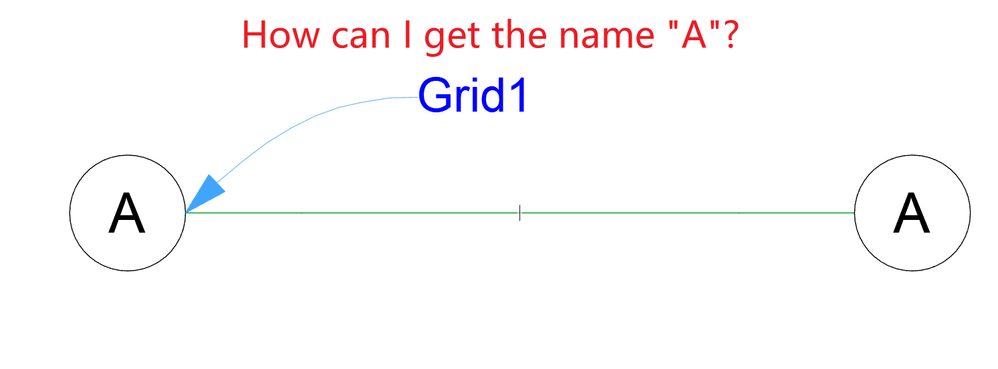
How can I read the grid name by using label tool? or using custom GDL label to read?
2022-10-02
09:02 AM
Hi guys! I am thinking to read the Grid element's name with Label tool.
but I can't get it. Did anybody know this? THank you!
AC 26 5002 CHI, Windows 10
Solved! Go to Solution.
1 Solution
Accepted Solutions

runxel
Moderator
Options
- Mark as New
- Bookmark
- Subscribe
- Mute
- Subscribe to RSS Feed
- Permalink
- Report Inappropriate Content
2022-10-02 01:28 PM
2022-10-02
01:28 PM
Labeling Grid lines is not officially supported, but it works.
Grids are just objects, their GLOB_ELEM_TYPE will yield "1" (=object), so they are not really first class members.
Anyway, since it's an object, you can just do
request('ASSOCLP_PARVALUE', 'AC_MarkerText_1', index, type, flags, dim1, dim2, AC_MarkerText_1)and "AC_MarkerText_1" will have the grid's name.
Lucas Becker | AC 29 on Mac (Sequoia) | Graphisoft Insider Panelist | Akroter.io – high-end GDL objects | Author of Runxel's Archicad Wiki | Editor at SelfGDL | Developer of the GDL plugin for Sublime Text
My List of AC shortcomings & bugs | I Will Piledrive You If You Mention AI Again |
POSIWID – The Purpose Of a System Is What It Does /// «Furthermore, I consider that Carth... yearly releases must be destroyed»
My List of AC shortcomings & bugs | I Will Piledrive You If You Mention AI Again |
POSIWID – The Purpose Of a System Is What It Does /// «Furthermore, I consider that Carth... yearly releases must be destroyed»
5 Replies 5
runxel
Moderator
Options
- Mark as New
- Bookmark
- Subscribe
- Mute
- Subscribe to RSS Feed
- Permalink
- Report Inappropriate Content
2022-10-02 01:28 PM
2022-10-02
01:28 PM
Labeling Grid lines is not officially supported, but it works.
Grids are just objects, their GLOB_ELEM_TYPE will yield "1" (=object), so they are not really first class members.
Anyway, since it's an object, you can just do
request('ASSOCLP_PARVALUE', 'AC_MarkerText_1', index, type, flags, dim1, dim2, AC_MarkerText_1)and "AC_MarkerText_1" will have the grid's name.
Lucas Becker | AC 29 on Mac (Sequoia) | Graphisoft Insider Panelist | Akroter.io – high-end GDL objects | Author of Runxel's Archicad Wiki | Editor at SelfGDL | Developer of the GDL plugin for Sublime Text
My List of AC shortcomings & bugs | I Will Piledrive You If You Mention AI Again |
POSIWID – The Purpose Of a System Is What It Does /// «Furthermore, I consider that Carth... yearly releases must be destroyed»
My List of AC shortcomings & bugs | I Will Piledrive You If You Mention AI Again |
POSIWID – The Purpose Of a System Is What It Does /// «Furthermore, I consider that Carth... yearly releases must be destroyed»

DGSketcher
Legend
Options
- Mark as New
- Bookmark
- Subscribe
- Mute
- Subscribe to RSS Feed
- Permalink
- Report Inappropriate Content
2022-10-02 06:09 PM
2022-10-02
06:09 PM
@runxel I see a solution to cropped grid lines on my to do list 👍
Apple iMac Intel i9 / macOS Sonoma / AC27UKI (most recent builds.. if they work)
William Yan
Expert
Options
- Mark as New
- Bookmark
- Subscribe
- Mute
- Subscribe to RSS Feed
- Permalink
- Report Inappropriate Content
2022-10-02 06:51 PM
2022-10-02
06:51 PM
For me it is hard to understand and use these GDL code, But I will try! Thank you!
AC 26 5002 CHI, Windows 10

Dendarii
Booster
Options
- Mark as New
- Bookmark
- Subscribe
- Mute
- Subscribe to RSS Feed
- Permalink
- Report Inappropriate Content
2022-10-03 04:58 AM
2022-10-03
04:58 AM
Another workaround is to name the Grid 'Element ID' the same as the Grid number or letter.
Go to Grid Element Selection Settings -> Classification and Properties -> ID (set to A, B, 01 etc. to match the grid name).
Then you can label the grid using the 'Element ID' autotext with either a pointer as you have shown or save as a custom label with circle/fill/autotext to match the grid heads.
Architect
Archicad user since 2001
Archicad user since 2001
William Yan
Expert
Options
- Mark as New
- Bookmark
- Subscribe
- Mute
- Subscribe to RSS Feed
- Permalink
- Report Inappropriate Content
2022-10-04 06:13 PM
2022-10-04
06:13 PM
I worked out. Although there are few more questions in my head, I made a label to read the text of the axis. Thank you.😁
AC 26 5002 CHI, Windows 10

Still looking?

