
Turn on suggestions
Auto-suggest helps you quickly narrow down your search results by suggesting possible matches as you type.
Showing results for
EN
Turn on suggestions
Auto-suggest helps you quickly narrow down your search results by suggesting possible matches as you type.
Showing results for
- English
- :
- Forum
- :
- Documentation
- :
- Re: How do I cancel the visualization?
Options
- Subscribe to RSS Feed
- Mark Topic as New
- Mark Topic as Read
- Pin this post for me
- Bookmark
- Subscribe to Topic
- Mute
- Printer Friendly Page

Danilloff
Beginner
Options
- Mark as New
- Bookmark
- Subscribe
- Mute
- Subscribe to RSS Feed
- Permalink
- Report Inappropriate Content
2022-01-18 12:33 PM
How do I cancel the visualization?
2022-01-18
12:33 PM
Tell me how to disable visualization? The picture
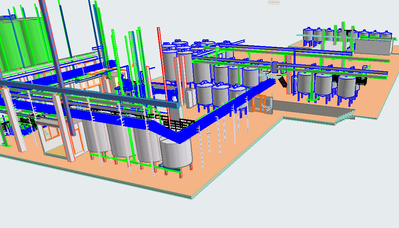
shows how the object is displayed in 3d.
Read-Only
6 Replies 6

Patrick M
Virtuoso
Options
- Mark as New
- Bookmark
- Subscribe
- Mute
- Subscribe to RSS Feed
- Permalink
- Report Inappropriate Content
2022-01-18 10:18 PM
2022-01-18
10:18 PM
if I understand the question, the solution should be one of these: show selection/marquee in 3d under the view menu. filter and cut elements in 3d. layers. renovation filter.
BIM solutions and trouble shooting (self proclaimed) expert. Using Archicad Version (all of them), on Mac OS (whatever is 1 version older than current)
Danilloff
Beginner
Options
- Mark as New
- Bookmark
- Subscribe
- Mute
- Subscribe to RSS Feed
- Permalink
- Report Inappropriate Content
2022-01-19 07:13 AM
2022-01-19
07:13 AM

Here is a picture with visualization. The view is not realistic.
Danilloff
Beginner
Options
- Mark as New
- Bookmark
- Subscribe
- Mute
- Subscribe to RSS Feed
- Permalink
- Report Inappropriate Content
2022-01-19 07:13 AM
2022-01-19
07:13 AM
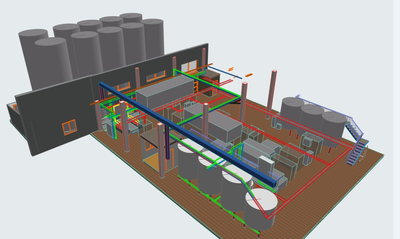
Here is a picture with a view without visualization. The view is more realistic.
Danilloff
Beginner
Options
- Mark as New
- Bookmark
- Subscribe
- Mute
- Subscribe to RSS Feed
- Permalink
- Report Inappropriate Content
2022-01-19 07:14 AM
2022-01-19
07:14 AM
How do I return to the view without visualization?

Jp1138
Advisor
Options
- Mark as New
- Bookmark
- Subscribe
- Mute
- Subscribe to RSS Feed
- Permalink
- Report Inappropriate Content
2022-01-19 09:44 AM
2022-01-19
09:44 AM
I don´t know if this is what you mean:
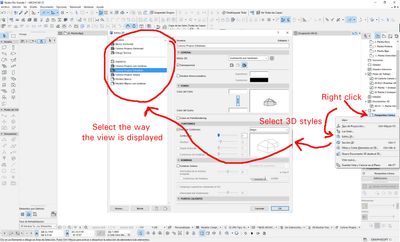
ARCHICAD 29 SPA (as long as the server works)
Windows 10
Windows 10
Danilloff
Beginner
Options
- Mark as New
- Bookmark
- Subscribe
- Mute
- Subscribe to RSS Feed
- Permalink
- Report Inappropriate Content
2022-01-19 10:13 AM
2022-01-19
10:13 AM
Thanks. But it doesn't help. I had a normal 3D view display. Then I did the visualization "F6" and I can't cancel the visualization. I can't return to my former normal appearance.

Still looking?

Suggested topics
- How to structure prompts for AI Visualizer in Archicad 30 in AI solutions
- Rounded Wall Corner displays correctly in Floor Plan but glitches in 3D Document in Modeling
- TIP: Visual Check for custom Dimension Texts in Documentation
- Archicad 29 AI Visualizer – Licence Issue in Installation & update
- Huge street fill visual glitch in Documentation
