
Turn on suggestions
Auto-suggest helps you quickly narrow down your search results by suggesting possible matches as you type.
Showing results for
EN
Turn on suggestions
Auto-suggest helps you quickly narrow down your search results by suggesting possible matches as you type.
Showing results for
- English
- :
- Forum
- :
- Documentation
- :
- Re: How to display column core and veneer lines in...
Options
- Subscribe to RSS Feed
- Mark Topic as New
- Mark Topic as Read
- Pin this post for me
- Bookmark
- Subscribe to Topic
- Mute
- Printer Friendly Page

Scott Bulmer
Booster
Options
- Mark as New
- Bookmark
- Subscribe
- Mute
- Subscribe to RSS Feed
- Permalink
- Report Inappropriate Content
2021-10-01
03:29 PM
- last edited on
2023-05-17
05:30 PM
by
 Gordana Radonic
How to display column core and veneer lines in plan view - AC24
2021-10-01
03:29 PM
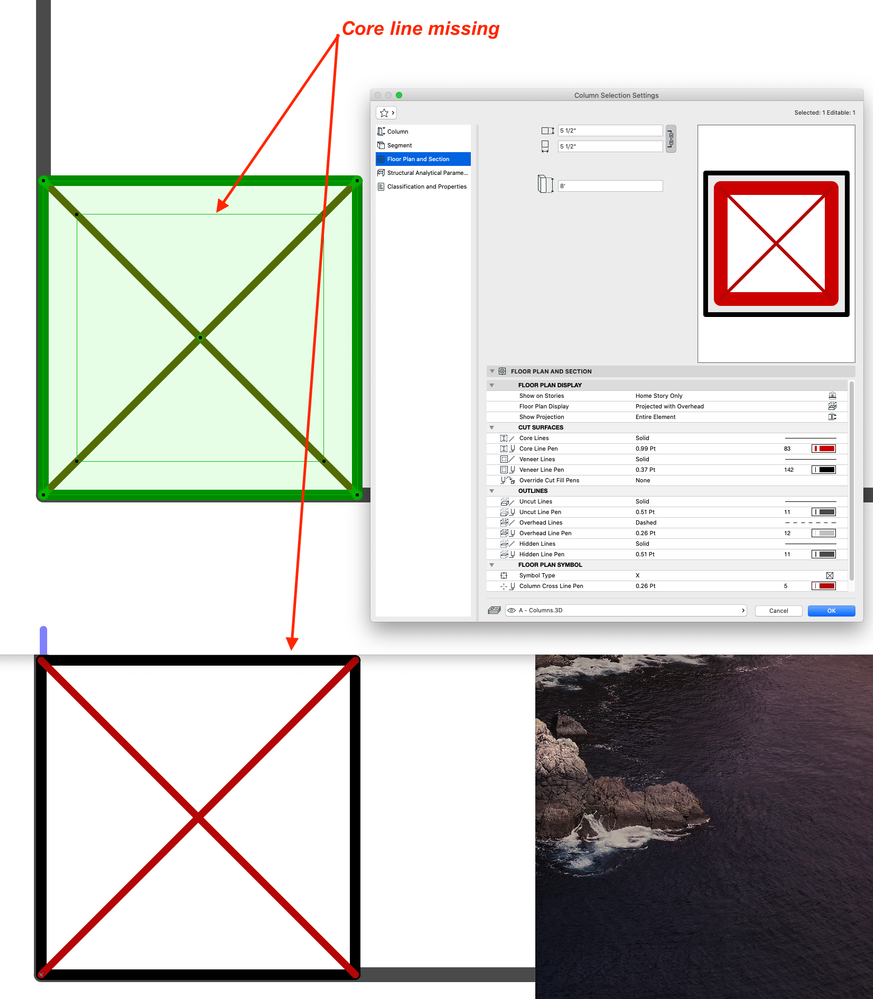
I need to display the column core and veneer lines. For some reason only the outer veneer lines appear. Please see the attached screenshot and advise. Thank you, Scott
AC27 v. 4060 w/ MEP, Cadimage, Twinmotion 2023.2.2 using AC from AC6.0, 2021 MacPro M1 chip, Adobe CC. Used AC on both platforms.
Solved! Go to Solution.
1 Solution
Accepted Solutions

DGSketcher
Legend
Options
- Mark as New
- Bookmark
- Subscribe
- Mute
- Subscribe to RSS Feed
- Permalink
- Report Inappropriate Content
2021-10-01 04:53 PM
2021-10-01
04:53 PM
@Scott Bulmer have a look at your Graphic Override settings. You will probably find a cut fill override with "Show skin separators" turned off.
Apple iMac Intel i9 / macOS Sonoma / AC27UKI (most recent builds.. if they work)
6 Replies 6
DGSketcher
Legend
Options
- Mark as New
- Bookmark
- Subscribe
- Mute
- Subscribe to RSS Feed
- Permalink
- Report Inappropriate Content
2021-10-01 04:53 PM
2021-10-01
04:53 PM
@Scott Bulmer have a look at your Graphic Override settings. You will probably find a cut fill override with "Show skin separators" turned off.
Apple iMac Intel i9 / macOS Sonoma / AC27UKI (most recent builds.. if they work)
Scott Bulmer
Booster
Options
- Mark as New
- Bookmark
- Subscribe
- Mute
- Subscribe to RSS Feed
- Permalink
- Report Inappropriate Content
2021-10-01 05:01 PM
2021-10-01
05:01 PM
Thank you, I double checked but that was the setting was set as 'show skin separators' for all renovation conditions.
AC27 v. 4060 w/ MEP, Cadimage, Twinmotion 2023.2.2 using AC from AC6.0, 2021 MacPro M1 chip, Adobe CC. Used AC on both platforms.

hevi
Ace
Options
- Mark as New
- Bookmark
- Subscribe
- Mute
- Subscribe to RSS Feed
- Permalink
- Report Inappropriate Content
2021-10-02 01:21 PM - edited 2021-10-02 01:21 PM
2021-10-02
01:21 PM
A bit unclear what’s going on. The X plan symbol usually only covers the core so at first glance I would say that it’s the veneer line that’s missing and that you should check the Partial Structure Display setting.
But PSD also affects the preview in the settings dialog and then there’s the hidden outline that shows when selected. How is the column position in relation to other elements? Do you get the same issue if you just place it by it self?
Scott Bulmer
Booster
Options
- Mark as New
- Bookmark
- Subscribe
- Mute
- Subscribe to RSS Feed
- Permalink
- Report Inappropriate Content
2021-10-02 09:14 PM
2021-10-02
09:14 PM
I apologize, DGSketcher answered correctly. Earlier I only changed the Renovation setting to include Skin Separators that had no affect. In addition I also needed to change the Graphic Override as well. Thank you so much for the help. All good now.
AC27 v. 4060 w/ MEP, Cadimage, Twinmotion 2023.2.2 using AC from AC6.0, 2021 MacPro M1 chip, Adobe CC. Used AC on both platforms.
hevi
Ace
Options
- Mark as New
- Bookmark
- Subscribe
- Mute
- Subscribe to RSS Feed
- Permalink
- Report Inappropriate Content
2021-10-02 10:20 PM
2021-10-02
10:20 PM
So Graphic Override > Fill Type - w/o Show Skin Separators extends the Floor Plan Symbol across the veneer. Rather odd that that and the skin toggle can't be done in the Column Settings.
Scott Bulmer
Booster
Options
- Mark as New
- Bookmark
- Subscribe
- Mute
- Subscribe to RSS Feed
- Permalink
- Report Inappropriate Content
2021-10-02 10:26 PM
2021-10-02
10:26 PM
Correct based on my recent experience with this issue.
AC27 v. 4060 w/ MEP, Cadimage, Twinmotion 2023.2.2 using AC from AC6.0, 2021 MacPro M1 chip, Adobe CC. Used AC on both platforms.

Still looking?
Suggested topics
- Surface / Component Schedule Bug: Automatic Column Wrapping Ignores Folded Geometry and Returns Flat in Project data & BIM
- Detailing | Better methods of 2d drafting, creation of Blocks , Detail Elements , 2d Objects in Documentation
- Column not appearing over wall in Modeling
- Archicad Project Compare & Project Migration in General discussions
- column,concrete wall and brick wall junction problem in Modeling
