
Turn on suggestions
Auto-suggest helps you quickly narrow down your search results by suggesting possible matches as you type.
Showing results for
EN
Turn on suggestions
Auto-suggest helps you quickly narrow down your search results by suggesting possible matches as you type.
Showing results for
- English
- :
- Forum
- :
- Documentation
- :
- Re: Printing from Project Map ignores lineweights
Options
- Subscribe to RSS Feed
- Mark Topic as New
- Mark Topic as Read
- Pin this post for me
- Bookmark
- Subscribe to Topic
- Mute
- Printer Friendly Page

wachaczaj
Participant
Options
- Mark as New
- Bookmark
- Subscribe
- Mute
- Subscribe to RSS Feed
- Permalink
- Report Inappropriate Content
2023-10-15
04:05 PM
- last edited on
2024-12-20
02:59 PM
by
 Laszlo Nagy
Printing from Project Map ignores lineweights
2023-10-15
04:05 PM
Hello! I have a weird issue where I try to print directly from the project map using CTRL+P and the resulting PDF's ignore the currently used pen set lineweight's. I have tried printing from the view map too (again I use marque tool to select the area I want to print from and CTRL+P) and similarly the lineweight's are ignored. When I use publisher set everything works perfectly only problem is publisher set is nowhere near as fast and efficient for printing when I need the drawings fast for any revisions and team discussions. Anyone came across a similar problem?
Thanks in advance.
6 Replies 6

hevi
Ace
Options
- Mark as New
- Bookmark
- Subscribe
- Mute
- Subscribe to RSS Feed
- Permalink
- Report Inappropriate Content
2023-10-15 05:25 PM
2023-10-15
05:25 PM
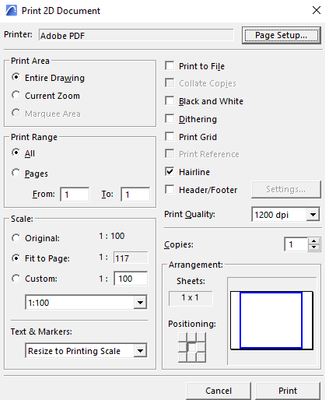
Is hairline enabled? If so it will print all lines at minimum thickness.
wachaczaj
Participant
Options
- Mark as New
- Bookmark
- Subscribe
- Mute
- Subscribe to RSS Feed
- Permalink
- Report Inappropriate Content
2023-10-15
05:31 PM
- last edited on
2024-12-20
02:25 PM
by
Laszlo Nagy
2023-10-15
05:31 PM
I also thought it could be the hairline but it is disabled. What makes it even more strange is that the outcome produces thicker lines than with 'hairline' selected. Below is printing straight from the project map and next is the publisher settings.


hevi
Ace
Options
- Mark as New
- Bookmark
- Subscribe
- Mute
- Subscribe to RSS Feed
- Permalink
- Report Inappropriate Content
2023-10-15 05:48 PM
2023-10-15
05:48 PM
And you are sure that you have the same settings (graphical overrides and pen set) for the item you are printing and publishing?
wachaczaj
Participant
Options
- Mark as New
- Bookmark
- Subscribe
- Mute
- Subscribe to RSS Feed
- Permalink
- Report Inappropriate Content
2023-10-15 06:18 PM - edited 2023-10-15 06:24 PM
2023-10-15
06:18 PM
I double checked everything and they are the same settings.

Lee Hankins
Virtuoso
Options
- Mark as New
- Bookmark
- Subscribe
- Mute
- Subscribe to RSS Feed
- Permalink
- Report Inappropriate Content
2023-10-15 11:37 PM
2023-10-15
11:37 PM
I haven’t checked but when you print from the Project Map without ‘True Lineweight’ turned on it may print in a uniform thinner pen. Try turning ‘True Lineweight’ on in on-screen view options and print again.
Lee Hankins
ArchiCAD 4.5 - Archicad 29
macOS Tahoe (26.0)
ArchiCAD 4.5 - Archicad 29
macOS Tahoe (26.0)
wachaczaj
Participant
Options
- Mark as New
- Bookmark
- Subscribe
- Mute
- Subscribe to RSS Feed
- Permalink
- Report Inappropriate Content
2023-10-22 02:55 PM
2023-10-22
02:55 PM
I am sorry for not replying. I still have not managed to solve the problem. Perhaps I need to update ArchiCAD or something.

Still looking?

Suggested topics
- Printing from Project Map ignores lineweights in Documentation
- PDF export pen weights issue- all lines always exported with hairline weight in Collaboration with other software
- LINE WEIGHTS IN PLAN in Documentation
- new drafting standard. in Documentation
- Resolution dropoff when printing from AC10 to HP 1055 CM in Documentation
