
Turn on suggestions
Auto-suggest helps you quickly narrow down your search results by suggesting possible matches as you type.
Showing results for
EN
Turn on suggestions
Auto-suggest helps you quickly narrow down your search results by suggesting possible matches as you type.
Showing results for
- English
- :
- Forum
- :
- Documentation
- :
- Re: Published pdf scale is off
Options
- Subscribe to RSS Feed
- Mark Topic as New
- Mark Topic as Read
- Pin this post for me
- Bookmark
- Subscribe to Topic
- Mute
- Printer Friendly Page

Anonymous
Not applicable
Options
- Mark as New
- Bookmark
- Subscribe
- Mute
- Subscribe to RSS Feed
- Permalink
- Report Inappropriate Content
2008-04-23
02:17 AM
- last edited on
2023-05-19
10:20 PM
by
 Gordana Radonic
Published pdf scale is off
2008-04-23
02:17 AM
When the PDF is opened using the Adobe reader and printed, the scale is off by a fractions of a foot. Horizontal (x-direction) 100' actual is printed at 99'-8.5" or so. Vertical (y-direction) 80' actual is printed at 79'-10.5".
When any of you sub-out your drawings as PDF to be printed, how do you assure the scaling remains true?
Read-Only
Labels:
- Labels:
-
PDF
-
Publishing
7 Replies 7

Thomas Holm
Enthusiast
Options
- Mark as New
- Bookmark
- Subscribe
- Mute
- Subscribe to RSS Feed
- Permalink
- Report Inappropriate Content
2008-04-23 06:08 AM
2008-04-23
06:08 AM
That happens when you print the pdf with "shrink/resize to paper margins" checked in Adobe Reader's or Acrobats's print dialog. If you check "no page scaling" (or something similar, depending on Adobe version) it should print right.
AC4.1-AC26SWE; MacOS13.5.1; MP5,1+MBP16,1
Anonymous
Not applicable
Options
- Mark as New
- Bookmark
- Subscribe
- Mute
- Subscribe to RSS Feed
- Permalink
- Report Inappropriate Content
2008-04-23 08:43 PM
2008-04-23
08:43 PM
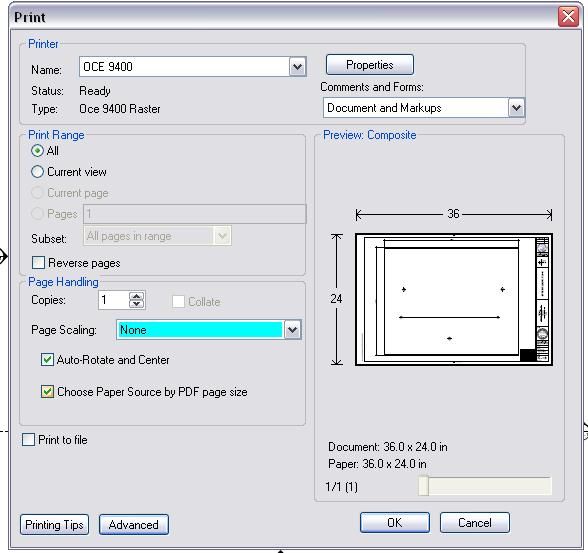
I have the Reader dialog set to "None"
Anonymous
Not applicable
Options
- Mark as New
- Bookmark
- Subscribe
- Mute
- Subscribe to RSS Feed
- Permalink
- Report Inappropriate Content
2008-04-23 08:48 PM
2008-04-23
08:48 PM
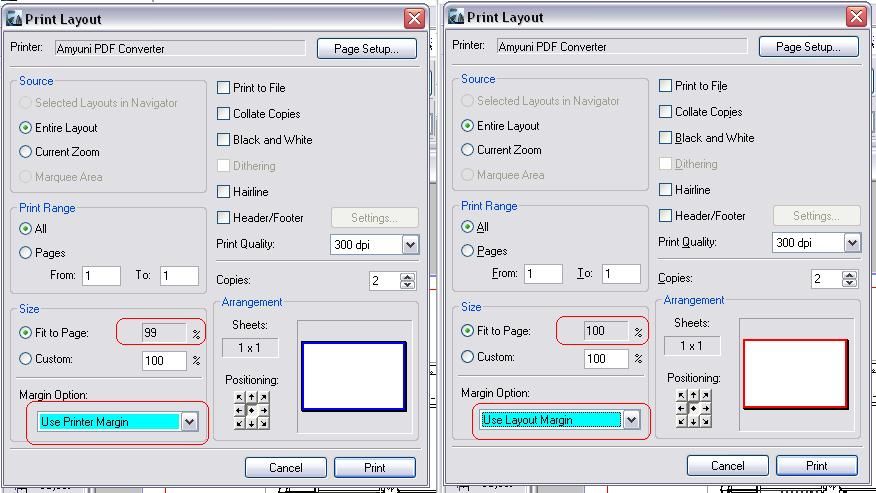
I can not see were the Amyuni Converter can be set up in Publisher, but if a layout is printed to the Converter from the print menu the Print layout shows the screen shot.
Anonymous
Not applicable
Options
- Mark as New
- Bookmark
- Subscribe
- Mute
- Subscribe to RSS Feed
- Permalink
- Report Inappropriate Content
2008-04-23 09:06 PM
2008-04-23
09:06 PM
Well I have come full circle.
Here is a link to the same question
I just do not trust this PDF scaling.
Here is a link to the same question
I just do not trust this PDF scaling.
Anonymous
Not applicable
Options
- Mark as New
- Bookmark
- Subscribe
- Mute
- Subscribe to RSS Feed
- Permalink
- Report Inappropriate Content
2008-04-24 01:52 AM
2008-04-24
01:52 AM
Jay,
Your master layout should reflect the same size as the media you are printing to...therefore, Master Layout Settings>Import settings from printer>PDF Converter>Custom
Set the size in millimeters...610 x 914
Now if you print your layout to pdf, your master layout will match the print drivers margins and you can scale your pdf at 100%...
Clear as mud?
Your master layout should reflect the same size as the media you are printing to...therefore, Master Layout Settings>Import settings from printer>PDF Converter>Custom
Set the size in millimeters...610 x 914
Now if you print your layout to pdf, your master layout will match the print drivers margins and you can scale your pdf at 100%...
Clear as mud?
Anonymous
Not applicable
Options
- Mark as New
- Bookmark
- Subscribe
- Mute
- Subscribe to RSS Feed
- Permalink
- Report Inappropriate Content
2008-04-24 02:38 AM
Anonymous
Not applicable
Options
- Mark as New
- Bookmark
- Subscribe
- Mute
- Subscribe to RSS Feed
- Permalink
- Report Inappropriate Content
2008-04-24 03:01 AM
2008-04-24
03:01 AM
This can cause a little heart-ache when you set the parameters correctly and then find you have to resize the title block by 2%...and move any independent text that may be floating on your master layout...
I print everything to pdf or plt...and adapted my master layouts as such in PM3.1, with seperate plotter settings and pdf settings...
I print everything to pdf or plt...and adapted my master layouts as such in PM3.1, with seperate plotter settings and pdf settings...
Still looking?


