
Turn on suggestions
Auto-suggest helps you quickly narrow down your search results by suggesting possible matches as you type.
Showing results for
EN
Turn on suggestions
Auto-suggest helps you quickly narrow down your search results by suggesting possible matches as you type.
Showing results for
- English
- :
- Forum
- :
- Documentation
- :
- Zone Tool Dimension Settings
Options
- Subscribe to RSS Feed
- Mark Topic as New
- Mark Topic as Read
- Pin this post for me
- Bookmark
- Subscribe to Topic
- Mute
- Printer Friendly Page

fortyone
Participant
Options
- Mark as New
- Bookmark
- Subscribe
- Mute
- Subscribe to RSS Feed
- Permalink
- Report Inappropriate Content
2019-09-11
05:39 AM
- last edited
7 hours ago
by
 Laszlo Nagy
Show X & Y dimensions of zone tool in plan view..
2019-09-11
05:39 AM
Good afternoon team,
Is there a way of showing the X and Y dimensions of a zone? I cant seem to use associative text label in plan view and the zone stamp tool doesn't have this option. AC22
Do you know of a way of doing this?
Is there a way of showing the X and Y dimensions of a zone? I cant seem to use associative text label in plan view and the zone stamp tool doesn't have this option. AC22
Do you know of a way of doing this?

36 Replies 36

Shir_2025
Booster
Options
- Mark as New
- Bookmark
- Subscribe
- Mute
- Subscribe to RSS Feed
- Permalink
- Report Inappropriate Content
2026-01-23 04:11 AM - edited 2026-01-23 04:13 AM
2026-01-23
04:11 AM
Would it possible to convert the millimetres into metres and remove the last two decimal ?
and also have the text in mult row text? I am currently doing it manually.
Thank you


Barry Kelly
Moderator
Options
- Mark as New
- Bookmark
- Subscribe
- Mute
- Subscribe to RSS Feed
- Permalink
- Report Inappropriate Content
2026-01-23 04:46 AM
2026-01-23
04:46 AM
@Shir_2025 wrote:
Would it possible to convert the millimetres into metres and remove the last two decimal ?
and also have the text in mult row text? I am currently doing it manually.
Anything is possible if you know a little GDL.
This is a very old object and does not use the project preferences for units of measurement, but it could be made to do so.
This one is just millimeters or meters.
It simply converts the measured value and converts it to a text string.
You can alter the string for meters to show only one decimal place, in the 2D script....

IT also simply places the text with the TEXT2 command.
This will simply give you a single line of text.
That would need to be changed to use the PARAGRAPH and RICHTEXT2 commands that would allow for a specific width of text.
Then you could add a hotspot to control that width, creating new lines.
But this would also interfere with the text above and below, so their position would have to be adjusted to allow for the extra lines of text.
Or if you always want two lines for the room size, you could add extra TEXT2 commands to output the height and width on separate lines.
You would still have to adjust the position of the text above and below.
I am just sharing the object as it is, and I am happy for you to edit it or have someone else edit it.
Unfortunately I don't have the time to alter the object for specific needs.
If you reduce the decimal points, you may not need to add the second line anyway.
Barry.
One of the forum moderators.
Versions 6.5 to 27
i7-10700 @ 2.9Ghz, 32GB ram, GeForce RTX 2060 (6GB), Windows 10
Lenovo Thinkpad - i7-1270P 2.20 GHz, 32GB RAM, Nvidia T550, Windows 11
Versions 6.5 to 27
i7-10700 @ 2.9Ghz, 32GB ram, GeForce RTX 2060 (6GB), Windows 10
Lenovo Thinkpad - i7-1270P 2.20 GHz, 32GB RAM, Nvidia T550, Windows 11
Shir_2025
Booster
Options
- Mark as New
- Bookmark
- Subscribe
- Mute
- Subscribe to RSS Feed
- Permalink
- Report Inappropriate Content
2026-01-23 06:34 AM
2026-01-23
06:34 AM
That's great and I have managed to change it, Thank you

Martin Jules
Mentor
Options
- Mark as New
- Bookmark
- Subscribe
- Mute
- Subscribe to RSS Feed
- Permalink
- Report Inappropriate Content
Friday
Friday
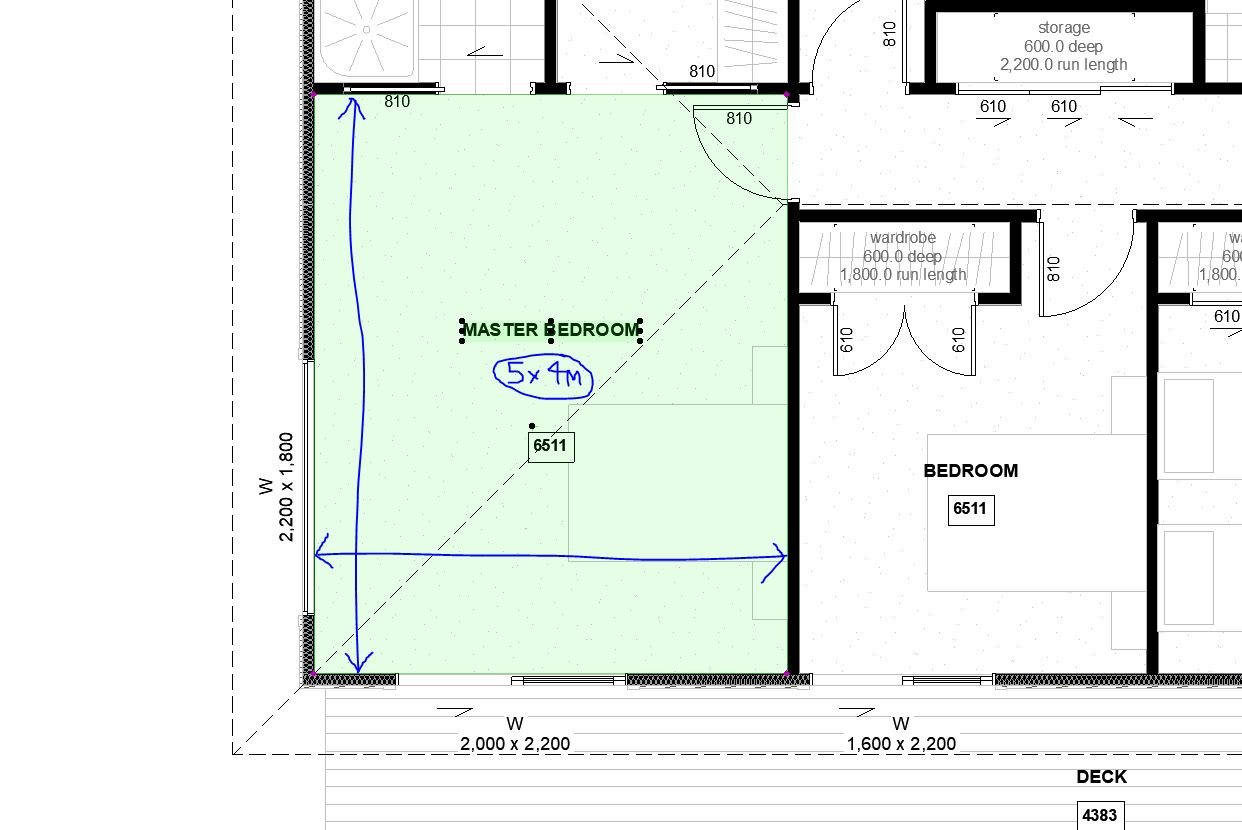
How can I set up the Zone tool to match the format shown below and automatically display or calculate the room’s X and Y dimensions (Length × Width)?

Operating system used: Windows
Martin Luther Jules
AC 10-29 (Full)
Asus | 64 GB RAM | Windows 11
AC 10-29 (Full)
Asus | 64 GB RAM | Windows 11
Barry Kelly
Moderator
Options
- Mark as New
- Bookmark
- Subscribe
- Mute
- Subscribe to RSS Feed
- Permalink
- Report Inappropriate Content
Friday
Friday
I have merged you post into this thread.
Read the previous posts and you will see it has been discussed many times before.
The issue you will have is zones can be any shape and do not have a length and width.
I am sure there are many other posts as well.
I even attached an object here similar to the one I use to display room sizes.
Barry.
One of the forum moderators.
Versions 6.5 to 27
i7-10700 @ 2.9Ghz, 32GB ram, GeForce RTX 2060 (6GB), Windows 10
Lenovo Thinkpad - i7-1270P 2.20 GHz, 32GB RAM, Nvidia T550, Windows 11
Versions 6.5 to 27
i7-10700 @ 2.9Ghz, 32GB ram, GeForce RTX 2060 (6GB), Windows 10
Lenovo Thinkpad - i7-1270P 2.20 GHz, 32GB RAM, Nvidia T550, Windows 11

Mathias Jonathan
Expert
Options
- Mark as New
- Bookmark
- Subscribe
- Mute
- Subscribe to RSS Feed
- Permalink
- Report Inappropriate Content
Friday
Friday
We are using an object like Barry's here, coupled with a python script using Tapir that place it, rotate it and scale it accordingly on top of each zone. It works well but we have to delete/launch the script again if there are too many modifications.
Archicad 27 - GDL - PYTHON

Cosminn
Enthusiast
Options
- Mark as New
- Bookmark
- Subscribe
- Mute
- Subscribe to RSS Feed
- Permalink
- Report Inappropriate Content
yesterday
- last edited
7 hours ago
by
Laszlo Nagy
yesterday
[Note: The post contains an ad to a commercial product.]
Hi Gabor,
Yes, this can be done using Zones.
I developed a Zone Geometry Indicator that reads the actual Zone polygon and automatically displays the length of every edge, regardless of how many sides the Zone has. It also follows irregular and reflex geometry and updates together with the Zone.
The workflow uses Archicad’s free Accessories Add-On, so the geometry is taken directly from the associated Zone rather than recreated manually.
You can see the tool here:
https://www.occular.eu/product-page/zone-geometry-indicator
The edge indexing you described, such as F1.01, F1.02, etc., and using those values later in a report would be an additional layer on top of this workflow, but the Zone geometry and individual edge lengths are already available automatically.
Best,
Daniel
Sincerely,
Daniel
Daniel

- « Previous
- Next »
- « Previous
- Next »
Still looking?

Suggested topics
- Archicad 30: what the official MCP and Tapir 1.7.1 can each do (side-by-side table) in AI solutions
- Graphic Override on a single custom GDL object with multiple independently colored zones (2D and 3D) in Documentation
- After 3 years with Archicad, I'm honestly disappointed in General discussions
- Archicad 29 Dimension Lagging issue in Documentation
- TIP: Visual Check for custom Dimension Texts in Documentation
