
Turn on suggestions
Auto-suggest helps you quickly narrow down your search results by suggesting possible matches as you type.
Showing results for
EN
Turn on suggestions
Auto-suggest helps you quickly narrow down your search results by suggesting possible matches as you type.
Showing results for
- English
- :
- Forum
- :
- Documentation
- :
- Re: problem opening file in current version of arc...
Options
- Subscribe to RSS Feed
- Mark Topic as New
- Mark Topic as Read
- Pin this post for me
- Bookmark
- Subscribe to Topic
- Mute
- Printer Friendly Page

JasonC
Participant
Options
- Mark as New
- Bookmark
- Subscribe
- Mute
- Subscribe to RSS Feed
- Permalink
- Report Inappropriate Content
2023-04-20 02:42 AM
problem opening file in current version of archicad
2023-04-20
02:42 AM
Hi Team
Currently have an issue on my windows 10 pc where if i double click an archicad .pln file it will open in an older version of archicad 21 instead of the vfersion im currently running v25
i have already right clicked on a .pln file and gone open with, then browsed to the archicad 25 launcher, (& always open .pln files with this) but even still it defaults to opening in AC21?
anyone know of a fix for this?
Currently im having to open AC25 first then browse to the file location instead.
1 Reply 1

Barry Kelly
Moderator
Options
- Mark as New
- Bookmark
- Subscribe
- Mute
- Subscribe to RSS Feed
- Permalink
- Report Inappropriate Content
2023-04-20 03:09 AM - edited 2023-04-20 03:09 AM
2023-04-20
03:09 AM
Try this (this is for Windows - might be the same with a Mac?).
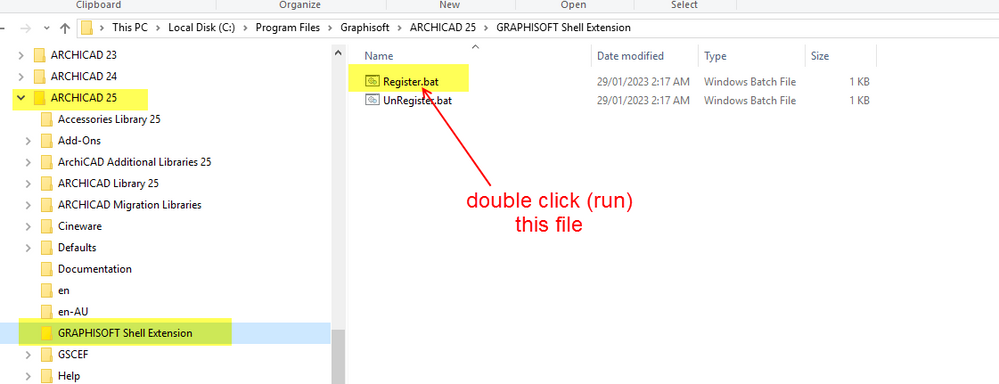
In the Archicad program folder you will find a 'Graphisoft Shell Extension' folder.
In there is a 'Register.bat' file.
Run that file.
You may need to restart your machine afterwards.
This may or may not work.
What you described in your post should have worked also.
Barry.
One of the forum moderators.
Versions 6.5 to 27
i7-10700 @ 2.9Ghz, 32GB ram, GeForce RTX 2060 (6GB), Windows 10
Lenovo Thinkpad - i7-1270P 2.20 GHz, 32GB RAM, Nvidia T550, Windows 11
Versions 6.5 to 27
i7-10700 @ 2.9Ghz, 32GB ram, GeForce RTX 2060 (6GB), Windows 10
Lenovo Thinkpad - i7-1270P 2.20 GHz, 32GB RAM, Nvidia T550, Windows 11

Still looking?

Suggested topics
- Archicad 30: What have you done? in General discussions
- Graphisoft Learn Archicad 30 Upgrade Training file beta warning in General discussions
- Add-on to automatically track/stamp elements with Teamwork user + date/time + create/reserve/edit in Teamwork & BIMcloud
- License Sell - Buy in General discussions
- Missing Attributes in Library Elements – Teamwork File / Educational Version in Libraries & objects
