
Turn on suggestions
Auto-suggest helps you quickly narrow down your search results by suggesting possible matches as you type.
Showing results for
EN
Turn on suggestions
Auto-suggest helps you quickly narrow down your search results by suggesting possible matches as you type.
Showing results for
- English
- :
- Forum
- :
- Documentation
- :
- Re: the edges of objects and slabs are broken
Options
- Subscribe to RSS Feed
- Mark Topic as New
- Mark Topic as Read
- Pin this post for me
- Bookmark
- Subscribe to Topic
- Mute
- Printer Friendly Page

sara12
Contributor
Options
- Mark as New
- Bookmark
- Subscribe
- Mute
- Subscribe to RSS Feed
- Permalink
- Report Inappropriate Content
2022-06-11 09:57 PM
the edges of objects and slabs are broken
2022-06-11
09:57 PM
hi,
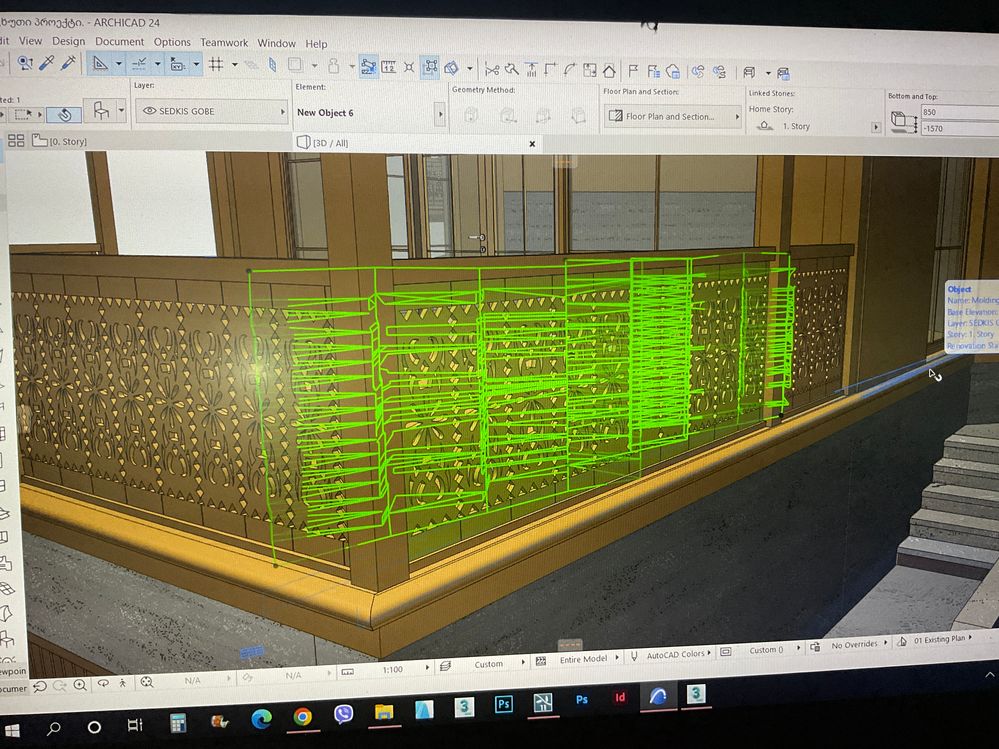
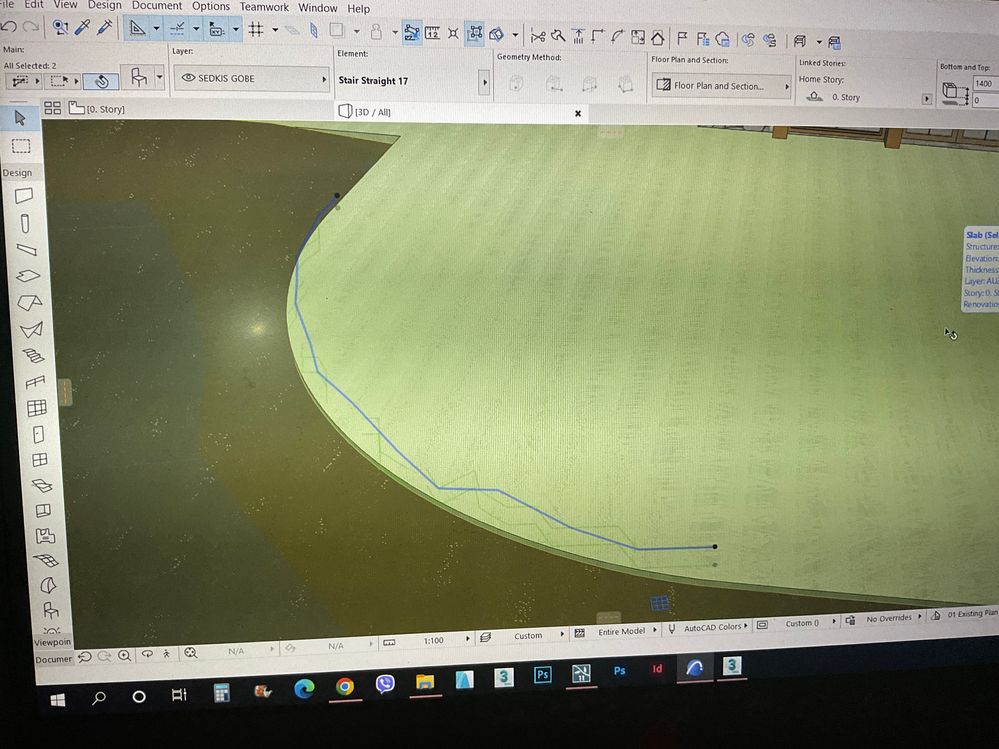
in Archicad the edges of objects and slabs are broken. can someone help me solve this problem?
Solved! Go to Solution.
Solved
Read-Only
2 Solutions
Accepted Solutions
mikas
Advisor
Options
- Mark as New
- Bookmark
- Subscribe
- Mute
- Subscribe to RSS Feed
- Permalink
- Report Inappropriate Content
2022-06-12 03:17 PM
2022-06-12
03:17 PM
Not sure, but are you possibly modelling too far from the origin?
If so, move the model closer, maybe it straightens out this way.
AC28, Rhino8+Grasshopper, TwinMotion • Mac Pro 6,1 E5-1650v2-3,5GHz/128GB/eGPU:6800XT/11.6.5 • HP Z4/Xeon W-2195/256GB/RTX4080FE 16GB/W11ProWS

runxel
Moderator
Options
- Mark as New
- Bookmark
- Subscribe
- Mute
- Subscribe to RSS Feed
- Permalink
- Report Inappropriate Content
2022-06-12 07:20 PM - edited 2022-06-12 07:22 PM
2022-06-12
07:20 PM
There are only two possible reasons: Your GPU driver has gone bad and you need to update (very rarely the case).
Or you have modeled something very far from the origin (or modeled seperate things with a very big distance between them).
Possibly you have imported a DWG at some point? Those tend to sometimes generate geometry far away.
Please note that this goes for every view! Also independent worksheets.
Meaning you need to check the extent of every view.
After cleaning everything up you also need to close and reopen the file so Archicad can rearrange its internals.
Lucas Becker | AC 29 on Mac (Sequoia) | Graphisoft Insider Panelist | Akroter.io – high-end GDL objects | Author of Runxel's Archicad Wiki | Editor at SelfGDL | Developer of the GDL plugin for Sublime Text
My List of AC shortcomings & bugs | I Will Piledrive You If You Mention AI Again |
POSIWID – The Purpose Of a System Is What It Does /// «Furthermore, I consider that Carth... yearly releases must be destroyed»
My List of AC shortcomings & bugs | I Will Piledrive You If You Mention AI Again |
POSIWID – The Purpose Of a System Is What It Does /// «Furthermore, I consider that Carth... yearly releases must be destroyed»
5 Replies 5
sara12
Contributor
Options
- Mark as New
- Bookmark
- Subscribe
- Mute
- Subscribe to RSS Feed
- Permalink
- Report Inappropriate Content
2022-06-11 09:59 PM
2022-06-11
09:59 PM
mikas
Advisor
Options
- Mark as New
- Bookmark
- Subscribe
- Mute
- Subscribe to RSS Feed
- Permalink
- Report Inappropriate Content
2022-06-12 03:17 PM
2022-06-12
03:17 PM
Not sure, but are you possibly modelling too far from the origin?
If so, move the model closer, maybe it straightens out this way.
AC28, Rhino8+Grasshopper, TwinMotion • Mac Pro 6,1 E5-1650v2-3,5GHz/128GB/eGPU:6800XT/11.6.5 • HP Z4/Xeon W-2195/256GB/RTX4080FE 16GB/W11ProWS
sara12
Contributor
Options
- Mark as New
- Bookmark
- Subscribe
- Mute
- Subscribe to RSS Feed
- Permalink
- Report Inappropriate Content
2022-06-12 05:20 PM - edited 2022-06-19 08:02 PM
2022-06-12
05:20 PM
thank you so much for the answer
runxel
Moderator
Options
- Mark as New
- Bookmark
- Subscribe
- Mute
- Subscribe to RSS Feed
- Permalink
- Report Inappropriate Content
2022-06-12 07:20 PM - edited 2022-06-12 07:22 PM
2022-06-12
07:20 PM
There are only two possible reasons: Your GPU driver has gone bad and you need to update (very rarely the case).
Or you have modeled something very far from the origin (or modeled seperate things with a very big distance between them).
Possibly you have imported a DWG at some point? Those tend to sometimes generate geometry far away.
Please note that this goes for every view! Also independent worksheets.
Meaning you need to check the extent of every view.
After cleaning everything up you also need to close and reopen the file so Archicad can rearrange its internals.
Lucas Becker | AC 29 on Mac (Sequoia) | Graphisoft Insider Panelist | Akroter.io – high-end GDL objects | Author of Runxel's Archicad Wiki | Editor at SelfGDL | Developer of the GDL plugin for Sublime Text
My List of AC shortcomings & bugs | I Will Piledrive You If You Mention AI Again |
POSIWID – The Purpose Of a System Is What It Does /// «Furthermore, I consider that Carth... yearly releases must be destroyed»
My List of AC shortcomings & bugs | I Will Piledrive You If You Mention AI Again |
POSIWID – The Purpose Of a System Is What It Does /// «Furthermore, I consider that Carth... yearly releases must be destroyed»
sara12
Contributor
Options
- Mark as New
- Bookmark
- Subscribe
- Mute
- Subscribe to RSS Feed
- Permalink
- Report Inappropriate Content
2022-06-19 08:02 PM
2022-06-19
08:02 PM
thank you so much for the help

Still looking?

Suggested topics
- Broken Door and Window MVO in Libraries & objects
- Display Order Workflow in Documentation
- Solid element operations line weight issue in Modeling
- Apple Silicon AC version .pln produces broken library objects when opened in Windows. And viceversa in Libraries & objects
- Custom Door/Window Handle not selectable in Libraries & objects
