
Turn on suggestions
Auto-suggest helps you quickly narrow down your search results by suggesting possible matches as you type.
Showing results for
EN
Turn on suggestions
Auto-suggest helps you quickly narrow down your search results by suggesting possible matches as you type.
Showing results for
- English
- :
- Developer Hub
- :
- GDL
- :
- Re: Default variable not working
Options
- Subscribe to RSS Feed
- Mark Topic as New
- Mark Topic as Read
- Pin this post for me
- Bookmark
- Subscribe to Topic
- Mute
- Printer Friendly Page

jc4d
Expert
Options
- Mark as New
- Bookmark
- Subscribe
- Mute
- Subscribe to RSS Feed
- Permalink
- Report Inappropriate Content
2022-02-10 01:47 PM
Default variable not working
2022-02-10
01:47 PM
Hello,
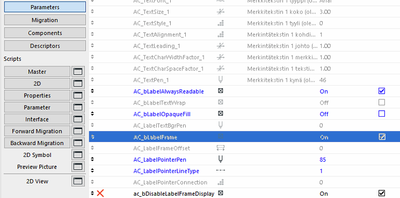
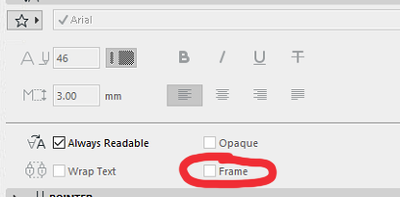
I made a copy of the Property Label 25 and set the AC_blabelFrame on and lock it, so it will be enable by default all the time. The problem is when I save that label to test it on a clean file. The frame checkbox comes unchecked which is not what I need.
That's not the right way to set a default?
This is how it looks before saving the label:
And here is how it looks when I load that label into a new Archicad instance:
Cheers.
Solved! Go to Solution.
1 Solution
Accepted Solutions

Yves
Expert
Options
- Mark as New
- Bookmark
- Subscribe
- Mute
- Subscribe to RSS Feed
- Permalink
- Report Inappropriate Content
2022-02-10 02:57 PM
2022-02-10
02:57 PM
Hello,
With this line in the master script 😉
PARAMETERS AC_bLabelFrame = 1
Yves Houssier
Belgium
Archicad 19 -> 24
iMac - Mac Os 10,13
Belgium
Archicad 19 -> 24
iMac - Mac Os 10,13
5 Replies 5

Options
- Mark as New
- Bookmark
- Subscribe
- Mute
- Subscribe to RSS Feed
- Permalink
- Report Inappropriate Content
2022-02-10 01:50 PM - edited 2022-02-12 12:27 PM
2022-02-10
01:50 PM
Unfortunately this parameter setting goes with the settings of the label You had settings open prior to loading Yours.
There are some parameters that cannot be set...and sometimes not even possible to hide...;(
Edit - I forgot of forcing it in master (because I did not test this one)
jc4d
Expert
Options
- Mark as New
- Bookmark
- Subscribe
- Mute
- Subscribe to RSS Feed
- Permalink
- Report Inappropriate Content
2022-02-10 02:07 PM
2022-02-10
02:07 PM
Ouch, not good. 😔
Thank you, I will unlock it then, there is no point to have it lock.
Options
- Mark as New
- Bookmark
- Subscribe
- Mute
- Subscribe to RSS Feed
- Permalink
- Report Inappropriate Content
2022-02-10 02:42 PM
2022-02-10
02:42 PM
I had the same with sill depth in windows 😜
Yves
Expert
Options
- Mark as New
- Bookmark
- Subscribe
- Mute
- Subscribe to RSS Feed
- Permalink
- Report Inappropriate Content
2022-02-10 02:57 PM
2022-02-10
02:57 PM
Hello,
With this line in the master script 😉
PARAMETERS AC_bLabelFrame = 1
Yves Houssier
Belgium
Archicad 19 -> 24
iMac - Mac Os 10,13
Belgium
Archicad 19 -> 24
iMac - Mac Os 10,13
jc4d
Expert
Options
- Mark as New
- Bookmark
- Subscribe
- Mute
- Subscribe to RSS Feed
- Permalink
- Report Inappropriate Content
2022-02-10 05:27 PM
2022-02-10
05:27 PM
That's fantastic, thank you 😊

Didn't find the answer?
Check other topics in this Forum
Back to ForumRead the latest accepted solutions!
Accepted SolutionsStart a new conversation!

Suggested topics
- GDL: Multi Use Code Label in GDL
- Wall Accessory GDL object doesn't write back dictionary to parameters (possible bug) in GDL
- How to read/edit/change/copy neig for drawings or the equivalent sub-elements identified by neig? in Archicad C++ API
- Zone Category Creation Issue in ArchiCAD C++ API in Archicad C++ API
- Display Objects Elevation in GDL
