
Turn on suggestions
Auto-suggest helps you quickly narrow down your search results by suggesting possible matches as you type.
Showing results for
EN
Turn on suggestions
Auto-suggest helps you quickly narrow down your search results by suggesting possible matches as you type.
Showing results for
- English
- :
- Forum
- :
- Installation & update
- :
- Re: AC21 - Hidden lines in 3D Document
Options
- Subscribe to RSS Feed
- Mark Topic as New
- Mark Topic as Read
- Pin this post for me
- Bookmark
- Subscribe to Topic
- Mute
- Printer Friendly Page

alemanda
Expert
Options
- Mark as New
- Bookmark
- Subscribe
- Mute
- Subscribe to RSS Feed
- Permalink
- Report Inappropriate Content
2017-11-07 07:35 PM
AC21 - Hidden lines in 3D Document
2017-11-07
07:35 PM
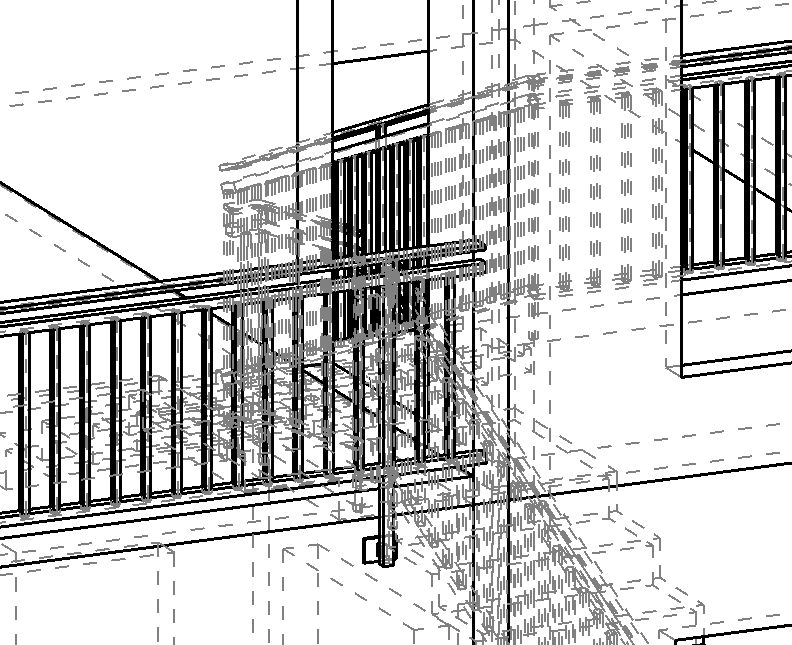
I think they should be displayed below the projection lines.
eng. Alessandro Mandala - Italy
AC27 latest hotfix
Win 11 Pro 64bit
Ultra 9 275HX 64GB GeForce RTX 5070ti
AC27 latest hotfix
Win 11 Pro 64bit
Ultra 9 275HX 64GB GeForce RTX 5070ti
Read-Only
Labels:
- Labels:
-
Performance
2 Replies 2

 Laszlo Nagy
Community Admin
Options
- Mark as New
- Bookmark
- Subscribe
- Mute
- Subscribe to RSS Feed
- Permalink
- Report Inappropriate Content
2017-11-12 05:56 PM
2017-11-12
05:56 PM
I think this situation is not that simple. There are multiple things in play here:
1. Cut lines
2. Uncut lines
3. Fills of cut surfaces
4. Fills of uncut surfaces
5. Vectorial hatches on uncut surfaces
6. Hidden lines
Currently, hidden lines are drawn in front of all other lines and fills.
If hidden lines were drawn behind all these, then hidden lines would not be visible behind any fills.
I think the way this should work best is hidden lines should be in front of all fills, but behind all other lines. I think this would be a more complex thing to achieve technologically, because you would have to separate the drawing of fills and lines (or maybe it is relatively simple, I am just guessing).
So I would say this is more a feature than a bug, but a feature that could be implemented more intelligently.
So I will forward this to GRAPHISOFT as a wish.
1. Cut lines
2. Uncut lines
3. Fills of cut surfaces
4. Fills of uncut surfaces
5. Vectorial hatches on uncut surfaces
6. Hidden lines
Currently, hidden lines are drawn in front of all other lines and fills.
If hidden lines were drawn behind all these, then hidden lines would not be visible behind any fills.
I think the way this should work best is hidden lines should be in front of all fills, but behind all other lines. I think this would be a more complex thing to achieve technologically, because you would have to separate the drawing of fills and lines (or maybe it is relatively simple, I am just guessing).
So I would say this is more a feature than a bug, but a feature that could be implemented more intelligently.
So I will forward this to GRAPHISOFT as a wish.
Loving Archicad since 1995 - Find Archicad Tips at x.com/laszlonagy
AMD Ryzen9 5900X CPU, 64 GB RAM 3600 MHz, Nvidia GTX 1060 6GB, 500 GB NVMe SSD
2x28" (2560x1440), Windows 10 PRO ENG, Ac20-Ac29
AMD Ryzen9 5900X CPU, 64 GB RAM 3600 MHz, Nvidia GTX 1060 6GB, 500 GB NVMe SSD
2x28" (2560x1440), Windows 10 PRO ENG, Ac20-Ac29
alemanda
Expert
Options
- Mark as New
- Bookmark
- Subscribe
- Mute
- Subscribe to RSS Feed
- Permalink
- Report Inappropriate Content
2017-11-12 06:05 PM
2017-11-12
06:05 PM
Saying that in programming way... it might be
If fills are off then draw hidden lines first.

If fills are off then draw hidden lines first.
eng. Alessandro Mandala - Italy
AC27 latest hotfix
Win 11 Pro 64bit
Ultra 9 275HX 64GB GeForce RTX 5070ti
AC27 latest hotfix
Win 11 Pro 64bit
Ultra 9 275HX 64GB GeForce RTX 5070ti

Still looking?

Suggested topics
