
Turn on suggestions
Auto-suggest helps you quickly narrow down your search results by suggesting possible matches as you type.
Showing results for
EN
Turn on suggestions
Auto-suggest helps you quickly narrow down your search results by suggesting possible matches as you type.
Showing results for
- English
- :
- Forum
- :
- Libraries & objects
- :
- Re: 3d window trees have square shadows
Options
- Subscribe to RSS Feed
- Mark Topic as New
- Mark Topic as Read
- Pin this post for me
- Bookmark
- Subscribe to Topic
- Mute
- Printer Friendly Page

Anonymous
Not applicable
Options
- Mark as New
- Bookmark
- Subscribe
- Mute
- Subscribe to RSS Feed
- Permalink
- Report Inappropriate Content
2014-08-11
06:57 PM
- last edited on
2023-05-24
12:33 PM
by
 Rubia Torres
3d window trees have square shadows
2014-08-11
06:57 PM
H

3 Replies 3
Anonymous
Not applicable
Options
- Mark as New
- Bookmark
- Subscribe
- Mute
- Subscribe to RSS Feed
- Permalink
- Report Inappropriate Content
2014-08-12 05:27 AM
2014-08-12
05:27 AM
These trees are not true 3D trees but are a 'Billboard' type of tree, they consist of a flat plane with an image mapped onto that plane.
If you want shadows you will need to use 'Tree Model' object and adjust parameters to suit the type of tree you require.
Regards,
Scott
If you want shadows you will need to use 'Tree Model' object and adjust parameters to suit the type of tree you require.
Regards,
Scott
Anonymous
Not applicable
Options
- Mark as New
- Bookmark
- Subscribe
- Mute
- Subscribe to RSS Feed
- Permalink
- Report Inappropriate Content
2014-08-12 05:57 AM
2014-08-12
05:57 AM
Thanks scott,
that is a wee bit of a pain. is there a way of telling, before i waste my time downloading then placing them?
h
that is a wee bit of a pain. is there a way of telling, before i waste my time downloading then placing them?
h
Anonymous
Not applicable
Options
- Mark as New
- Bookmark
- Subscribe
- Mute
- Subscribe to RSS Feed
- Permalink
- Report Inappropriate Content
2014-08-12 08:31 AM
2014-08-12
08:31 AM
I generally use the trees included in the ArchiCAD library and edit the parameters and textures till I get a tree that I am happy with.
Trees in attached image are Tree Deciduous 6 17 from the ArchiCAD 17 Object Library.
Regards,
Scott
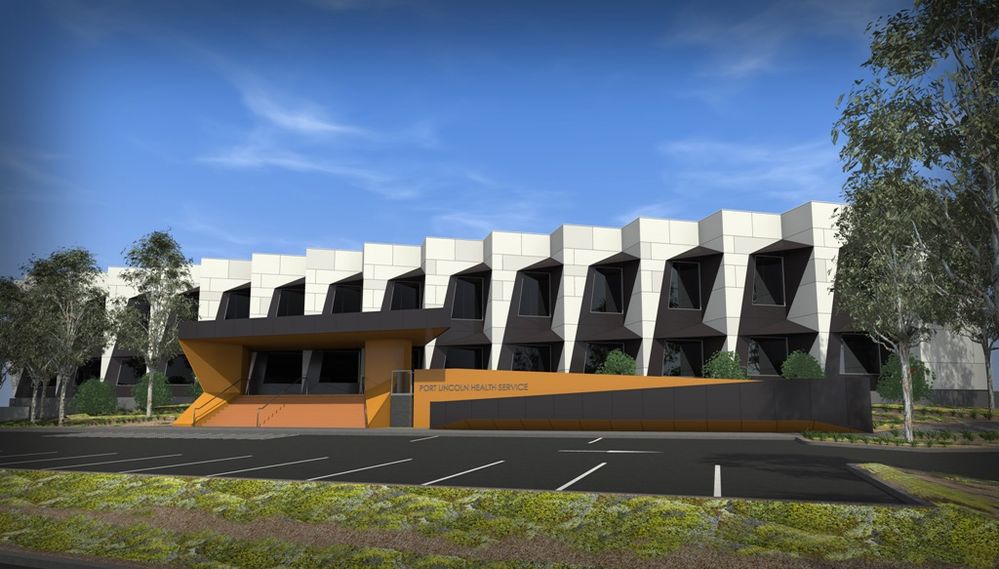
Trees in attached image are Tree Deciduous 6 17 from the ArchiCAD 17 Object Library.
Regards,
Scott
Didn't find the answer?
Check other topics in this Forum
Back to ForumRead the latest accepted solutions!
Accepted SolutionsStart a new conversation!

Suggested topics
