
Turn on suggestions
Auto-suggest helps you quickly narrow down your search results by suggesting possible matches as you type.
Showing results for
EN
Turn on suggestions
Auto-suggest helps you quickly narrow down your search results by suggesting possible matches as you type.
Showing results for
- English
- :
- Forum
- :
- Libraries & objects
- :
- Change Relative Base Height
Options
- Subscribe to RSS Feed
- Mark Topic as New
- Mark Topic as Read
- Pin this post for me
- Bookmark
- Subscribe to Topic
- Mute
- Printer Friendly Page

Anonymous
Not applicable
Options
- Mark as New
- Bookmark
- Subscribe
- Mute
- Subscribe to RSS Feed
- Permalink
- Report Inappropriate Content
2020-03-23 03:16 PM
Change Relative Base Height
2020-03-23
03:16 PM
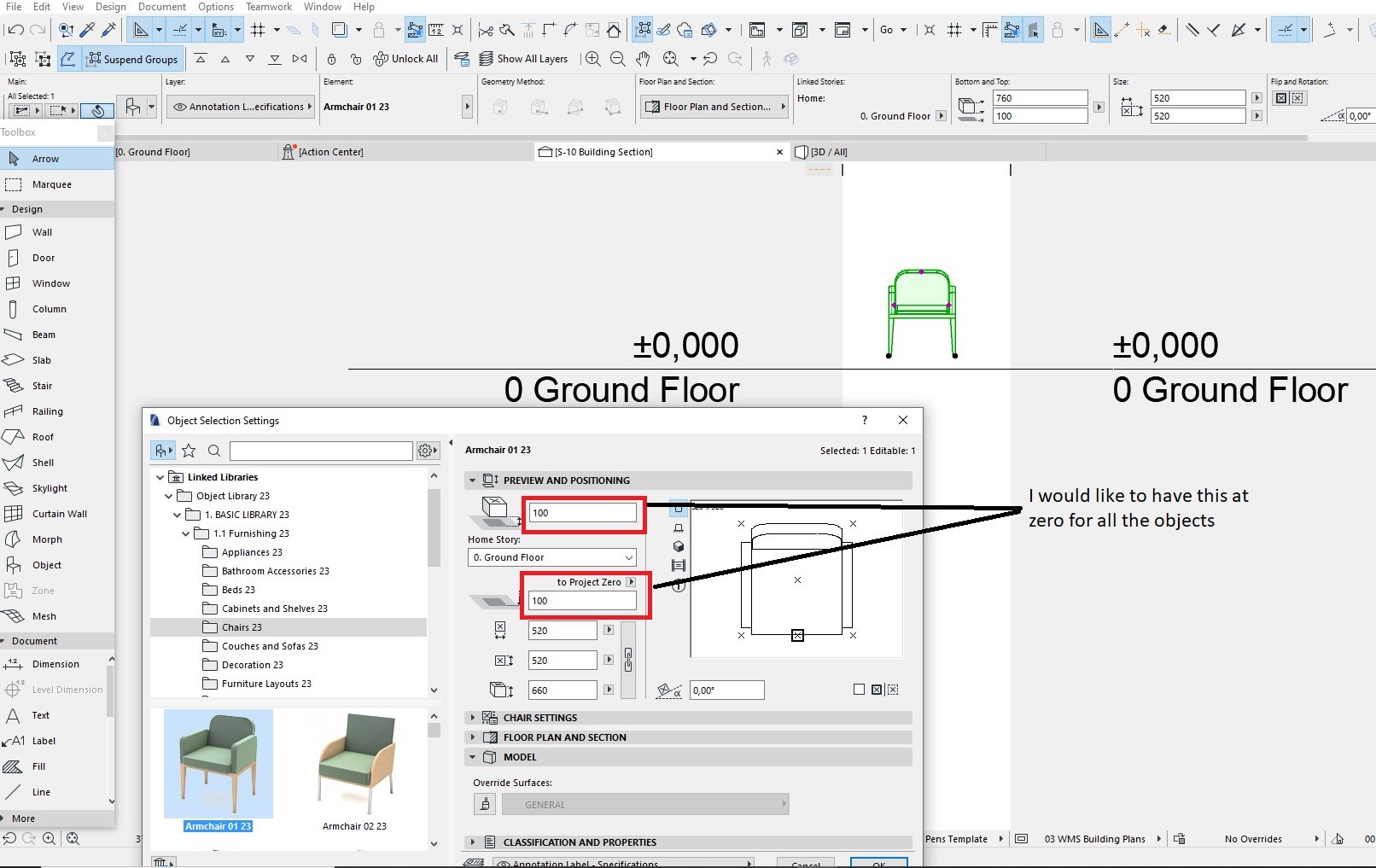
Since we installed Archicad 23 the Relative Base Height (Elevation to Project Zero) defaults to Zero This causes all our objects that we place in the project to be 100mm above Project Zero. We would like it to be Zero. Where can I set this globally so that all the objects are placed at zero above Project Zero.
2 Replies 2

runxel
Moderator
Options
- Mark as New
- Bookmark
- Subscribe
- Mute
- Subscribe to RSS Feed
- Permalink
- Report Inappropriate Content
2020-03-23 04:41 PM
2020-03-23
04:41 PM
If you're using favorites you might need to update them.
If not:
The things you set in a tool will stay until the next time. So just set it once, but don't place anything. This can be done everywhere, e.g. set a default layer for walls.
If you're happy with your "defaults" just save the file as a template: it will remember the tool settings as well!
For all the objects already placed:
Just use find&select.
If not:
The things you set in a tool will stay until the next time. So just set it once, but don't place anything. This can be done everywhere, e.g. set a default layer for walls.
If you're happy with your "defaults" just save the file as a template: it will remember the tool settings as well!
For all the objects already placed:
Just use find&select.
Lucas Becker | AC 29 on Mac (Sequoia) | Graphisoft Insider Panelist | Akroter.io – high-end GDL objects | Author of Runxel's Archicad Wiki | Editor at SelfGDL | Developer of the GDL plugin for Sublime Text
My List of AC shortcomings & bugs | I Will Piledrive You If You Mention AI Again |
POSIWID – The Purpose Of a System Is What It Does /// «Furthermore, I consider that Carth... yearly releases must be destroyed»
My List of AC shortcomings & bugs | I Will Piledrive You If You Mention AI Again |
POSIWID – The Purpose Of a System Is What It Does /// «Furthermore, I consider that Carth... yearly releases must be destroyed»
Anonymous
Not applicable
Options
- Mark as New
- Bookmark
- Subscribe
- Mute
- Subscribe to RSS Feed
- Permalink
- Report Inappropriate Content
2020-03-24 07:36 AM
2020-03-24
07:36 AM
Thanks! Will do so.
Didn't find the answer?
Check other topics in this Forum
Back to ForumRead the latest accepted solutions!
Accepted SolutionsStart a new conversation!

Suggested topics
- Surface / Component Schedule Bug: Automatic Column Wrapping Ignores Folded Geometry and Returns Flat in Project data & BIM
- Custome Cabinet design in Modeling
- door leaf not matching nominal sizes in Libraries & objects
- Can't change height spiral stair in Modeling
- specific type of window in Archicad in Libraries & objects
