
Turn on suggestions
Auto-suggest helps you quickly narrow down your search results by suggesting possible matches as you type.
Showing results for
EN
Turn on suggestions
Auto-suggest helps you quickly narrow down your search results by suggesting possible matches as you type.
Showing results for
- English
- :
- Forum
- :
- Libraries & objects
- :
- Re: What is the thick black line on the cross sect...
Options
- Subscribe to RSS Feed
- Mark Topic as New
- Mark Topic as Read
- Pin this post for me
- Bookmark
- Subscribe to Topic
- Mute
- Printer Friendly Page

LeeJaeYoung
Virtuoso
Options
- Mark as New
- Bookmark
- Subscribe
- Mute
- Subscribe to RSS Feed
- Permalink
- Report Inappropriate Content
2022-10-16
01:58 PM
- last edited on
2023-05-24
09:41 AM
by
 Rubia Torres
What is the thick black line on the cross section of the door?
2022-10-16
01:58 PM

1. Enterance door 25
2. Style 1
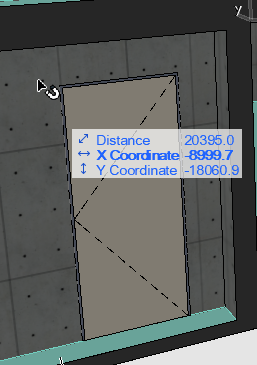
I can't find it. ^^
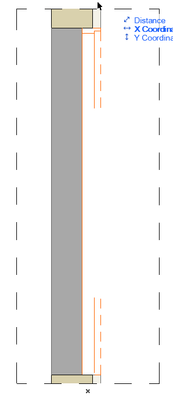
this is detail view.
I deleted one outline.
It had these things in it.
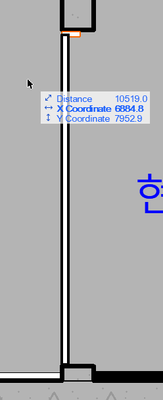
This image was opened 4 days ago.
AC27 on window 11
Solved! Go to Solution.
1 Solution
Accepted Solutions

A_ Smith
Expert
Options
- Mark as New
- Bookmark
- Subscribe
- Mute
- Subscribe to RSS Feed
- Permalink
- Report Inappropriate Content
2022-10-17 08:00 AM
2022-10-17
08:00 AM
Looks like it's "opening lines" you need to disable at door settings or MVO
AC 22, 24 | Win 10
4 Replies 4
A_ Smith
Expert
Options
- Mark as New
- Bookmark
- Subscribe
- Mute
- Subscribe to RSS Feed
- Permalink
- Report Inappropriate Content
2022-10-17 08:00 AM
2022-10-17
08:00 AM
Looks like it's "opening lines" you need to disable at door settings or MVO
AC 22, 24 | Win 10
LeeJaeYoung
Virtuoso
Options
- Mark as New
- Bookmark
- Subscribe
- Mute
- Subscribe to RSS Feed
- Permalink
- Report Inappropriate Content
2022-10-17 12:02 PM
2022-10-17
12:02 PM
thank you so much ^^
AC27 on window 11
LeeJaeYoung
Virtuoso
Options
- Mark as New
- Bookmark
- Subscribe
- Mute
- Subscribe to RSS Feed
- Permalink
- Report Inappropriate Content
2022-10-17 12:03 PM
2022-10-17
12:03 PM
But why does this happen? Why does the opening line affect 3D?
AC27 on window 11

Barry Kelly
Moderator
Options
- Mark as New
- Bookmark
- Subscribe
- Mute
- Subscribe to RSS Feed
- Permalink
- Report Inappropriate Content
2022-10-18 03:03 AM
2022-10-18
03:03 AM
The opening lines are set to show in 3D.
Seems on one side they are dashed and on the other side of the door they are solid.
Because they show in 3D, they also show in elevations and sections.
Your section cuts through the door, so you are only seeing part of those opening lines.
Barry.
One of the forum moderators.
Versions 6.5 to 27
i7-10700 @ 2.9Ghz, 32GB ram, GeForce RTX 2060 (6GB), Windows 10
Lenovo Thinkpad - i7-1270P 2.20 GHz, 32GB RAM, Nvidia T550, Windows 11
Versions 6.5 to 27
i7-10700 @ 2.9Ghz, 32GB ram, GeForce RTX 2060 (6GB), Windows 10
Lenovo Thinkpad - i7-1270P 2.20 GHz, 32GB RAM, Nvidia T550, Windows 11

Didn't find the answer?
Check other topics in this Forum
Back to ForumRead the latest accepted solutions!
Accepted SolutionsStart a new conversation!

Suggested topics
- Walls visible in cross sections are disappearing in interior elevations in Modeling
- DWG Export Issue: Elevations and Sections Showing as Solid Black Fills in Collaboration with other software
- Combine result of two properties which differentiates between 2 different element types in Project data & BIM
- How to modeling rectangular ducts with specific inner bend radius or reduction length in the new MEP in Modeling
- Updates. Wish list in Our Community
