
Turn on suggestions
Auto-suggest helps you quickly narrow down your search results by suggesting possible matches as you type.
Showing results for
EN
Turn on suggestions
Auto-suggest helps you quickly narrow down your search results by suggesting possible matches as you type.
Showing results for
- English
- :
- Forum
- :
- Libraries & objects
- :
- Re: cannot get .gsm to load in library
Options
- Subscribe to RSS Feed
- Mark Topic as New
- Mark Topic as Read
- Pin this post for me
- Bookmark
- Subscribe to Topic
- Mute
- Printer Friendly Page

Dave Brach
Expert
Options
- Mark as New
- Bookmark
- Subscribe
- Mute
- Subscribe to RSS Feed
- Permalink
- Report Inappropriate Content
2023-08-30 04:31 PM
cannot get .gsm to load in library
2023-08-30
04:31 PM
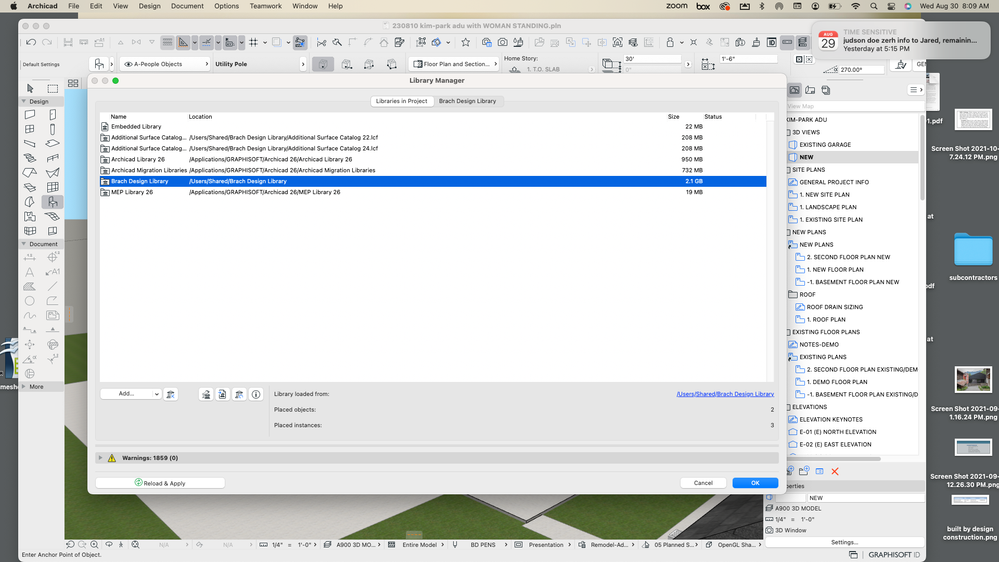
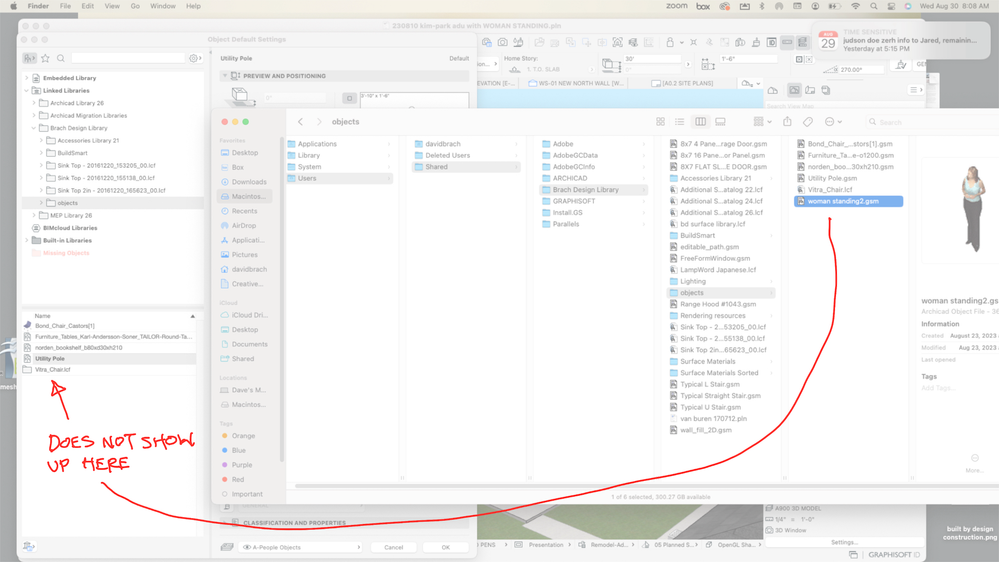
I downloaded an object ("womanstanding2.gsm"), then exported it to my local drive where my company library is. But it will not show up in the "objects" folder in the archicad object tool, even though I have clicked "reload and apply" and also closed the file and reopened it.
Dave Brach/architect AC28 Macbook M4 Pro OS Sequoia
Solved! Go to Solution.
Solved
Labels:
- Labels:
-
Library Management
1 Solution
Accepted Solutions
Dave Brach
Expert
Options
- Mark as New
- Bookmark
- Subscribe
- Mute
- Subscribe to RSS Feed
- Permalink
- Report Inappropriate Content
2023-08-31 12:53 AM
2023-08-31
12:53 AM
Thanks for your responses. I realized that when I downloaded the object it went into the embedded library, and that it would not show in the linked library until I deleted it in the embedded library. So now it shows up fine.
Dave Brach/architect AC28 Macbook M4 Pro OS Sequoia
3 Replies 3

Karl Ottenstein
Moderator Emeritus
Options
- Mark as New
- Bookmark
- Subscribe
- Mute
- Subscribe to RSS Feed
- Permalink
- Report Inappropriate Content
2023-08-30 07:39 PM
2023-08-30
07:39 PM
Strange! Wonder if something is wrong with the object? To check, try (1) just dragging the object from Finder into your model to verify if that works correctly and/or (2) open the object with the GDL editor to see if anything is reported to be wrong with it.
Vote for Wish: Copy/Paste in 3D
AC 29 USA and earlier • hardware key • macOS Tahoe 26.7 MacBook Pro M2 Max 12CPU/30GPU cores, 32GB
AC 29 USA and earlier • hardware key • macOS Tahoe 26.7 MacBook Pro M2 Max 12CPU/30GPU cores, 32GB

DGSketcher
Legend
Options
- Mark as New
- Bookmark
- Subscribe
- Mute
- Subscribe to RSS Feed
- Permalink
- Report Inappropriate Content
2023-08-30 08:40 PM
2023-08-30
08:40 PM
If it's a Graphisoft object then it may be linked to called function(s) / data that you don't have in your library. The name you have supplied doesn't appear in my AC26 UKI library, a global search or the AC27TP INT library.
Apple iMac Intel i9 / macOS Sonoma / AC27UKI (most recent builds.. if they work)
Dave Brach
Expert
Options
- Mark as New
- Bookmark
- Subscribe
- Mute
- Subscribe to RSS Feed
- Permalink
- Report Inappropriate Content
2023-08-31 12:53 AM
2023-08-31
12:53 AM
Thanks for your responses. I realized that when I downloaded the object it went into the embedded library, and that it would not show in the linked library until I deleted it in the embedded library. So now it shows up fine.
Dave Brach/architect AC28 Macbook M4 Pro OS Sequoia

Didn't find the answer?
Check other topics in this Forum
Back to ForumRead the latest accepted solutions!
Accepted SolutionsStart a new conversation!

Suggested topics
- Parking layouts and solar parks in a site polygon in Libraries & objects
- Two free GDL objects: parking layouts and solar parks in a site polygon in Libraries & objects
- Knowledge Base Update & Migration in Our Community
- Climate and sunpath objects for analysis presentation in Libraries & objects
- Office Library & Template Management - When to Embed vs Link in Libraries & objects
