
Turn on suggestions
Auto-suggest helps you quickly narrow down your search results by suggesting possible matches as you type.
Showing results for
EN
Turn on suggestions
Auto-suggest helps you quickly narrow down your search results by suggesting possible matches as you type.
Showing results for
Options
- Subscribe to RSS Feed
- Mark Topic as New
- Mark Topic as Read
- Pin this post for me
- Bookmark
- Subscribe to Topic
- Mute
- Printer Friendly Page

Anonymous
Not applicable
Options
- Mark as New
- Bookmark
- Subscribe
- Mute
- Subscribe to RSS Feed
- Permalink
- Report Inappropriate Content
2021-05-15
11:24 AM
- last edited on
2023-05-25
05:31 PM
by
 Rubia Torres
Can not edit slab
2021-05-15
11:24 AM
Could you please tell me why I cannot edit "Slab" element (see attached file "Inactive Slab"?
I need it to be like the attached file "Active Slab".
Aysel.
Solved! Go to Solution.


1 Solution
Accepted Solutions

Podolsky
Ace
Options
- Mark as New
- Bookmark
- Subscribe
- Mute
- Subscribe to RSS Feed
- Permalink
- Report Inappropriate Content
2021-05-15 12:37 PM
2021-05-15
12:37 PM
What I can see here - two screenshots. One from Russian ArchiCAD, I guess version before 24, and second from English ArchiCAD 24.
The first (active, Russian) says - it's load-bearing element (конструктивная функция - несущий элемент).
Second says that structural load is undefined.
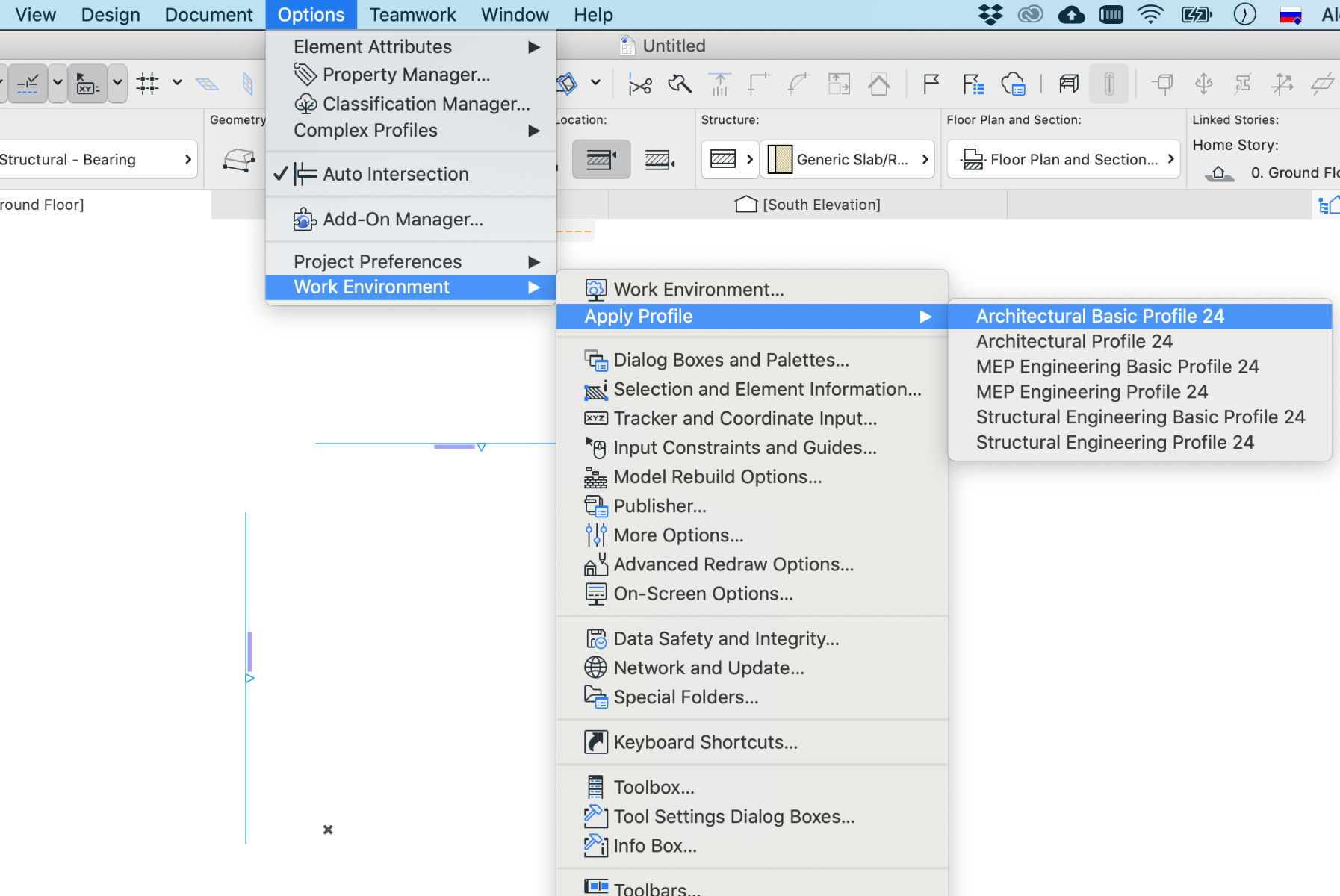
Also in the second screenshot FLOOR PLAN AND SECTION and MODEL (ОТОБРАЖЕНИЕ НА ПЛАНЕ И В РАЗРЕЗЕ и МОДЕЛЬ) tabs are hidden. It happens when ArchiCAD work environment is switched to "Structural Engineering Basic Profile". Switch to Architectural Basic, Architectural of Structural Engineer profile, to see these tabs.
The first (active, Russian) says - it's load-bearing element (конструктивная функция - несущий элемент).
Second says that structural load is undefined.
Also in the second screenshot FLOOR PLAN AND SECTION and MODEL (ОТОБРАЖЕНИЕ НА ПЛАНЕ И В РАЗРЕЗЕ и МОДЕЛЬ) tabs are hidden. It happens when ArchiCAD work environment is switched to "Structural Engineering Basic Profile". Switch to Architectural Basic, Architectural of Structural Engineer profile, to see these tabs.
Solution
2 Replies 2
Podolsky
Ace
Options
- Mark as New
- Bookmark
- Subscribe
- Mute
- Subscribe to RSS Feed
- Permalink
- Report Inappropriate Content
2021-05-15 12:37 PM
2021-05-15
12:37 PM
What I can see here - two screenshots. One from Russian ArchiCAD, I guess version before 24, and second from English ArchiCAD 24.
The first (active, Russian) says - it's load-bearing element (конструктивная функция - несущий элемент).
Second says that structural load is undefined.
Also in the second screenshot FLOOR PLAN AND SECTION and MODEL (ОТОБРАЖЕНИЕ НА ПЛАНЕ И В РАЗРЕЗЕ и МОДЕЛЬ) tabs are hidden. It happens when ArchiCAD work environment is switched to "Structural Engineering Basic Profile". Switch to Architectural Basic, Architectural of Structural Engineer profile, to see these tabs.
The first (active, Russian) says - it's load-bearing element (конструктивная функция - несущий элемент).
Second says that structural load is undefined.
Also in the second screenshot FLOOR PLAN AND SECTION and MODEL (ОТОБРАЖЕНИЕ НА ПЛАНЕ И В РАЗРЕЗЕ и МОДЕЛЬ) tabs are hidden. It happens when ArchiCAD work environment is switched to "Structural Engineering Basic Profile". Switch to Architectural Basic, Architectural of Structural Engineer profile, to see these tabs.
Solution
Anonymous
Not applicable
Options
- Mark as New
- Bookmark
- Subscribe
- Mute
- Subscribe to RSS Feed
- Permalink
- Report Inappropriate Content
2021-05-16 10:30 AM
2021-05-16
10:30 AM
Thank you for your help @Podolsky, it worked out!
KR,
Aysel.
KR,
Aysel.
Still looking?

Suggested topics
- Rounded Wall Corner displays correctly in Floor Plan but glitches in 3D Document in Modeling
- MEP AC29 Incorrect behavior of the Z mark in the tracking display when editing the Z mark of a pipe in Modeling
- Some free useful objects: Road signs, parametric pathway, roof crickets, crowds in Libraries & objects
- Custome Cabinet design in Modeling
- Can't create custom opening (grayed out) in Modeling
