
Turn on suggestions
Auto-suggest helps you quickly narrow down your search results by suggesting possible matches as you type.
Showing results for
EN
Turn on suggestions
Auto-suggest helps you quickly narrow down your search results by suggesting possible matches as you type.
Showing results for
Options
- Subscribe to RSS Feed
- Mark Topic as New
- Mark Topic as Read
- Pin this post for me
- Bookmark
- Subscribe to Topic
- Mute
- Printer Friendly Page

cadsph
Enthusiast
Options
- Mark as New
- Bookmark
- Subscribe
- Mute
- Subscribe to RSS Feed
- Permalink
- Report Inappropriate Content
2022-05-31 08:52 AM
Can't modify Edge beam strip footing profile dimensions
2022-05-31
08:52 AM
Hello,
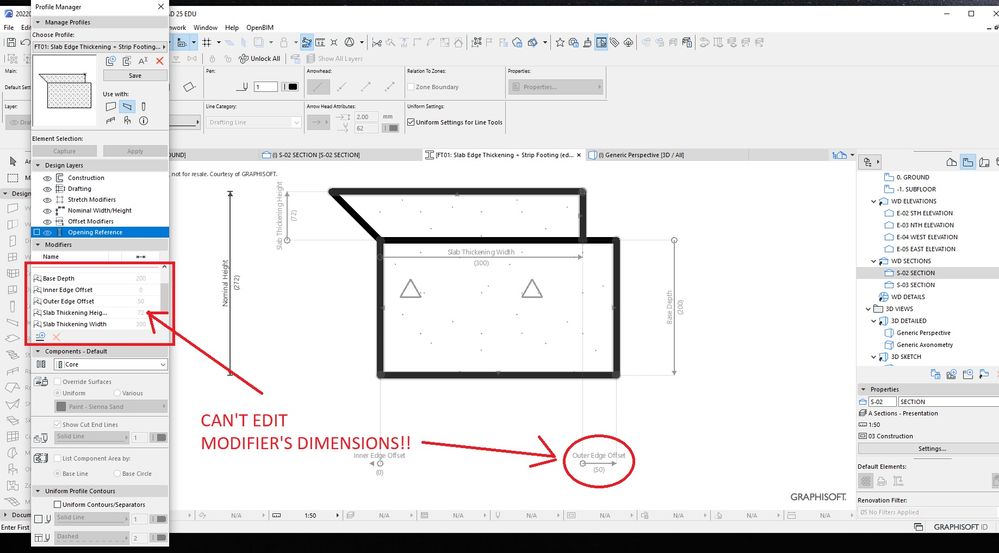
I can't modify Edge beam strip footing profile dimensions (or "Modifier" parameters).
I want to create copy & modify the "Outer Edge Offset" distance .
please see attached.
Or should I create a new profile from scratch?
Solved! Go to Solution.
Solved
Read-Only
1 Solution
Accepted Solutions

 James B
Graphisoft
Options
- Mark as New
- Bookmark
- Subscribe
- Mute
- Subscribe to RSS Feed
- Permalink
- Report Inappropriate Content
2022-05-31 09:25 AM
2022-05-31
09:25 AM
To adjust the dimension, select the fill and offset the edge of the polygon.
The modifiers in the Profile are the defaults, and these can be modified when used on an element (Wall, Beam or Column). But if you want to modify the defaults, then you just need to modify the fills shapes.
James Badcock
Graphisoft Staff Product Manager
Graphisoft Staff Product Manager
3 Replies 3
James B
Graphisoft
Options
- Mark as New
- Bookmark
- Subscribe
- Mute
- Subscribe to RSS Feed
- Permalink
- Report Inappropriate Content
2022-05-31 09:25 AM
2022-05-31
09:25 AM
To adjust the dimension, select the fill and offset the edge of the polygon.
The modifiers in the Profile are the defaults, and these can be modified when used on an element (Wall, Beam or Column). But if you want to modify the defaults, then you just need to modify the fills shapes.
James Badcock
Graphisoft Staff Product Manager
Graphisoft Staff Product Manager
cadsph
Enthusiast
Options
- Mark as New
- Bookmark
- Subscribe
- Mute
- Subscribe to RSS Feed
- Permalink
- Report Inappropriate Content
2022-05-31 03:19 PM
2022-05-31
03:19 PM
Great. Thanks James.
That was not at all obvious.
cadsph
Enthusiast
Options
- Mark as New
- Bookmark
- Subscribe
- Mute
- Subscribe to RSS Feed
- Permalink
- Report Inappropriate Content
2022-05-31 03:20 PM
2022-05-31
03:20 PM
Sorry, I meant to accept your post as "Accept Solution"

Still looking?
