
Turn on suggestions
Auto-suggest helps you quickly narrow down your search results by suggesting possible matches as you type.
Showing results for
EN
Turn on suggestions
Auto-suggest helps you quickly narrow down your search results by suggesting possible matches as you type.
Showing results for
Options
- Subscribe to RSS Feed
- Mark Topic as New
- Mark Topic as Read
- Pin this post for me
- Bookmark
- Subscribe to Topic
- Mute
- Printer Friendly Page

stevini
Booster
Options
- Mark as New
- Bookmark
- Subscribe
- Mute
- Subscribe to RSS Feed
- Permalink
- Report Inappropriate Content
2021-10-06 10:27 AM
Export to DWG overlapping items
2021-10-06
10:27 AM
Hello Folks 🙂
I draw a multi-storeys building and I need to export it in dwg. When I visualize, for instance the second floor, and export it to dwg, the file I get shows all the elements underneath the selected floor I am exporting. So, while in Archicad, the floor plan is clean, in autocad, it shows the second floor overlapping the 3 floors below.
How can I do?
Solved! Go to Solution.
Solved
Read-Only
1 Solution
Accepted Solutions
stevini
Booster
Options
- Mark as New
- Bookmark
- Subscribe
- Mute
- Subscribe to RSS Feed
- Permalink
- Report Inappropriate Content
2021-10-08 07:59 PM
2021-10-08
07:59 PM
I managed to solve the problem! I had to select each element on each floor and in "Floor Plan Display" select "Home Story Only". In this way I have a dwg drawing clean and tidy exactly the same I visualize in Archicad. Thanks anyway a lot for the support!
13 Replies 13

Options
- Mark as New
- Bookmark
- Subscribe
- Mute
- Subscribe to RSS Feed
- Permalink
- Report Inappropriate Content
2021-10-06 04:38 PM - edited 2021-10-06 04:39 PM
2021-10-06
04:38 PM
Hello Stevini,
You have to prepare a layout with all your level plans and publish this layout with the right DWG export translator. By this way you are able to get all your level plans into the "Object" space into Autocad.
stevini
Booster
Options
- Mark as New
- Bookmark
- Subscribe
- Mute
- Subscribe to RSS Feed
- Permalink
- Report Inappropriate Content
2021-10-06 07:19 PM
2021-10-06
07:19 PM
So I create one layout drawing which inclused 4 plans of my building, I save the drawing in DWG, and the result is the same as the previous one. Any wrong passage? Btw I am using Archicad 25
Options
- Mark as New
- Bookmark
- Subscribe
- Mute
- Subscribe to RSS Feed
- Permalink
- Report Inappropriate Content
2021-10-06 07:28 PM
2021-10-06
07:28 PM
Yes wrong passage about dwg translator parameters. 🤗
stevini
Booster
Options
- Mark as New
- Bookmark
- Subscribe
- Mute
- Subscribe to RSS Feed
- Permalink
- Report Inappropriate Content
2021-10-06 08:44 PM
2021-10-06
08:44 PM
I am editing the paramenters. I do not find any parameter which includes only the visible items. The only thing I find is visible layer but it doesn't work because the layer of the walls are the same in every floor. There isn't any straight forward and preset way to have a dwg clean as tidy as in the viewport in Archicad?
Options
- Mark as New
- Bookmark
- Subscribe
- Mute
- Subscribe to RSS Feed
- Permalink
- Report Inappropriate Content
2021-10-06 09:01 PM - edited 2021-10-06 09:01 PM
2021-10-06
09:01 PM
English is not my birth language, I'm not able to explain you as well as I want. Share you file and I will do it for you.
stevini
Booster
Options
- Mark as New
- Bookmark
- Subscribe
- Mute
- Subscribe to RSS Feed
- Permalink
- Report Inappropriate Content
2021-10-06 09:11 PM
2021-10-06
09:11 PM
well.. thank you very much! I cannot attach .pln files here so I will attach a link to wetransfer:
Options
- Mark as New
- Bookmark
- Subscribe
- Mute
- Subscribe to RSS Feed
- Permalink
- Report Inappropriate Content
2021-10-06 09:51 PM
2021-10-06
09:51 PM
Into AC you should put all your level plan views into one layout

Then add this DWG export translators into Archicad before publishing DWG :
https://fromsmash.com/all-dwg-into-one
It seems to be like this :
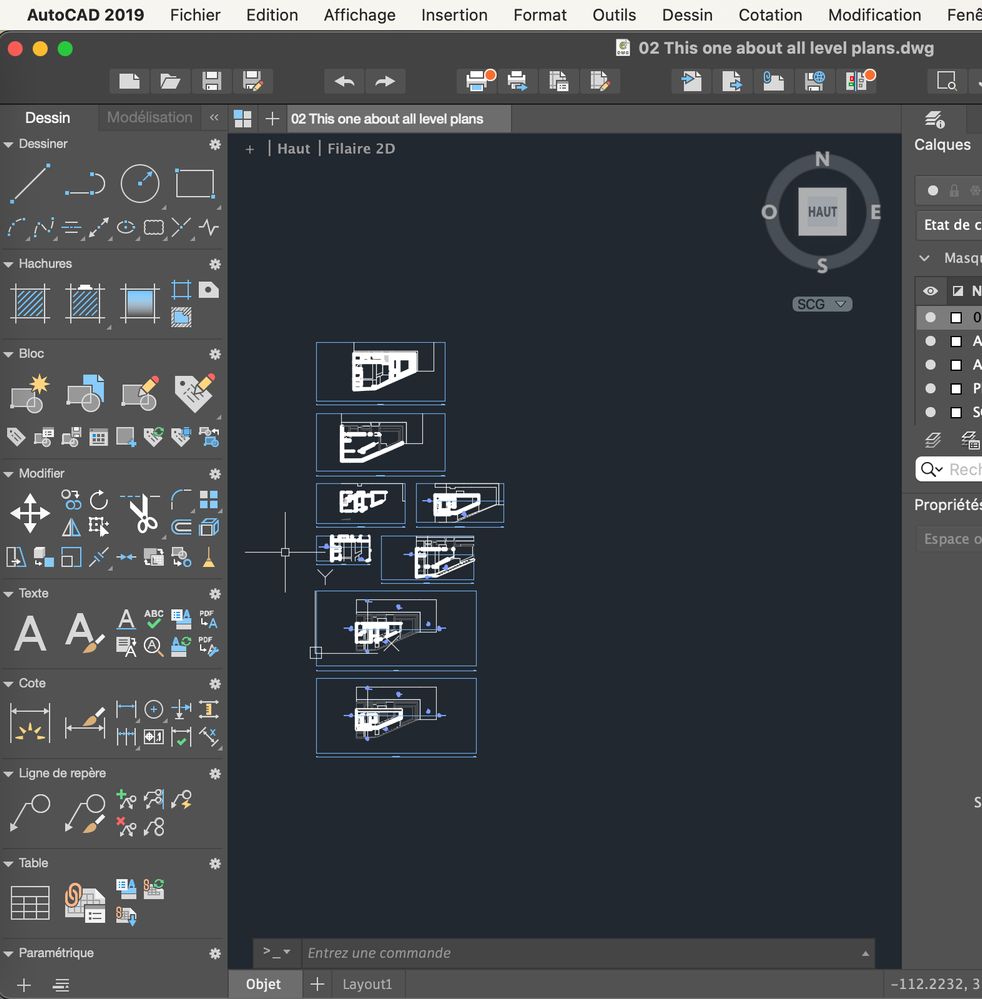
All your level plan views into Autocad "Object" space through one publication.
Is it what you need ?
Options
- Mark as New
- Bookmark
- Subscribe
- Mute
- Subscribe to RSS Feed
- Permalink
- Report Inappropriate Content
2021-10-06 10:15 PM - edited 2021-10-06 10:16 PM
2021-10-06
10:15 PM
Then you are able to change hatches, lines or pen type correspondences between Archicad and Autocad. It's possible to export windows, doors or cut hatches into associated layers too.
stevini
Booster
Options
- Mark as New
- Bookmark
- Subscribe
- Mute
- Subscribe to RSS Feed
- Permalink
- Report Inappropriate Content
2021-10-06 10:16 PM
2021-10-06
10:16 PM
I don't know how to use all-dwg-into-one.xml

Still looking?

Suggested topics
- Creating Working Drawing Sections in Documentation
- Workflow between Modules and Bimcloud Saas in Teamwork & BIMcloud
- Graphic Overrides By Renovation Status in Documentation
- DWG Object to Block in Collaboration with other software
- BOQ’s how do you organize them with AC to send them to XL ? in Project data & BIM
