
Turn on suggestions
Auto-suggest helps you quickly narrow down your search results by suggesting possible matches as you type.
Showing results for
EN
Turn on suggestions
Auto-suggest helps you quickly narrow down your search results by suggesting possible matches as you type.
Showing results for
Options
- Subscribe to RSS Feed
- Mark Topic as New
- Mark Topic as Read
- Pin this post for me
- Bookmark
- Subscribe to Topic
- Mute
- Printer Friendly Page

VideshN
Participant
Options
- Mark as New
- Bookmark
- Subscribe
- Mute
- Subscribe to RSS Feed
- Permalink
- Report Inappropriate Content
2021-09-09 02:28 PM
Expressions In Zone Stamp Rounded Number no Decimal
2021-09-09
02:28 PM
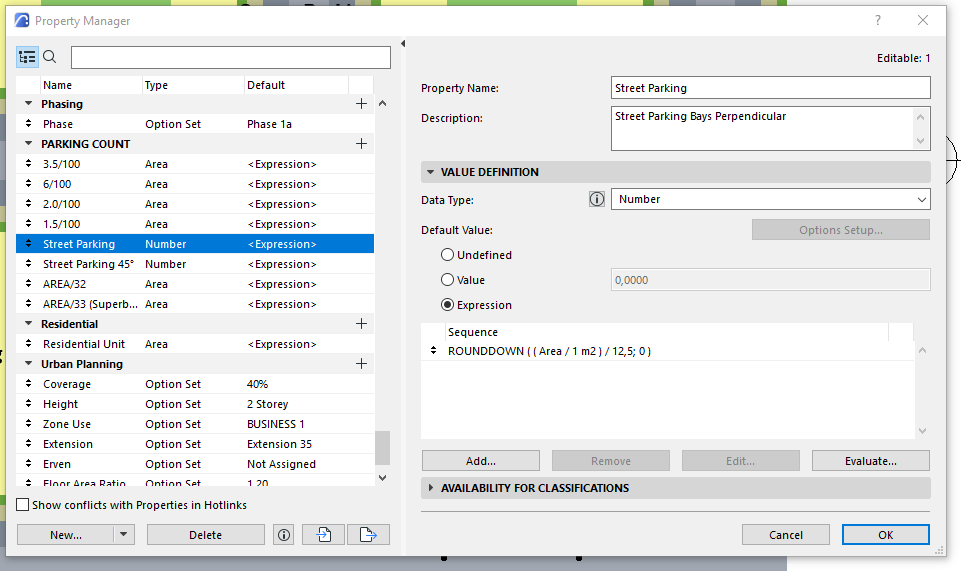
Using the Zone Tool and Expressions to calculate parking bays..
Instead of 20,00 and 13,00 it should read 20 & 13.
i also would like to add text that says Bays at the end, to read 20 bays
I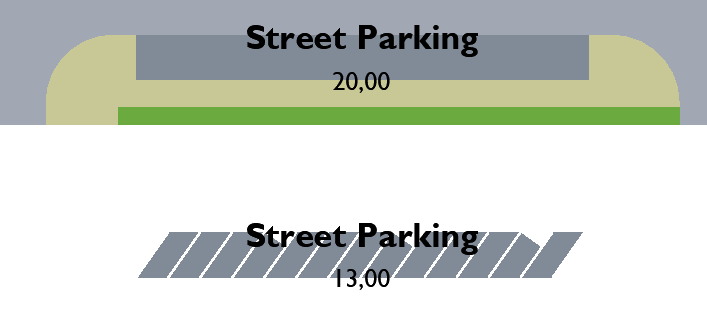
Solved! Go to Solution.
Solved
Read-Only
2 Solutions
Accepted Solutions

 Laszlo Nagy
Community Admin
Options
- Mark as New
- Bookmark
- Subscribe
- Mute
- Subscribe to RSS Feed
- Permalink
- Report Inappropriate Content
2021-09-09 02:58 PM
2021-09-09
02:58 PM
Make the "Street Parking" Property an "Integer" Data Type instead of a "Number" Data Type.
Loving Archicad since 1995 - Find Archicad Tips at x.com/laszlonagy
AMD Ryzen9 5900X CPU, 64 GB RAM 3600 MHz, Nvidia GTX 1060 6GB, 500 GB NVMe SSD
2x28" (2560x1440), Windows 10 PRO ENG, Ac20-Ac29
AMD Ryzen9 5900X CPU, 64 GB RAM 3600 MHz, Nvidia GTX 1060 6GB, 500 GB NVMe SSD
2x28" (2560x1440), Windows 10 PRO ENG, Ac20-Ac29
Laszlo Nagy
Community Admin
Options
- Mark as New
- Bookmark
- Subscribe
- Mute
- Subscribe to RSS Feed
- Permalink
- Report Inappropriate Content
2021-09-09 03:28 PM - edited 2021-09-09 03:31 PM
2021-09-09
03:28 PM
Actually, the whole thing can be achieved within a single Expression:
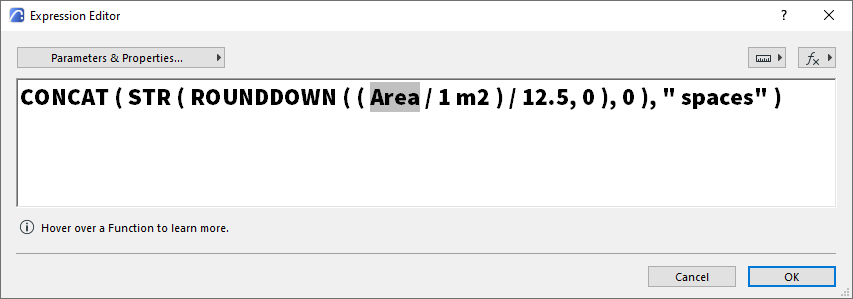
The exact Property Expression for copy-pasting it into your Property Expression Editor Dialog (triple-click to select it).
CONCAT ( STR ( ROUNDDOWN ( ( {Property:General Parameters/Area} / 1 m2 ) / 12.5, 0 ), 0 ), " spaces" )
Loving Archicad since 1995 - Find Archicad Tips at x.com/laszlonagy
AMD Ryzen9 5900X CPU, 64 GB RAM 3600 MHz, Nvidia GTX 1060 6GB, 500 GB NVMe SSD
2x28" (2560x1440), Windows 10 PRO ENG, Ac20-Ac29
AMD Ryzen9 5900X CPU, 64 GB RAM 3600 MHz, Nvidia GTX 1060 6GB, 500 GB NVMe SSD
2x28" (2560x1440), Windows 10 PRO ENG, Ac20-Ac29
9 Replies 9
Laszlo Nagy
Community Admin
Options
- Mark as New
- Bookmark
- Subscribe
- Mute
- Subscribe to RSS Feed
- Permalink
- Report Inappropriate Content
2021-09-09 02:58 PM
2021-09-09
02:58 PM
Make the "Street Parking" Property an "Integer" Data Type instead of a "Number" Data Type.
Loving Archicad since 1995 - Find Archicad Tips at x.com/laszlonagy
AMD Ryzen9 5900X CPU, 64 GB RAM 3600 MHz, Nvidia GTX 1060 6GB, 500 GB NVMe SSD
2x28" (2560x1440), Windows 10 PRO ENG, Ac20-Ac29
AMD Ryzen9 5900X CPU, 64 GB RAM 3600 MHz, Nvidia GTX 1060 6GB, 500 GB NVMe SSD
2x28" (2560x1440), Windows 10 PRO ENG, Ac20-Ac29
VideshN
Participant
Options
- Mark as New
- Bookmark
- Subscribe
- Mute
- Subscribe to RSS Feed
- Permalink
- Report Inappropriate Content
2021-09-09 03:05 PM
2021-09-09
03:05 PM
thank you..
VideshN
Participant
Options
- Mark as New
- Bookmark
- Subscribe
- Mute
- Subscribe to RSS Feed
- Permalink
- Report Inappropriate Content
2021-09-09 03:09 PM
2021-09-09
03:09 PM
what about adding text after, eg. 20 bays
Laszlo Nagy
Community Admin
Options
- Mark as New
- Bookmark
- Subscribe
- Mute
- Subscribe to RSS Feed
- Permalink
- Report Inappropriate Content
2021-09-09 03:26 PM
2021-09-09
03:26 PM
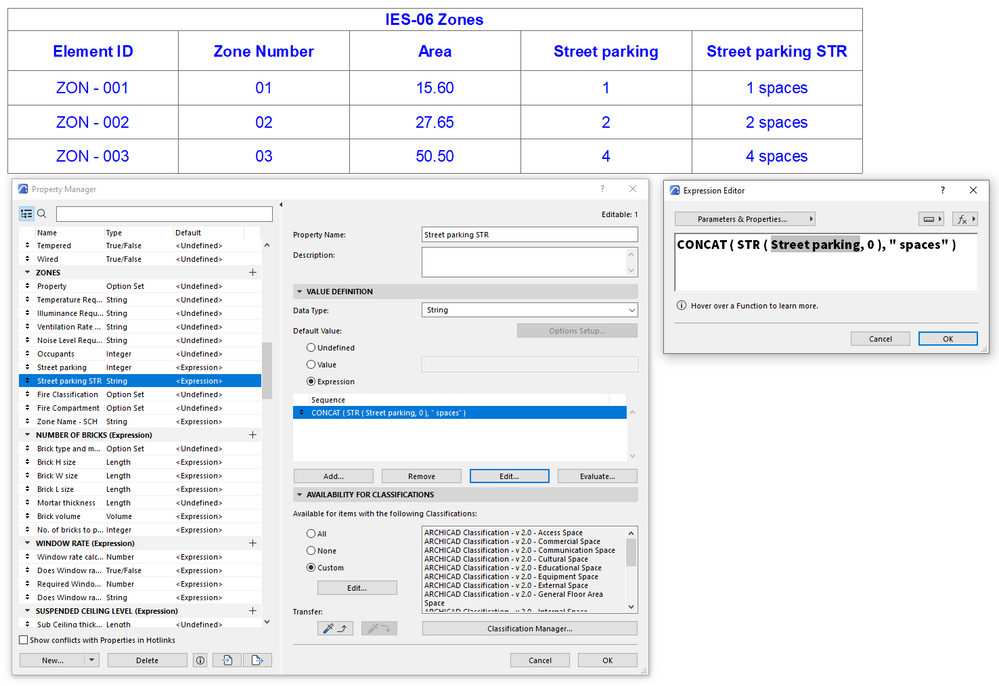
Use the STR operator to convert your Integer to a String, and then use the CONCAT operator to create a single String out of the number and the " spaces" text.
Loving Archicad since 1995 - Find Archicad Tips at x.com/laszlonagy
AMD Ryzen9 5900X CPU, 64 GB RAM 3600 MHz, Nvidia GTX 1060 6GB, 500 GB NVMe SSD
2x28" (2560x1440), Windows 10 PRO ENG, Ac20-Ac29
AMD Ryzen9 5900X CPU, 64 GB RAM 3600 MHz, Nvidia GTX 1060 6GB, 500 GB NVMe SSD
2x28" (2560x1440), Windows 10 PRO ENG, Ac20-Ac29
Laszlo Nagy
Community Admin
Options
- Mark as New
- Bookmark
- Subscribe
- Mute
- Subscribe to RSS Feed
- Permalink
- Report Inappropriate Content
2021-09-09 03:28 PM - edited 2021-09-09 03:31 PM
2021-09-09
03:28 PM
Actually, the whole thing can be achieved within a single Expression:
The exact Property Expression for copy-pasting it into your Property Expression Editor Dialog (triple-click to select it).
CONCAT ( STR ( ROUNDDOWN ( ( {Property:General Parameters/Area} / 1 m2 ) / 12.5, 0 ), 0 ), " spaces" )
Loving Archicad since 1995 - Find Archicad Tips at x.com/laszlonagy
AMD Ryzen9 5900X CPU, 64 GB RAM 3600 MHz, Nvidia GTX 1060 6GB, 500 GB NVMe SSD
2x28" (2560x1440), Windows 10 PRO ENG, Ac20-Ac29
AMD Ryzen9 5900X CPU, 64 GB RAM 3600 MHz, Nvidia GTX 1060 6GB, 500 GB NVMe SSD
2x28" (2560x1440), Windows 10 PRO ENG, Ac20-Ac29
VideshN
Participant
Options
- Mark as New
- Bookmark
- Subscribe
- Mute
- Subscribe to RSS Feed
- Permalink
- Report Inappropriate Content
2021-09-09 06:10 PM
2021-09-09
06:10 PM
You are Awesome Thank you so much!!
This was Great!
VideshN
Participant
Options
- Mark as New
- Bookmark
- Subscribe
- Mute
- Subscribe to RSS Feed
- Permalink
- Report Inappropriate Content
2021-09-09 06:38 PM
2021-09-09
06:38 PM
CONCAT ( STR ( ROUNDDOWN ( ( {Property:General Parameters/Area} / 1 m2 ) / 12,5; 0 ); 0 ); " spaces" )
The Windows Version.
Laszlo Nagy
Community Admin
Options
- Mark as New
- Bookmark
- Subscribe
- Mute
- Subscribe to RSS Feed
- Permalink
- Report Inappropriate Content
2021-09-09 07:29 PM
2021-09-09
07:29 PM
It is an operating system localization difference rather than an operating system version difference. I am on Windows too, but use another localization setting.
Your system is using the , character (comma) as a decimal character, while mine is using the . character (dot). Thus, in Property Expressions, your system needs to use the ; character between parameters, while my system needs to use the , character.
Loving Archicad since 1995 - Find Archicad Tips at x.com/laszlonagy
AMD Ryzen9 5900X CPU, 64 GB RAM 3600 MHz, Nvidia GTX 1060 6GB, 500 GB NVMe SSD
2x28" (2560x1440), Windows 10 PRO ENG, Ac20-Ac29
AMD Ryzen9 5900X CPU, 64 GB RAM 3600 MHz, Nvidia GTX 1060 6GB, 500 GB NVMe SSD
2x28" (2560x1440), Windows 10 PRO ENG, Ac20-Ac29
VideshN
Participant
Options
- Mark as New
- Bookmark
- Subscribe
- Mute
- Subscribe to RSS Feed
- Permalink
- Report Inappropriate Content
2021-09-09 09:10 PM
2021-09-09
09:10 PM
I see, thank you..

Still looking?

Suggested topics
- Expression Editor Help-Decimal Expression in Project data & BIM
- Can falls be expressed in say 1:40 (1 in 40) or 1:30.5 (1 in 39.48) rounded down to the nearest in Documentation
- Updates. Wish list in Our Community
- Converting Feet and Fractional Inches to Inches in Documentation
- Property expression are rounding to 2 decimal places??? in Documentation
