
Turn on suggestions
Auto-suggest helps you quickly narrow down your search results by suggesting possible matches as you type.
Showing results for
EN
Turn on suggestions
Auto-suggest helps you quickly narrow down your search results by suggesting possible matches as you type.
Showing results for
Options
- Subscribe to RSS Feed
- Mark Topic as New
- Mark Topic as Read
- Pin this post for me
- Bookmark
- Subscribe to Topic
- Mute
- Printer Friendly Page

Llian
Advocate
Options
- Mark as New
- Bookmark
- Subscribe
- Mute
- Subscribe to RSS Feed
- Permalink
- Report Inappropriate Content
2018-07-30 03:27 AM
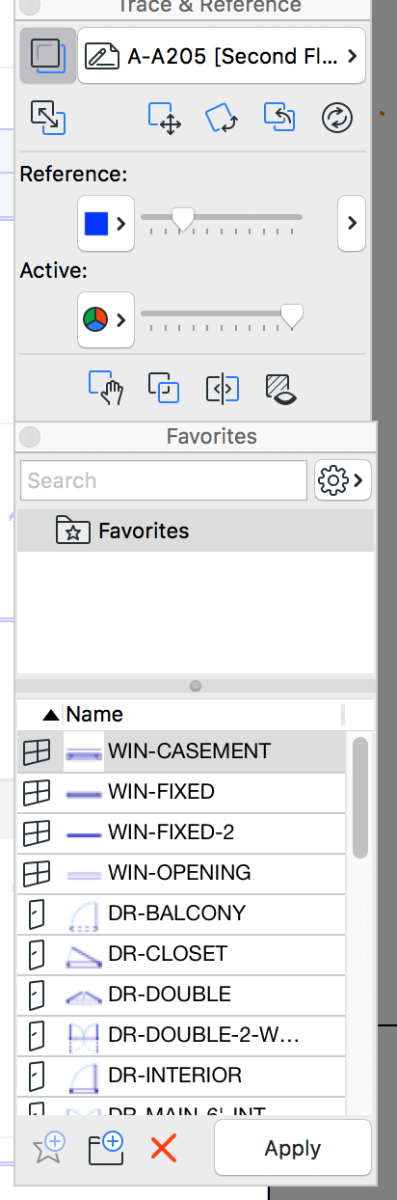
Favorite Palette
2018-07-30
03:27 AM
Lilian Seow LEED AP | cSBA | CAPM | PMP
AC 29 USA FULL | Windows 11 Enterprise i5 3.10GHz | Archicad-user since 1994!
AC 29 USA FULL | Windows 11 Enterprise i5 3.10GHz | Archicad-user since 1994!
Solved! Go to Solution.
1 Solution
Accepted Solutions
Llian
Advocate
Options
- Mark as New
- Bookmark
- Subscribe
- Mute
- Subscribe to RSS Feed
- Permalink
- Report Inappropriate Content
2018-08-15 11:35 PM
2018-08-15
11:35 PM
After the update 8005, the issue seems to have resolved. I can now reduced the width without losing the description. 🙂
Lilian Seow LEED AP | cSBA | CAPM | PMP
AC 29 USA FULL | Windows 11 Enterprise i5 3.10GHz | Archicad-user since 1994!
AC 29 USA FULL | Windows 11 Enterprise i5 3.10GHz | Archicad-user since 1994!
Solution
5 Replies 5

Barry Kelly
Moderator
Options
- Mark as New
- Bookmark
- Subscribe
- Mute
- Subscribe to RSS Feed
- Permalink
- Report Inappropriate Content
2018-07-30 03:47 AM
2018-07-30
03:47 AM
Have you tried adjusting the column width marker?
I don't seem to have this in the Windows version so I don't know if it can be adjusted or not (or even why it would be there).
Barry.
I don't seem to have this in the Windows version so I don't know if it can be adjusted or not (or even why it would be there).
Barry.
One of the forum moderators.
Versions 6.5 to 27
i7-10700 @ 2.9Ghz, 32GB ram, GeForce RTX 2060 (6GB), Windows 10
Lenovo Thinkpad - i7-1270P 2.20 GHz, 32GB RAM, Nvidia T550, Windows 11
Versions 6.5 to 27
i7-10700 @ 2.9Ghz, 32GB ram, GeForce RTX 2060 (6GB), Windows 10
Lenovo Thinkpad - i7-1270P 2.20 GHz, 32GB RAM, Nvidia T550, Windows 11

Rick Thompson
Advisor
Options
- Mark as New
- Bookmark
- Subscribe
- Mute
- Subscribe to RSS Feed
- Permalink
- Report Inappropriate Content
2018-07-30 04:07 PM
2018-07-30
04:07 PM
I have the same issue with 20. The last update was said to fix it, but not for me. The column adjuster doesn't work, best I can tell. The odd thing is it was fine after migrating from 19, but started acting up after I did a re-install trying to fix something unrelated. I had to switch to icons, which I don't really like.

Erwin Edel
Rockstar
Options
- Mark as New
- Bookmark
- Subscribe
- Mute
- Subscribe to RSS Feed
- Permalink
- Report Inappropriate Content
2018-07-30 04:31 PM
2018-07-30
04:31 PM
No real fix for the problem at hand, but have you tried using the 'popup' favourites from the toolbox icons/buttons? You can change these to list / 3D preview as preferred and you don't have another palette cluttering your workspace.
You can also get to the favourites fairly easily from the settings dialogue of all the tools.
You can also get to the favourites fairly easily from the settings dialogue of all the tools.
Erwin Edel, Project Lead, Leloup Architecten
www.leloup.nl
ArchiCAD 9-29NED FULL
Windows 11 Pro for Workstations
Adobe Design Premium CS5
www.leloup.nl
ArchiCAD 9-29NED FULL
Windows 11 Pro for Workstations
Adobe Design Premium CS5
Llian
Advocate
Options
- Mark as New
- Bookmark
- Subscribe
- Mute
- Subscribe to RSS Feed
- Permalink
- Report Inappropriate Content
2018-07-31 02:27 AM




Llian
Advocate
Options
- Mark as New
- Bookmark
- Subscribe
- Mute
- Subscribe to RSS Feed
- Permalink
- Report Inappropriate Content
2018-08-15 11:35 PM
Solution

Still looking?
Suggested topics
- Detailing | Better methods of 2d drafting, creation of Blocks , Detail Elements , 2d Objects in Documentation
- Button to activate or deactivate 3d editting plane. in Project data & BIM
- Railing and Curtain Wall in Modeling
- Re: Display order tool in General discussions
- Favorites Palette 2.0! – Free add-on for Archicad 29 in General discussions
